
TL;DR
One PCAP carries the whole attack. Brianna clicked a gift-card link, the stealer that landed phoned home over HTTP, and then shipped its haul (system fingerprint plus every saved credential) inside an unencrypted SMTP email. Twelve questions walk that path in order, from the dropper download to the base64 login the attacker used to send the loot. What gets tested is patience with plaintext protocols: one smtp filter and one Follow TCP Stream unlock most of the answers.
Scenario

Jake, a Transgear Corp incident response analyst, picks up an alert from Brianna, who flagged unusual activity on her workstation. A week earlier, enticed by an email promising Amazon gift cards, Brianna clicked a link and unknowingly downloaded malware. That gave the attackers access, and they used it for espionage: capturing credentials, copying files, and eavesdropping on video calls. Days later Brianna noticed her workstation lagging and received a LinkedIn login attempt notification from an unfamiliar device. Worried, she reported it to the IT help desk. Jake now investigates to find and collect IOCs.
The investigation
First contact and the dropper
Question (3 points). What time did the suspected user system/browser connect to the malicious website? (Format: XX:XX:XX:XXXXXX)
Answer: 22:51:00:243743
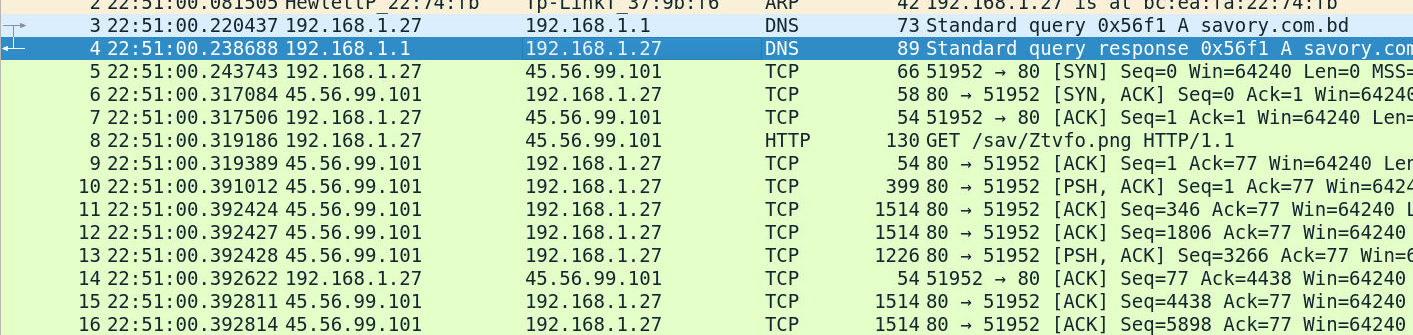
How I got there. When we first open the pcap we can see an HTTP request to download a file.
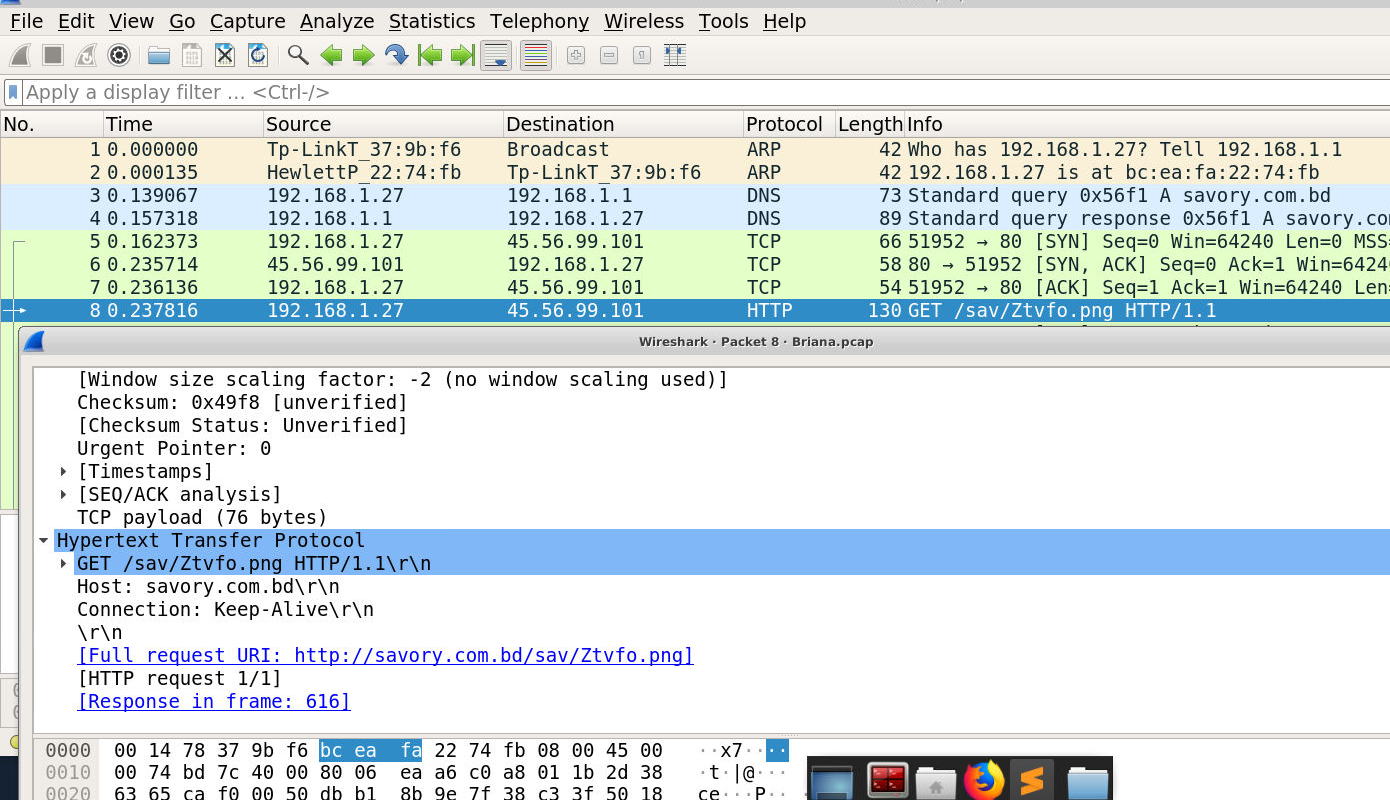
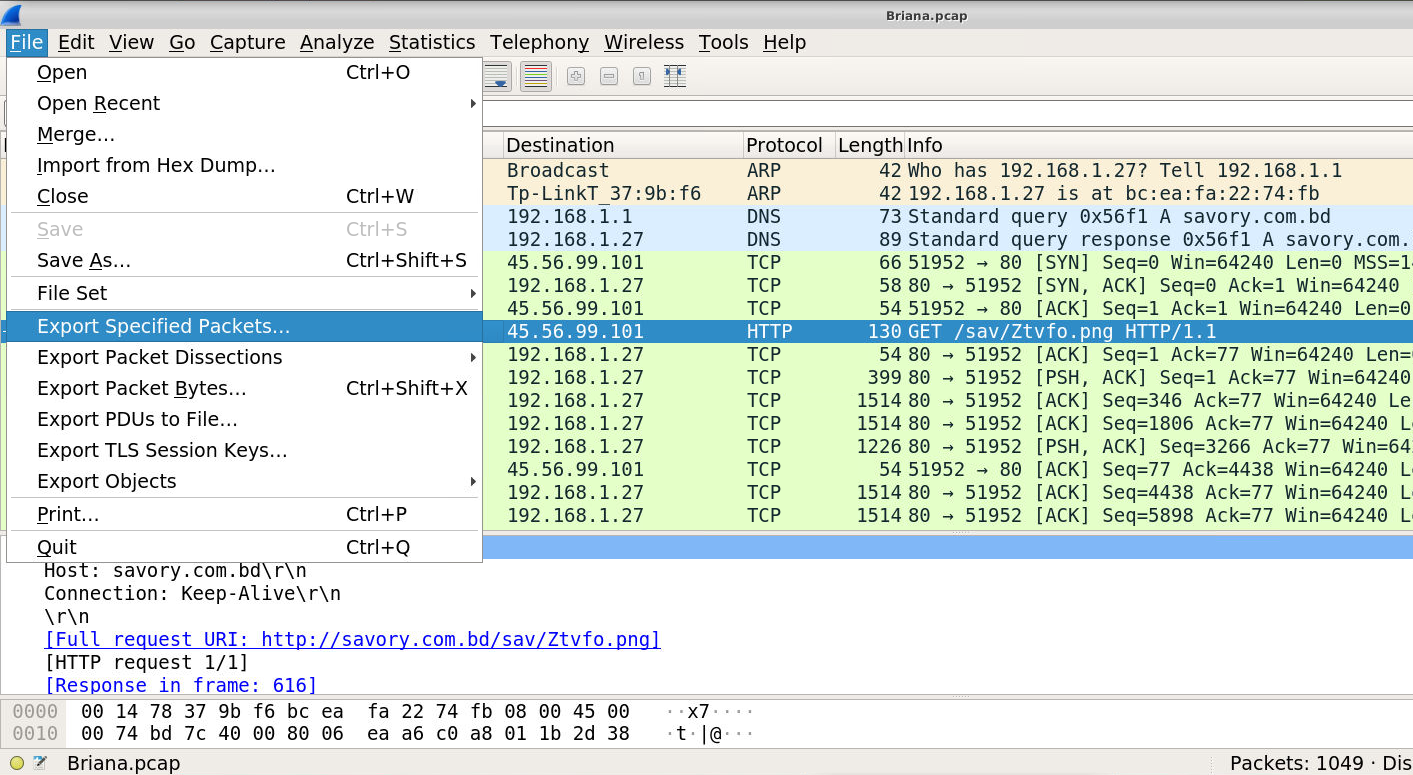
Let’s extract the file to check if this is the virus we are suspicious of.
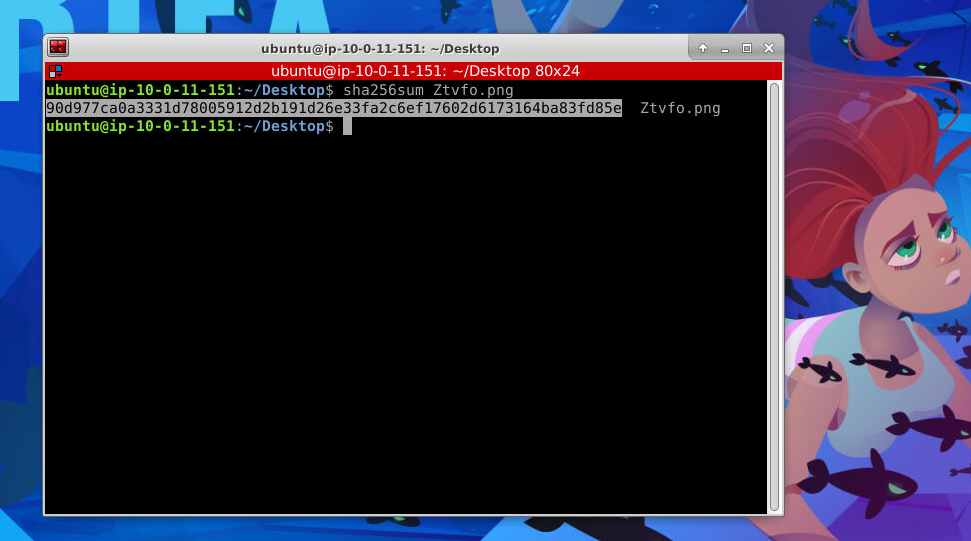
To search VirusTotal I first hashed the extracted file with sha256sum.
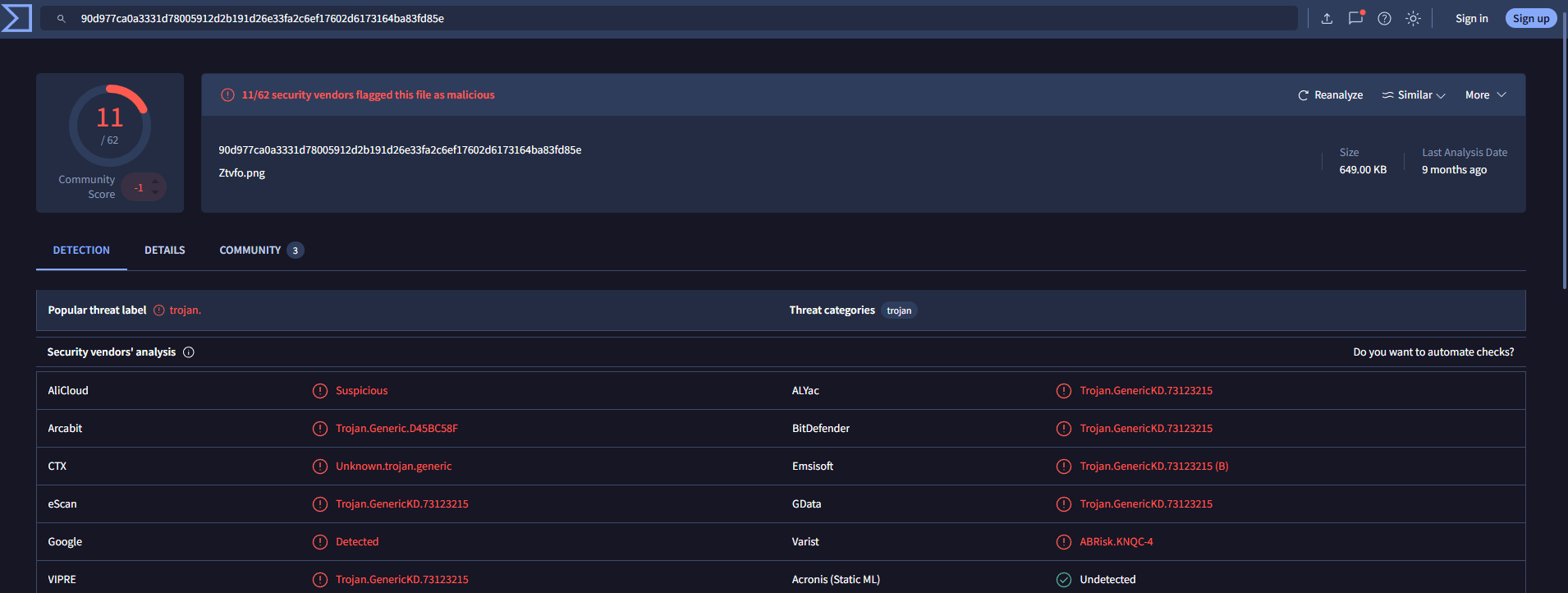
VirusTotal identifies it as a trojan, so with the file confirmed I went back for the timestamp.
The answer is 22:51:00:243743. My first pick was the wrong packet: the lab wanted the time of the SYN packet, not the OK response.
Brianna’s IP address
Question (2 points). What is Briana’s IP address? (Format: IP Address)
Answer: 192.168.1.27
How I got there. The same opening packets give it away: the DNS request for savory.com.bd leaves from 192.168.1.27.
The MAC address behind the IP
Question (2 points). What is Briana’s MAC/Ethernet address? What is the vendor name for the MAC address? (Format: MAC, Vendor Name)
Answer: bc:ea:fa:22:74:fb, Hewlett-Packard
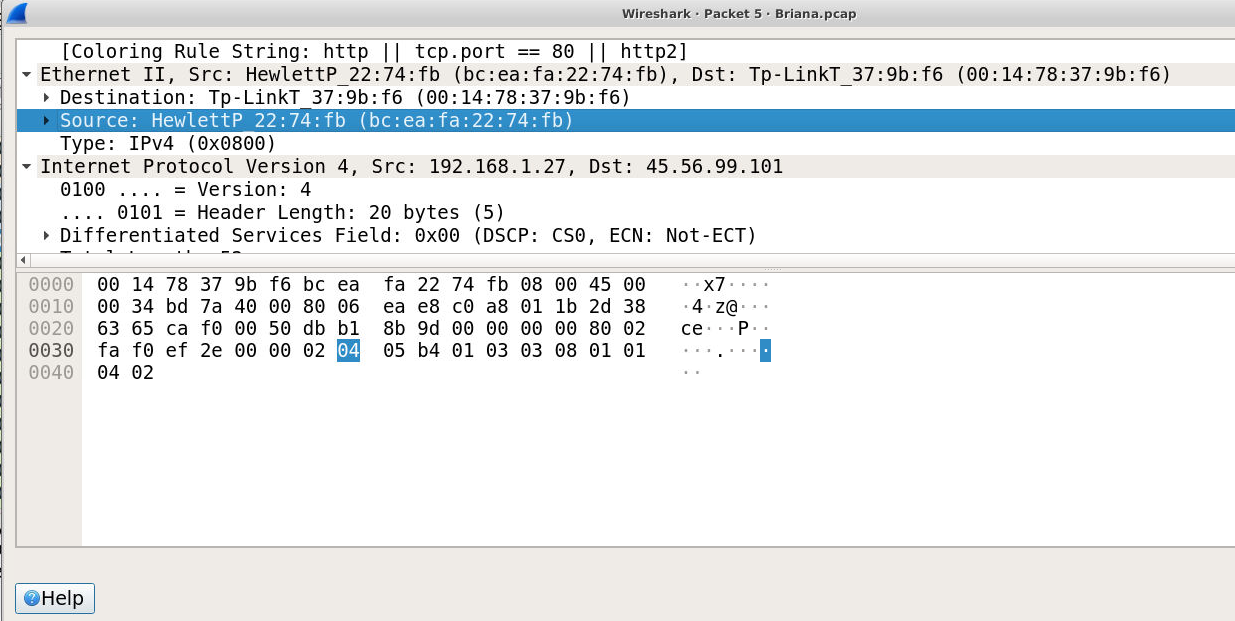
How I got there. By looking at a packet that she herself sent, the Ethernet header carries the MAC address. Wireshark’s own resolution already points at the vendor, the source reads HewlettP_22:74:fb, and a MAC lookup database confirms the full name.
The machine name, in plaintext
Question (2 points). What is Briana’s Windows machine name? (Format: Machine Name)
Answer: DESKTOP-WIN11PC
How I got there. To answer that we need a packet that transmits the name in plaintext, so we filter for SMTP.
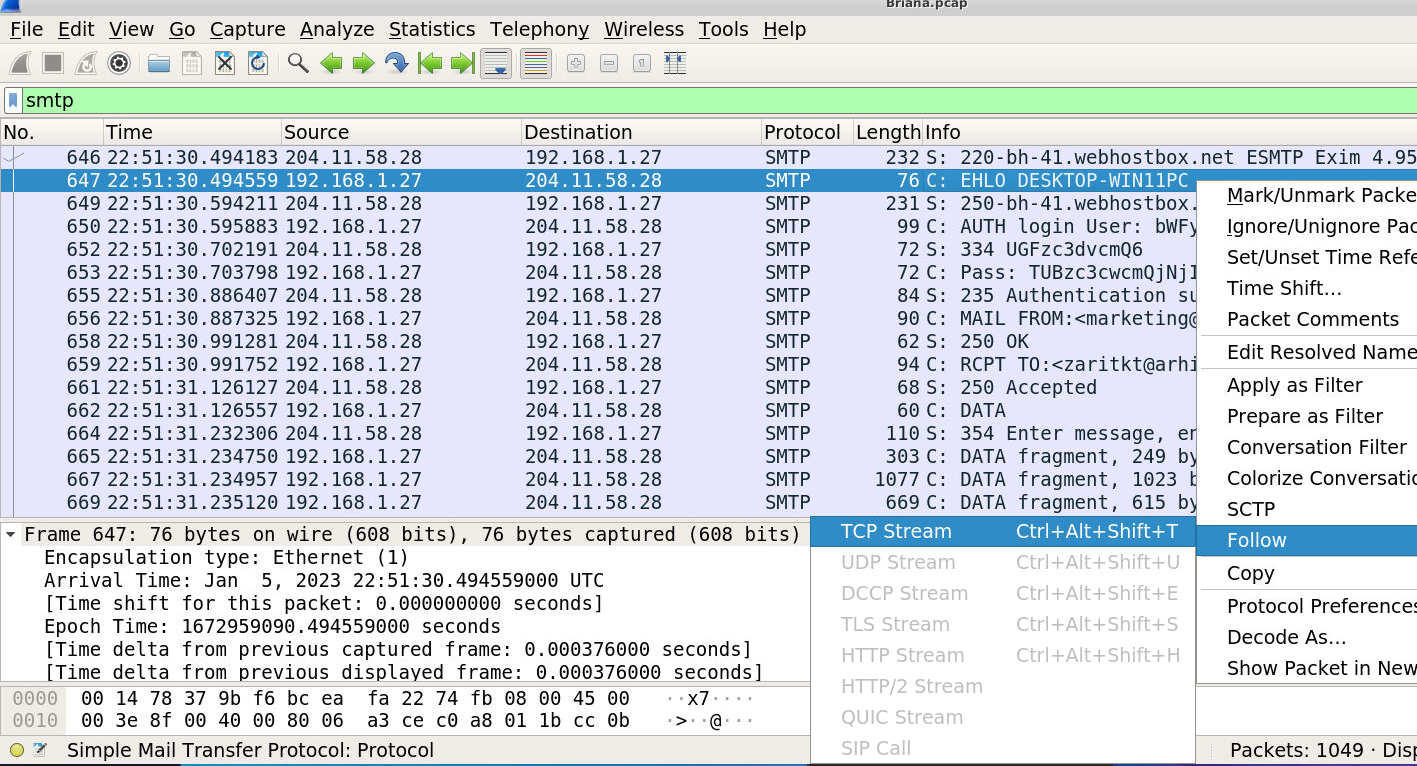
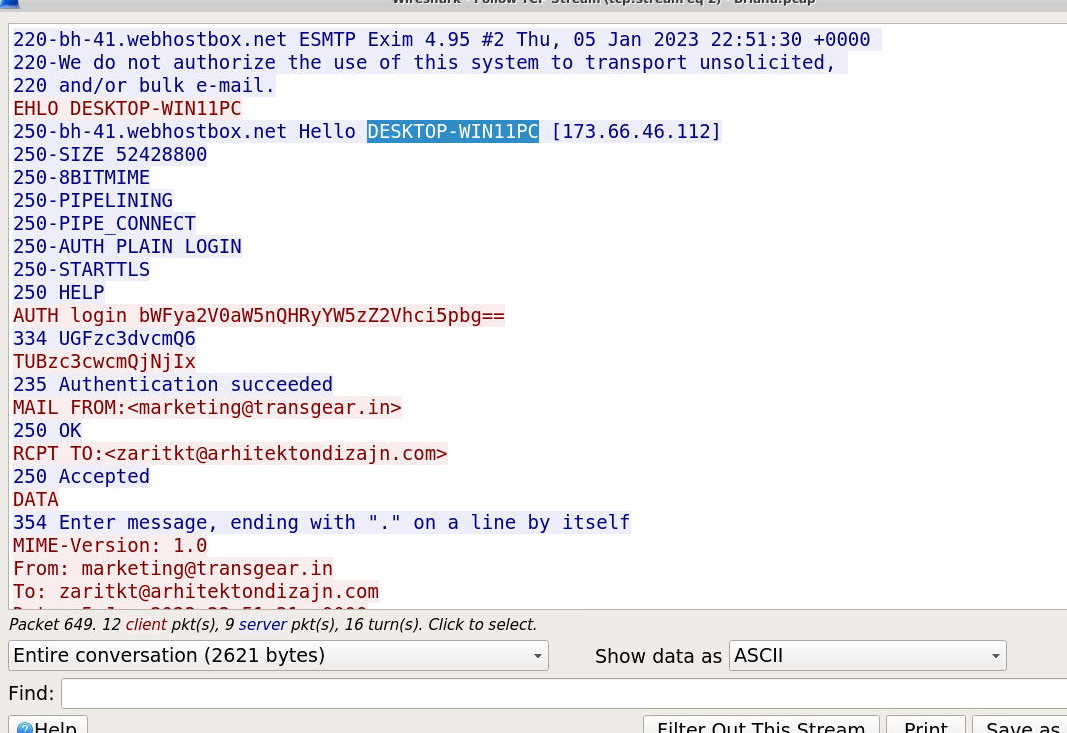
We find the EHLO packet and follow the TCP stream, which gives us the answer: the client announces itself as DESKTOP-WIN11PC.
The mailbox username
Question (2 points). What is Briana’s Windows username? (Format: username@domain.tld)
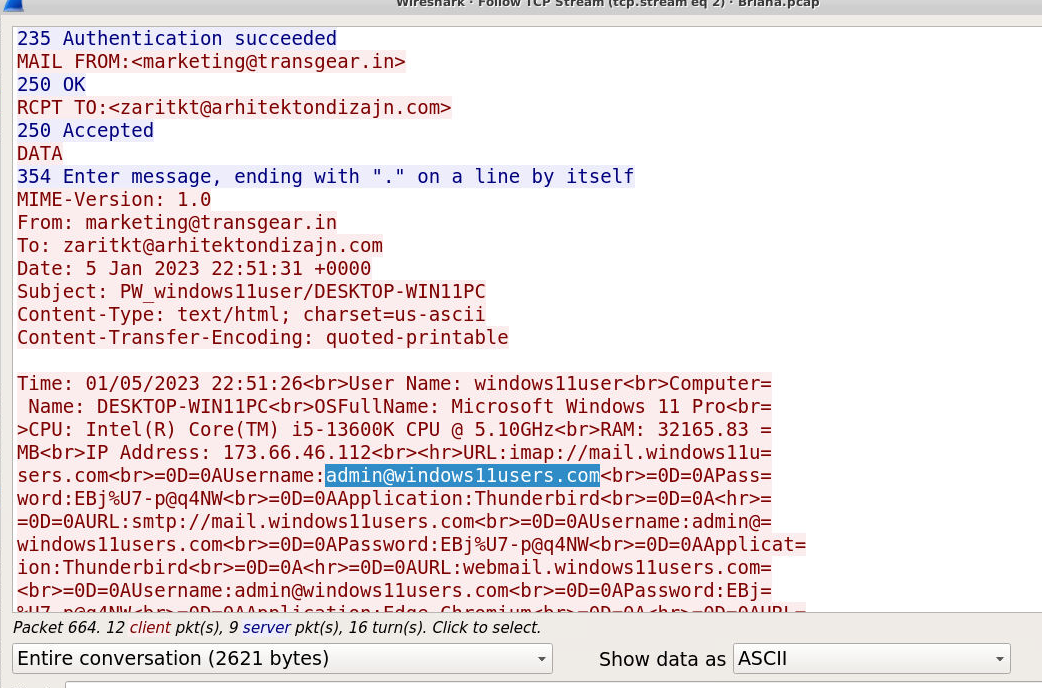
Answer: admin@windows11users.com
How I got there. Following the same SMTP conversation, the message body lists the mailbox credentials.
Where the stolen data went
Question (2 points). What email address was the attacker sending data to? (Format: name@domain.tld)
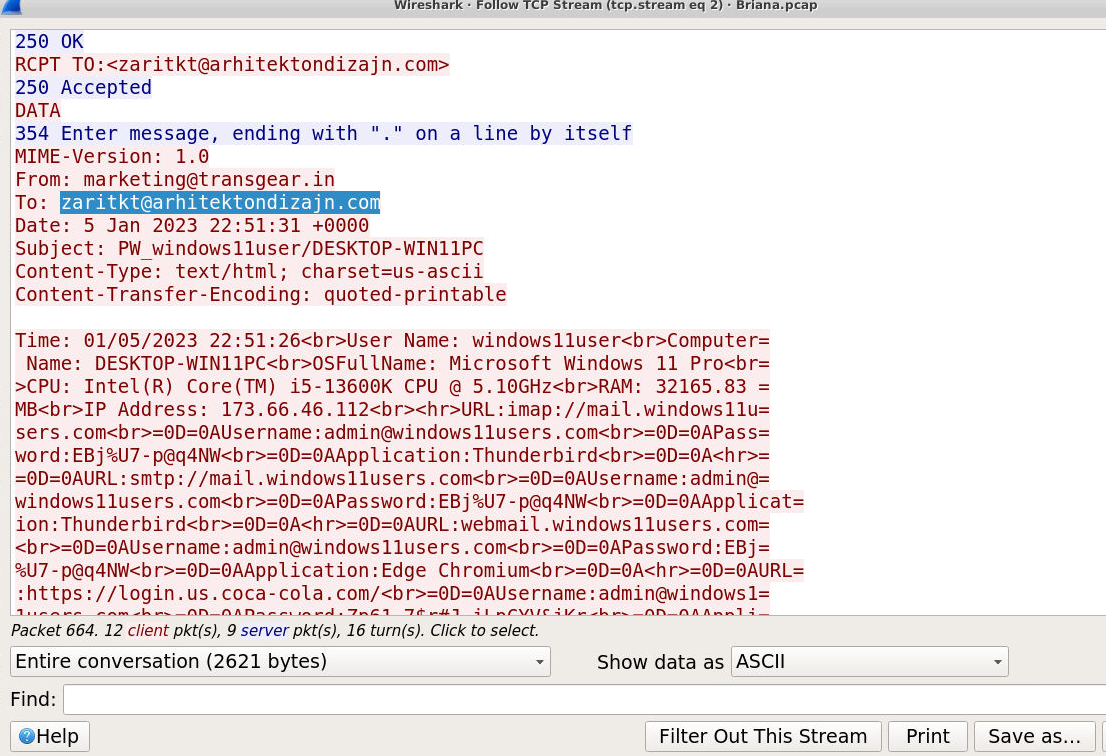
Answer: zaritkt@arhitektondizajn.com
How I got there. Since this email was sent from Brianna’s PC, the To field tells us which email the data was sent to.
The CPU fingerprint
Question (2 points). What type of CPU does Briana’s computer use? (Format: CPU Name)
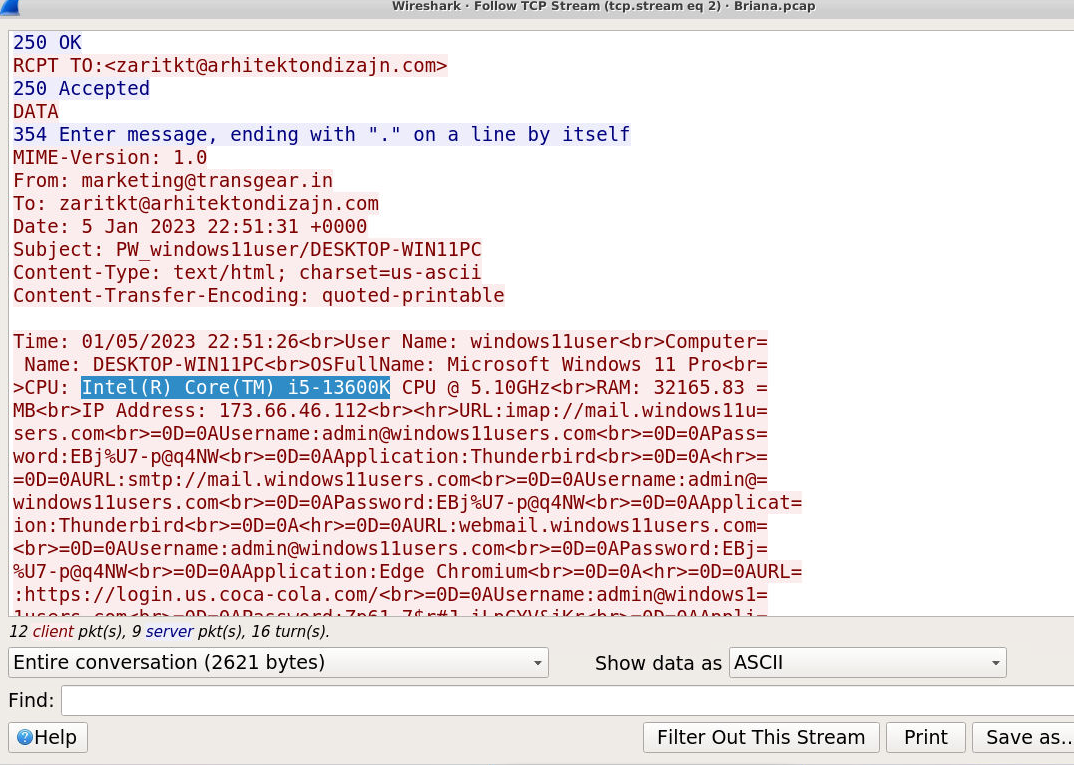
Answer: Intel(R) Core(TM) i5-13600K
How I got there. The hardware summary sits in the same message body, CPU line included.
RAM, converted to GB
Question (2 points). How much RAM does Briana’s computer have, in GBs? (Format: XXGB)
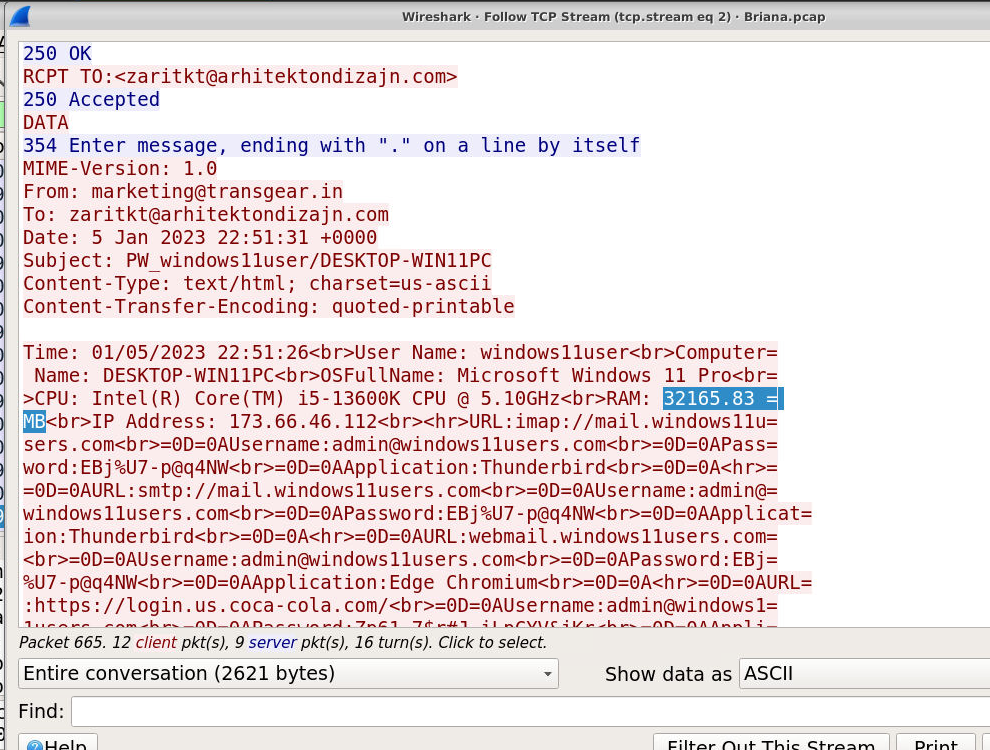
Answer: 32GB
How I got there. The beacon reports RAM: 32165.83 MB. Dividing by 1024 gives about 31.4, and since memory ships in power-of-two sizes the machine has 32GB.
What kind of login data was stolen
Question (2 points). What type of account login data was stolen by the attacker? (Format: Data1, Data2)
Answer: Username, Password
How I got there. If we copy the message and clean it up a bit, we can clearly see it:
Time: 01/05/2023 22:51:26
User Name: windows11user
Computer Name: DESKTOP-WIN11PC
OSFullName: Microsoft Windows 11 Pro
CPU: Intel(R) Core(TM) i5-13600K CPU @ 5.10GHz
RAM: 32165.83 MB
IP Address: 173.66.46.112
URL: imap://mail.windows11users.com
Username: admin@windows11users.com
Password: EBj%U7-p@q4NW
The Amazon credentials
Question (2 points). What are the username and password related to the Amazon account? (Format: Username, Password)
Answer: admin@windows11users.com, 3Fo76#PT4$P!m!9mLSo69e
How I got there. Further down the same stream, among the harvested browser credentials, the Amazon sign-in entry:
URL: https://www.amazon.com/ap/signin
Username: admin@windows11users.com
Password: 3Fo76#PT4$P!m!9mLSo69e
Decoding the relay username
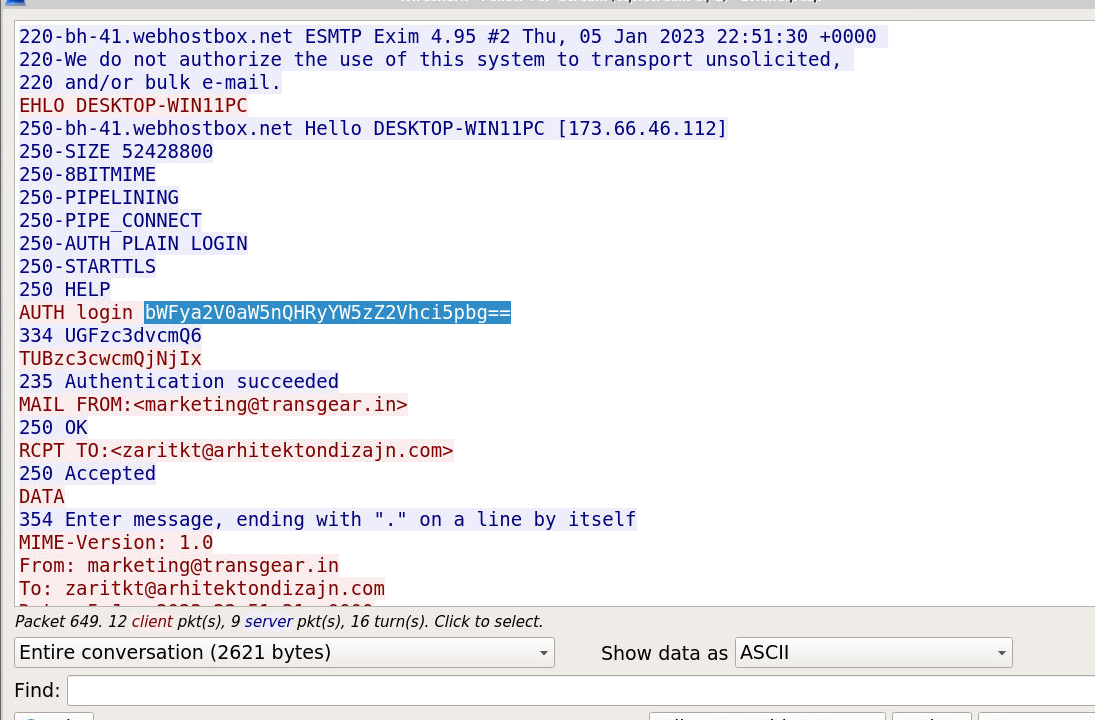
Question (2 points). What username did Briana use to authenticate to webhostbox[.]net? Can you decode it? (Format: Username)
Answer: marketing@transgear.in
How I got there. webhostbox[.]net is where the SMTP session logged in at the start. The AUTH LOGIN username is base64 encoded, so we decode it in CyberChef: bWFya2V0aW5nQHRyYW5zZ2Vhci5pbg== becomes marketing@transgear.in.
Decoding the relay password
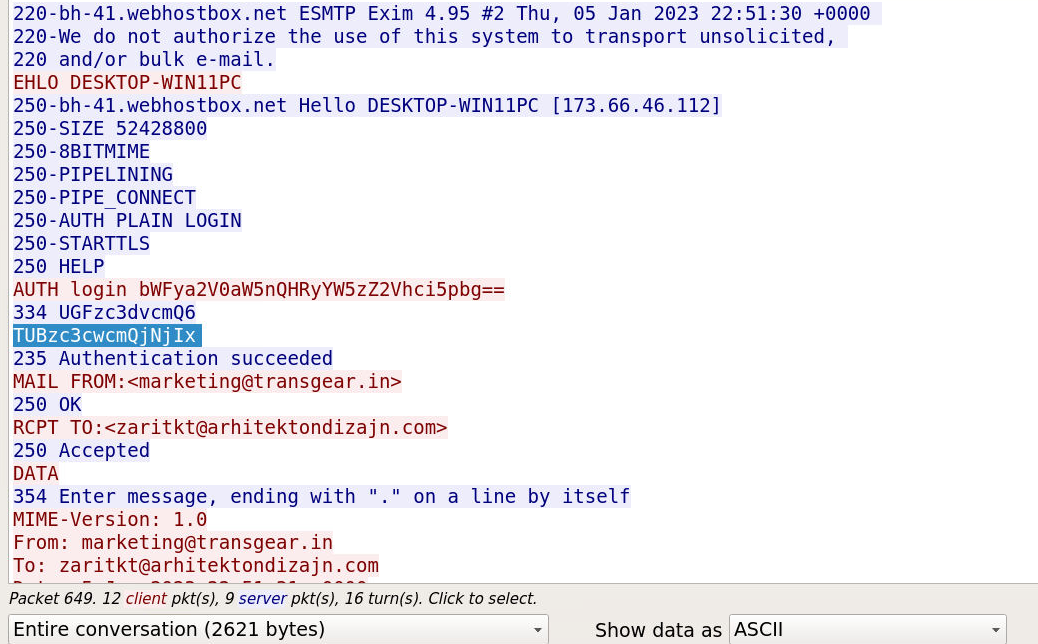
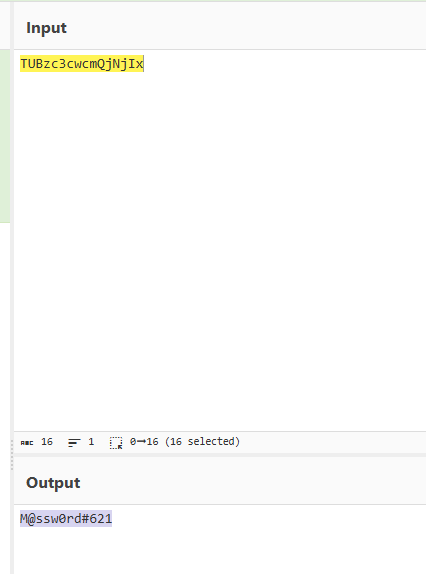
Question (2 points). What password did Briana use to authenticate to webhostbox[.]net? Can you decode it? (Format: Password)
Answer: M@ssw0rd#621
How I got there. Same place, one line below: TUBzc3cwcmQjNjIx. Same base64 tactic, and CyberChef turns it into M@ssw0rd#621.
What this lab really tests
Whether you treat plaintext as the gift it is. One unencrypted mail session exposes the victim’s machine name, hardware, mailbox credentials, and the attacker’s dropbox address without any decryption work. The same capture shows how narrow that luck is: the server advertised STARTTLS, and one configuration change on either side would have hidden all of it. Reading each protocol at the right layer (HTTP for the dropper, ARP and DNS for the host, SMTP for everything else) is the actual skill.
Skills and techniques
- Wireshark:
smtpdisplay filter, Follow > TCP Stream, File > Export Objects, UTC time display format - File evidence:
sha256sumhashing of the exported object, VirusTotal lookup by hash - CyberChef: From_Base64 to recover SMTP AUTH LOGIN credentials
- Protocols read in cleartext: HTTP, DNS, ARP, SMTP (EHLO, AUTH LOGIN, DATA)
- MITRE ATT&CK: T1566 (Phishing), T1204 (User Execution)