
TL;DR
Sysmon 14 shipped the first thing Sysmon has ever done besides watch: FileBlockExecutable, a rule that stops an executable from reaching disk instead of logging it afterwards. This lab reads the four Event ID 27 records it left behind, traces one blocked download back to a310Logger through URLHaus and a .ru source URL, then writes two rules of its own. It is part log triage, part detection engineering, and the config questions reward reading the XML structure rather than memorizing syntax.
Scenario
Learn more about Sysmon 14’s File Block Executable functionality to prevent files being written to disk!
Reading material: Olaf Hartong’s Sysmon 14.0 FileBlockExecutable article, linked in the Sources below.
The investigation
First Event ID 27 timestamp
Question (3 points). Open Event Viewer as administrator and navigate to Microsoft > Windows > Sysmon > Operational. Filter on Event ID 27 to only see File Block Executable events. What is the timestamp of the first observed 27 event? (Format: date and time)
Answer: 8/22/2022 3:55:16 PM
How I got there. After the investigation machine deployed, I opened Event Viewer as administrator, went to Microsoft > Windows > Sysmon > Operational, and filtered the log to Event ID 27. Four events came back, all on 8/22/2022, with the oldest at 3:55:16 PM. I checked the list view against the event detail before writing the timestamp down, since the filter panel already tells you there are only four to look at.

The process behind the download
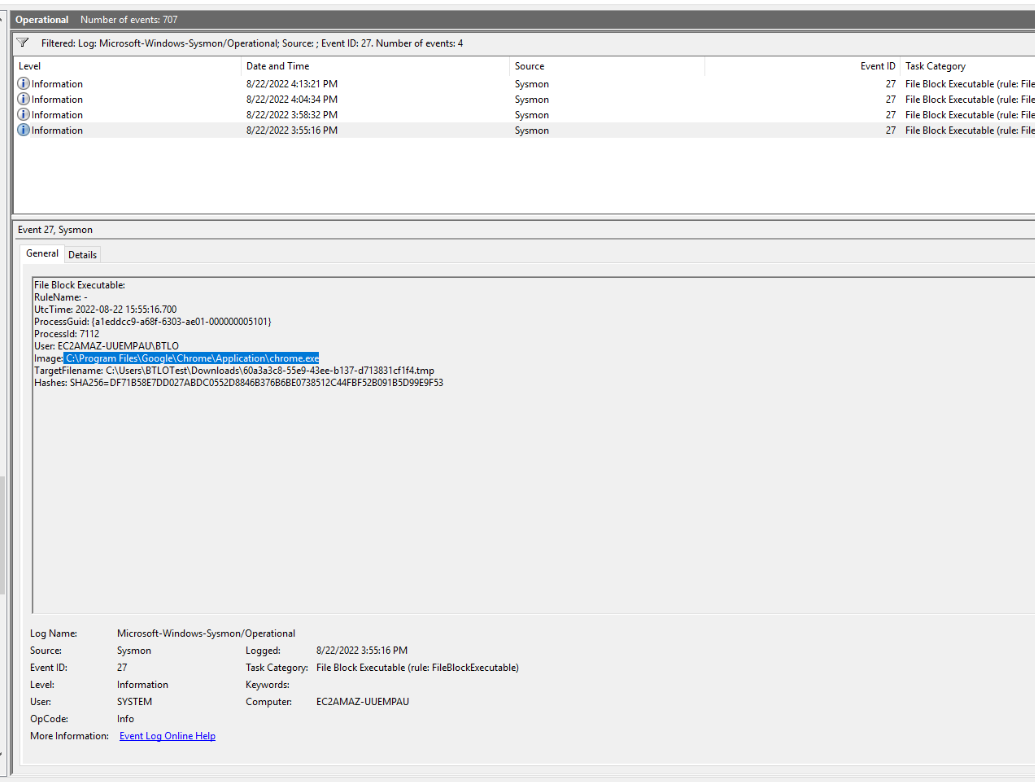
Question (3 points). In the first 27 event, what is the Image that initiated the file download? (Format: file path)
Answer: C:\Program Files\Google\Chrome\Application\chrome.exe
How I got there. The first event’s detail pane reads like a short story: RuleName points at the blocking rule, UtcTime matches the 3:55:16 PM I noted before, and Image names the process that tried to write the file. Chrome, at its standard install path. TargetFilename shows what it was trying to drop: a random-looking .tmp file in the user’s Downloads folder. I selected the Image value straight from the pane to avoid retyping the path.
Malware identification on URLHaus
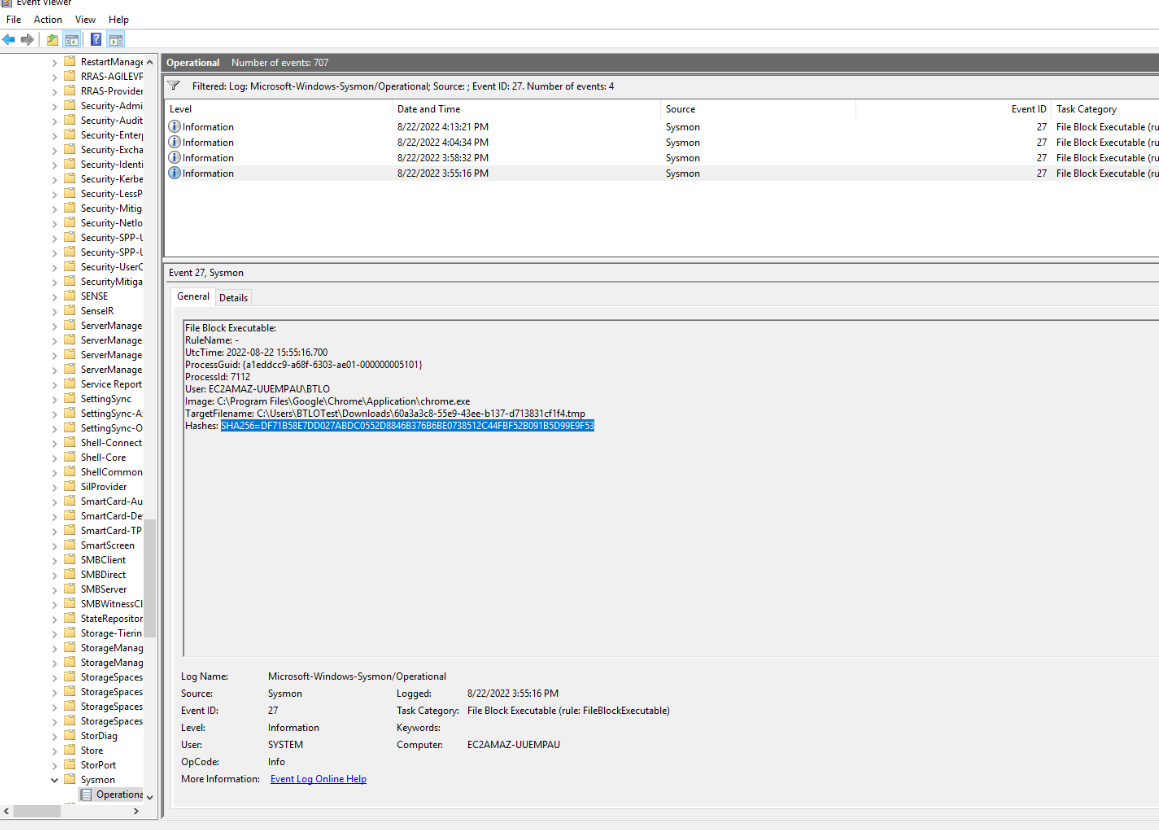
Question (3 points). In the first 27 event, retrieve the SHA256 hash of the file that was blocked and search for it on URLHaus. Based on the tags, what is the name of this malware? (Format: MalwareName)
Answer: a310Logger
How I got there. I selected the SHA256 from the Hashes line of the same event and searched it on URLHaus. The lookup came back tagged as a310Logger. I did not screenshot the URLHaus page itself, only the event with the hash selected, so my note for this one rests on the answer text and the two public writeups I checked it against later.
Blocking Word from dropping executables
Question (3 points). If we wanted to create a new Sysmon configuration file that would prevent Microsoft Word from creating executable files (dropped from weaponized macros), what line would we use? (You do not need to include an Image ‘name’ property)
Answer: <Image condition="image">word.exe</Image>
How I got there. I followed the lab’s reading material, Olaf Hartong’s article on FileBlockExecutable, which shows the msoffice-fileblock.xml rule for blocking Office from writing executables. His version lists the Office process images under <FileBlockExecutable onmatch="include">, and Word’s image name there is winword.exe. My note took the shorthand path and wrote word.exe. Public writeups of this lab give <Image condition="is">WINWORD.EXE</Image>, and one uses the same image condition as Olaf’s rule with the lowercase name, so the grader has clearly accepted more than one spelling.
Correction. My original note said
<Image condition="image">word.exe</Image>. Word’s process image name is winword.exe, and every working rule needs the real image name. Both writeups I verified against give that name, Chicken0248 with<Image condition="is">WINWORD.EXE</Image>and inksec with<Image condition="image">winword.exe</Image>, which matches Olaf’s own msoffice-fileblock.xml. The corrected answer is<Image condition="image">winword.exe</Image>.
Rewriting the Temp directory rule
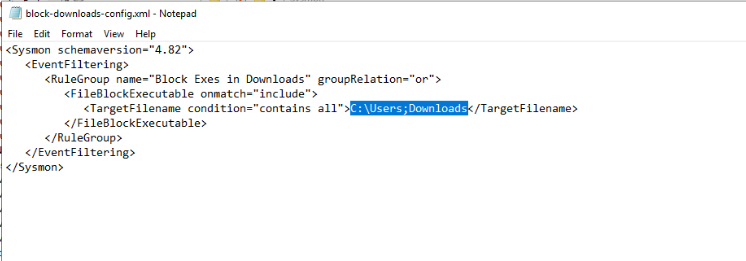
Question (3 points). View the block-downloads-config.xml in the /Downloads/Sysmon/ folder. Review the logic to block all executables within the Downloads folder. What would be the re-written line to block files being written to the OS-level Temp directory? (Format: XML line)
Answer: <TargetFilename condition="contains all">C:\Users;tmp</TargetFilename>
How I got there. The lab ships block-downloads-config.xml in the Downloads folder, so I opened it in Notepad to read the structure rather than guessing the syntax. The existing rule is <TargetFilename condition="contains all">C:\Users;Downloads</TargetFilename>, one condition with a semicolon-separated list, meaning both parts must appear in the path. My note rewrote it for the Temp directory as C:\Users;tmp. Public writeups give the OS-level path as C:\Windows;Temp, and Olaf’s article also lists temp folders as a suggested use of the feature.
Correction. My original note said
<TargetFilename condition="contains all">C:\Users;tmp</TargetFilename>. The question says OS-level Temp, which isC:\Windows\Temp, not a user profile path. Both writeups I verified against agree, and the re-written line keeps thecontains allcondition with the semicolon list. The corrected answer is<TargetFilename condition="contains all">C:\Windows;Temp</TargetFilename>.
The B4A2 event and its filename
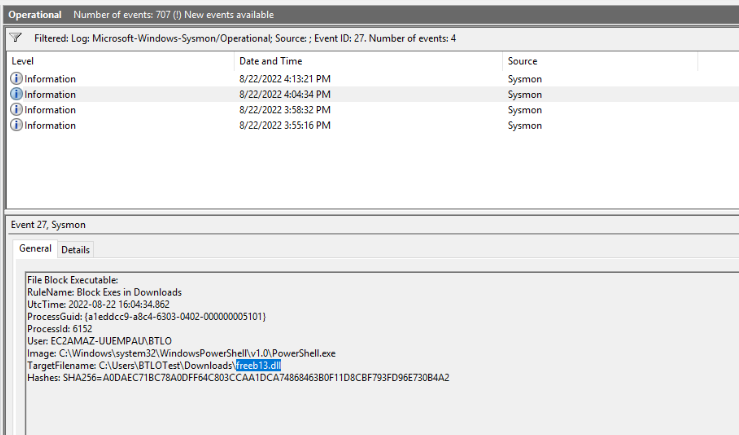
Question (3 points). Find the 27 event with the hash ending in B4A2. What is the TargetFilename (filename only, not path)? (Format: filename)
Answer: freeb13.dll
How I got there. With the ID 27 filter still applied, I clicked through the four events until the Hashes line ended in B4A2. That one was PowerShell writing to Downloads, not Chrome, and RuleName shows the same Block Exes in Downloads rule did the blocking. TargetFilename carried freeb13.dll, with a digit one. I have the file name highlighted in my screenshot, and the next question uses the same hash, so this is worth spelling carefully.
The source URL on VirusTotal
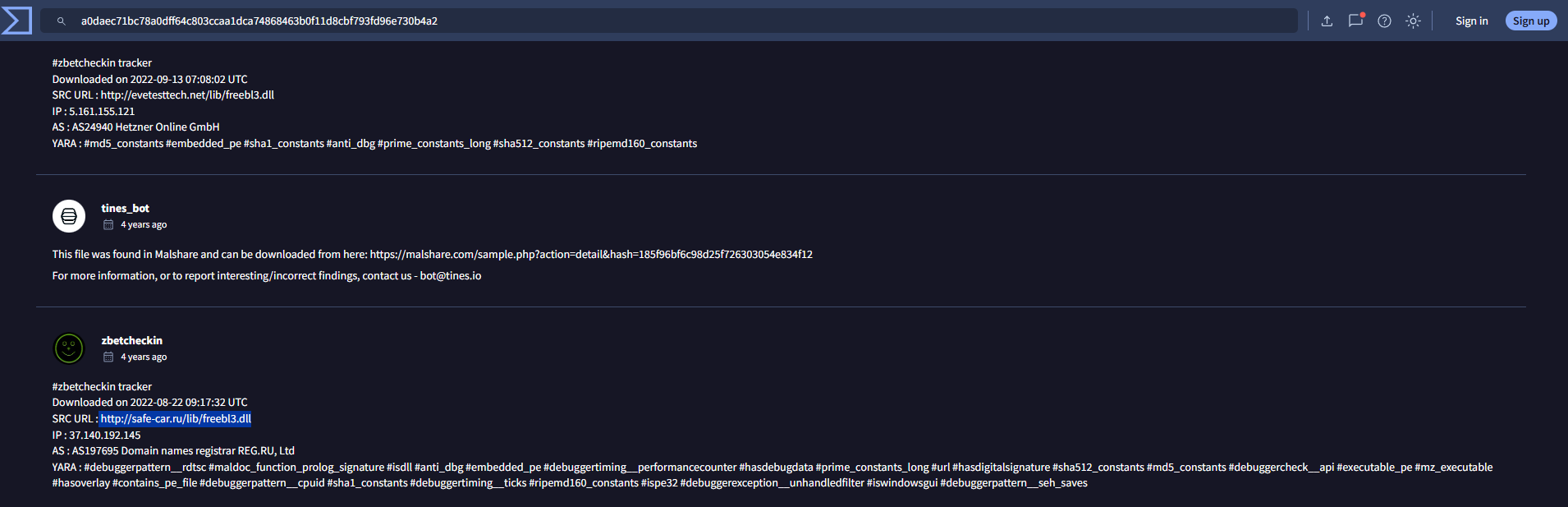
Question (3 points). Search the hash on VirusTotal and look at the Community tab. What is the source URL? (Format: URL)
Answer: http://safe-car.ru/lib/freebl3.dll
How I got there. The same SHA256, now on VirusTotal, Community tab. The first comment carries the useful line, a tracker summary naming the download URL, and the ones after it repeat other sightings. I highlighted http://safe-car.ru/lib/freebl3.dll from the tracker summary. Watch the filename here: the URL spells it with a lowercase L, freebl3, while the blocked file on disk is freeb13.dll with a digit. Two different records, easy to mix up.
The missing property
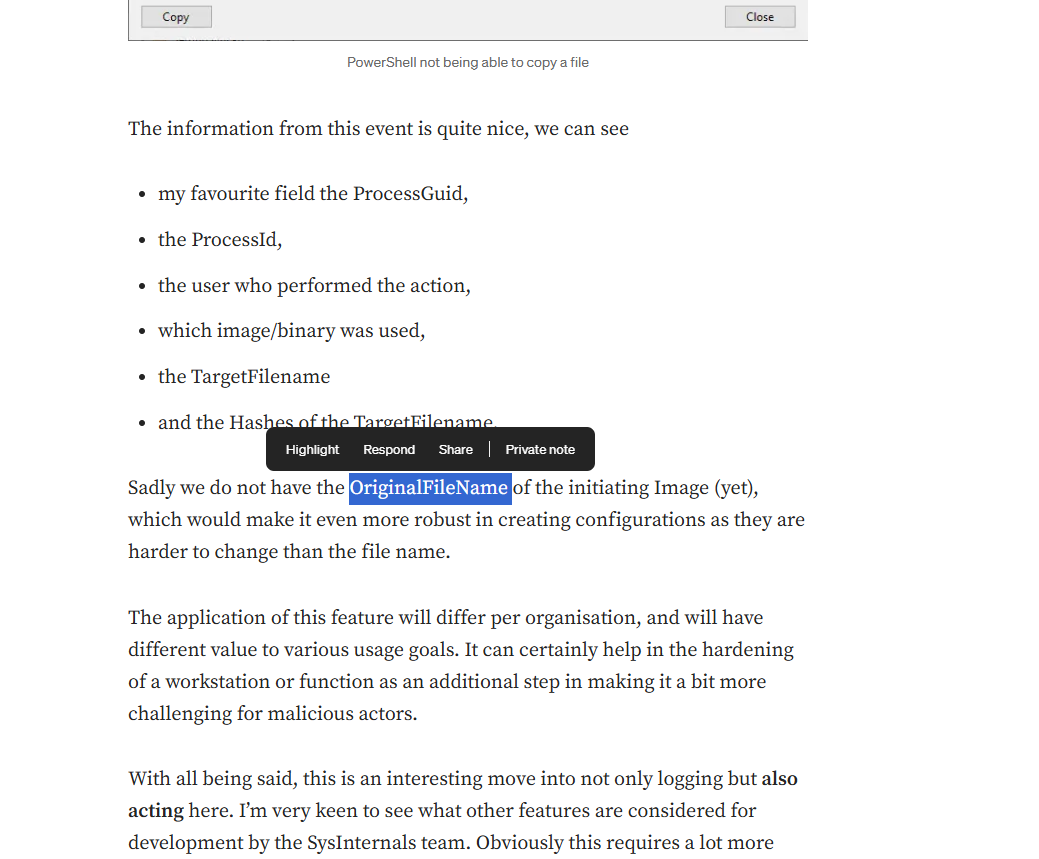
Question (3 points). One limitation of Sysmon 14’s new blocking feature (as of 22/08/2022) is that files downloaded from a browser show the TargetFilename as the temporary file name, randomly generated by Windows. What is the name of the property that we hope to see in the near future, giving us better visibility over the file that was actually blocked? (Format: property name)
Answer: OriginalFileName
How I got there. The lab’s reading material points at Olaf Hartong’s article on Sysmon 14, and near the end he lists what the event gives you and what it is missing. His line: “Sadly we do not have the OriginalFileName of the initiating Image (yet)”. I highlighted the word there and that is the whole answer. It also explains my own screenshots: the Chrome event shows a scrambled .tmp name precisely because the original name is not recorded.
Other affected file types
Question (1 point). File Block Executable doesn’t just work on .exe files. What are the other filetypes that are affected by this functionality? (Format: filetype, filetype, filetype)
Answer: DLL, XLL, WLL
How I got there. Same article. Sysmon decides by file header, and DLL, XLL, and WLL all carry the MZ header that marks a PE executable, so the block catches them too. My note added the reason: DLLs are the obvious one, and XLL and WLL are add-in formats that macros can abuse, which makes the coverage sensible rather than arbitrary.
What this lab really tests
Whether you can work a detection engineering loop, not just read logs: block events on one side, the rule syntax that produced them on the other, and hash enrichment connecting the two to a named family. It also tests careful reading. Two characters, a digit 1 and a letter l, separate the blocked filename from the source URL, and the config questions want the path the question actually names, not the one you assumed.
Skills and techniques
- Event Viewer: filtering the Sysmon Operational channel, reading Event ID 27 (FileBlockExecutable) detail fields
- Sysmon config syntax:
<FileBlockExecutable onmatch="include">rules,contains allconditions, semicolon-separated lists - Threat intel pivots: URLHaus tag lookup by SHA256, VirusTotal Community tab for source URLs
- Malware context: a310Logger (aka BluStealer), a .NET credential stealer
- MITRE ATT&CK: T1564.001, Hidden Files and Directories, as the closest mapping for a browser dropping a renamed executable