
Original investigation notes: Original Notion notes
Evidence reviewed and write-up prepared: 5 October 2026.
Lab achievement: View my Sukana achievement.
Tools: PowerShell, Cisco Talos, Microsoft Defender, Notepad, CyberChef, Volatility, Wireshark, MFTECmd, Timeline Explorer and Autopsy.
Investigation summary
I started with the supplied malware report, then followed scanner.exe through the email, memory image and collected NTFS records. Microsoft Defender identified the sample as VirTool:Win32/PoshC2.G. The network capture contained a connection to the report’s network indicator on TCP port 443, and the MFT export placed scanner.exe in the victim’s Downloads folder with a creation timestamp of 2023-01-31 09:33:41.
Two details needed more care than simply finding an answer. Talos returned a detection name that the lab did not accept, and the MFT question mixed up two NTFS attribute names. I kept the observed values and checked what each actually represented.
Original lab scenario

Scenario reproduced verbatim from the original lab notes.
Desi Sukana is an aspiring DFIR Analyst. These are professionals who gather and investigate vast amounts of data to fill in gaps in information about cyber attacks. He garnered this interest after witnessing his father pass in a tragic accident. His father, Drake Sukana, fell victim to a data breach that compromised his personal information including salary, location, marital status, etc. The attacker used that information to send robbers to his domicile in the United States. He faithfully defended his household but could not survive the injuries. After the funeral, Mrs. Sukana (Desi’s mom) took him and moved to Sydney, Australia — her home country. Fueled by the passing of his father and strange environment, Desi rigorously pushed through his college classes and independent studies to not only gain the skills needed to solve his father’s murder but also to find gainful employment.
Mr. Sukana was the breadwinner in the family while Ms. Sukana was the housewife. The life insurance payout from his death provided Desi and his mother to live 4 years without having a job — that same payout ends in two months. Mrs. Sukana has no employable skills in the market to afford the high rent in Bellevue Hill. She is placing her bets on Desi to land a job within the cybersecurity field - specifically DFIR.
Desi currently holds a Bachelor of Science in Computer Forensics, GHFI, and GCFA. He runs a DFIR Discord, Podcast, and hosts CTFs. Despite this killer portfolio, he is struggling to break into the field of cybersecurity as a recent grad. He still deals with depression from his father’s passing 4 years ago. He has two service dogs called Moxie (a human lover) and Waffle (a wild barker) for support. On his recent dog walk, he met the opportunity of a lifetime.
He met Kurt Hansen in a local dog park. Kurt is the CEO of Tesserent, Australia’s largest listed cybersecurity company. Moxie and Waffle were doing a canine freestyle that gathered a public crowd — especially Kurt. Desi, knowing his status within the country, used the opportunity to sell himself and explain his interest in DFIR. Kurt was impressed with his background and passed his information along to his cybersecurity department.
A week later, Desi had an interview with the DFIR team at Tesserent. It went extremely well. He made it to the final stages after some behavior assessments and an introduction call with the team. His final round consisted of an Online Assessment (OA). He has been provided with the KAPE output and a memory dump of an infected Windows machine. Some extra context was provided in the OA like the email conversation with the victim and a malware report. If Desi passes this OA, he will be presented with a DFIR Analyst Role with a starting salary of $120,000. This will allow him to afford rent in Bellevue Hill, get more treatment for his depression, and take care of his mother. Will he pass the 19-question OA is it up to you? You have 24 hours, Desi. Good luck!
Scenario and evidence
Sukana is a simulated DFIR assessment built around an infected Windows machine. The evidence includes KAPE-collected artifacts, a memory image, an email, malware reports, a packet capture and a related-samples CSV. A separate memory image is used for the final Autopsy exercise.
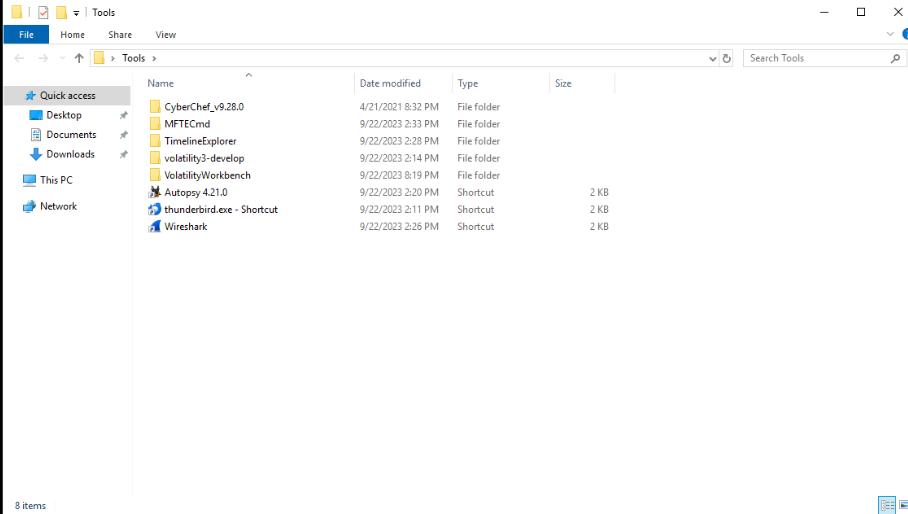
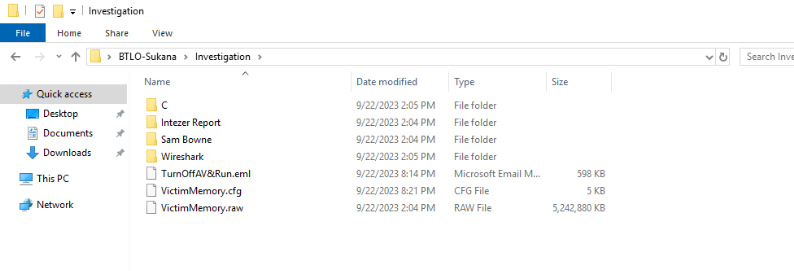
I first checked the Tools folder and the BTLO-Sukana evidence directory. With several sources available, I wanted a starting point that would help me recognise the same sample in the other artifacts. The malware report was the quickest way to get that context.
Evidence and tool inventory
Identifying the sample
Q1. Malware hash
Q1: What is the SHA256 hash value for the malware file? (Format: SHA256)
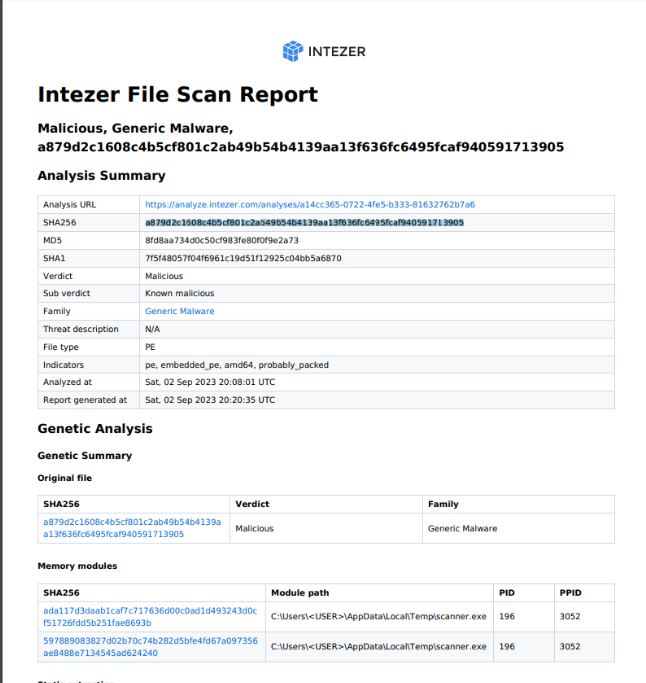
The first page of the Intezer report supplied the SHA-256:
a879d2c1608c4b5cf801c2ab49b54b4139aa13f636fc6495fcaf940591713905Answer (Q1): a879d2c1608c4b5cf801c2ab49b54b4139aa13f636fc6495fcaf940591713905.
This was a hash recorded in the supplied report, rather than a hash I independently calculated.
Q2. Malware file size
Q2: What is the file size of the malware in bytes? (Format: XXXXXX)
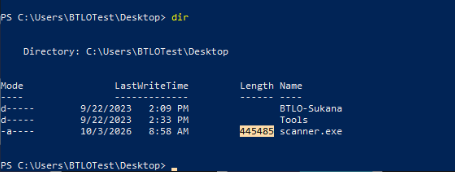
I then saved the email attachment to the lab desktop and checked its size with PowerShell’s dir command. The Length column showed 445485 bytes for scanner.exe.
Answer (Q2): 445485 bytes.
Q3 and Q4. Talos detection name and reputation
Q3: Utilizing Cisco Talos, what is the “Cisco Secure Endpoint Detection Name” for the given malware? (Format: Name)
Q4: Utilizing Cisco Talos, what is the file reputation of the given malware? (Format: String)
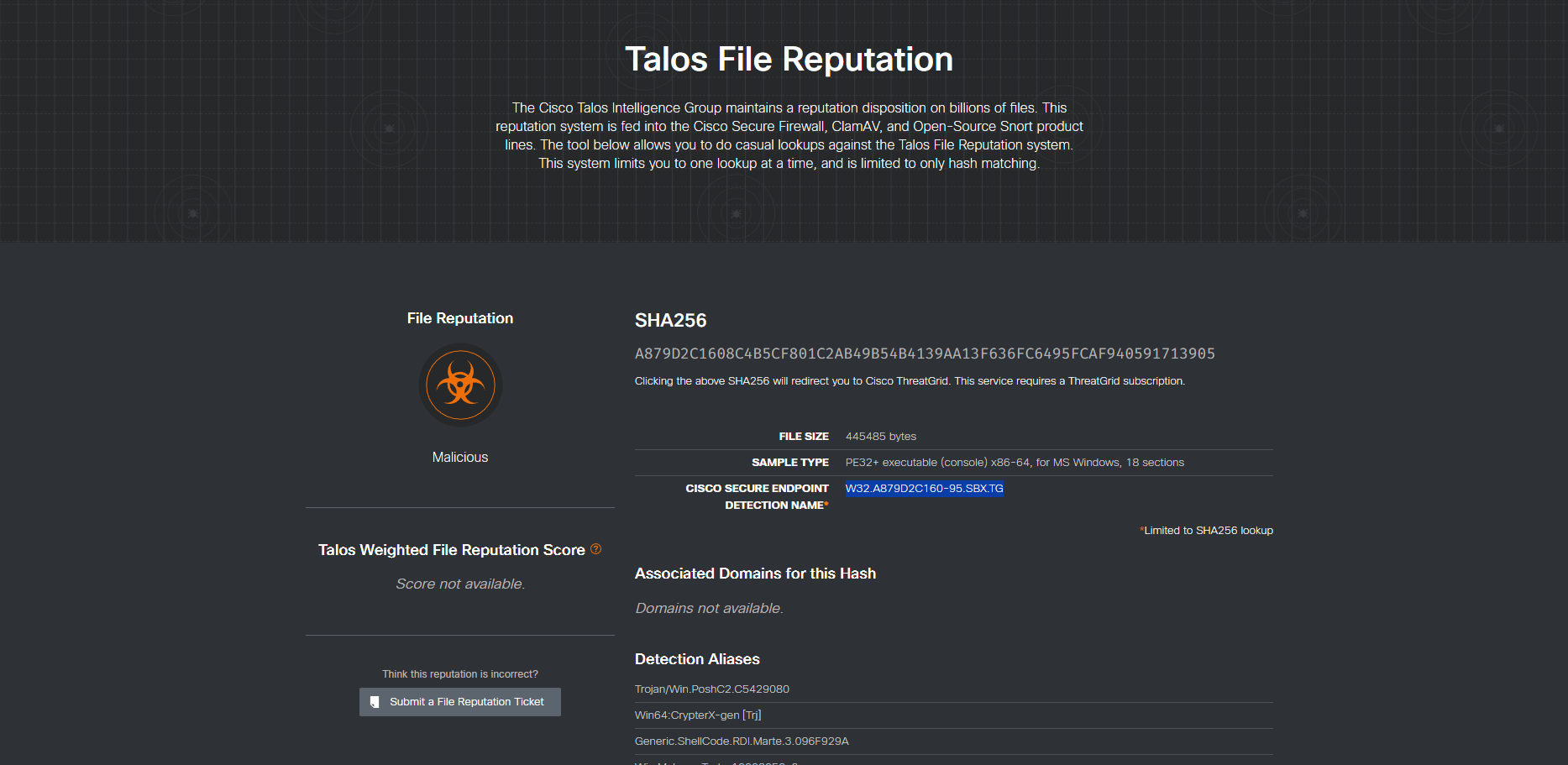
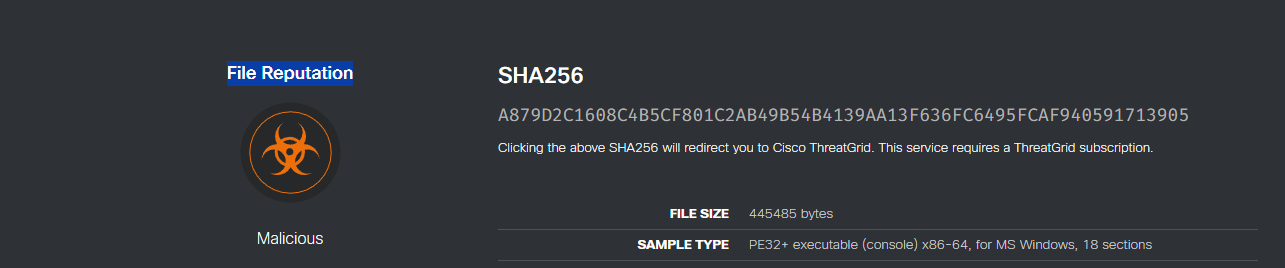
I used the hash for the Talos lookup from my own machine because the lab had no internet access. Talos classified the file as Malicious and returned W32.A879D2C160-95.SBX.TG.
That name did not pass the lab’s answer check. I rechecked the hash three times before consulting the Zero Day Sukana walkthrough . It provided the lab-accepted string, W32.Auto:a879d2.in03.Talos. The mismatch appeared to be a change in Talos’s naming, so I recorded both strings instead of treating the older answer as the result I had observed.
Answer (Q3): W32.Auto:a879d2.in03.Talos. Talos returned W32.A879D2C160-95.SBX.TG during my investigation; the first string is the lab-accepted answer.
Answer (Q4): Malicious.
Q5. Defender detection
Q5: With Windows Defender enabled, launch the malware. What is the name of the threat according to Microsoft Defender Antivirus? (Format: Name)
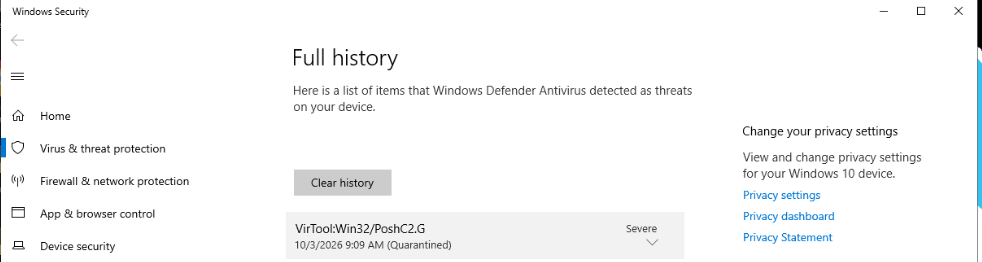
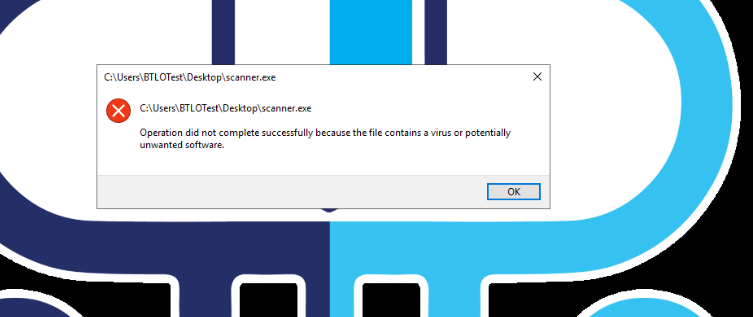
Following the exercise’s instructions, I attempted to launch the sample inside the provided lab with Defender enabled. Windows blocked the attempt. Protection history listed VirTool:Win32/PoshC2.G and marked the detection as quarantined.
Answer (Q5): VirTool:Win32/PoshC2.G.
Q6. The C2 framework language
Q6: What scripting language is this C2 Framework primarily written in? (Format: Language)
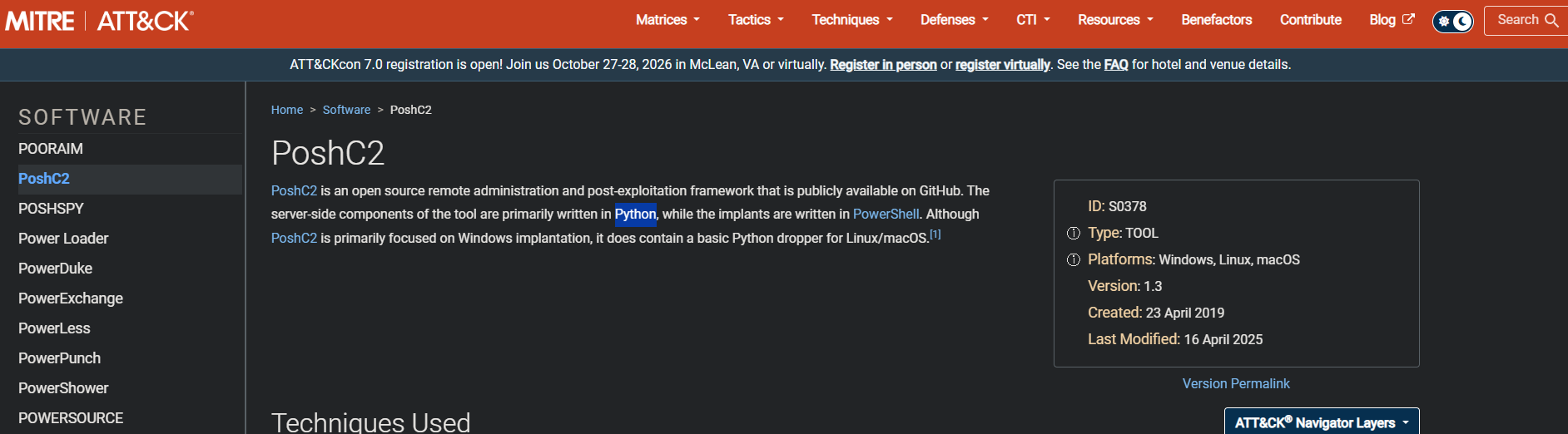
That gave me a specific framework name to research. MITRE’s PoshC2 entry describes server-side components written primarily in Python and implants written in PowerShell. The lab’s answer was Python.
Answer (Q6): Python.
Supporting reputation and detection screenshots
Reading the email without losing the MIME structure
Q7 and Q8. Email sender and subject
Q7: What was the sending email address in question? (Format: mailbox@domain.tld)
Q8: What is the email subject name? (Format: Subject)
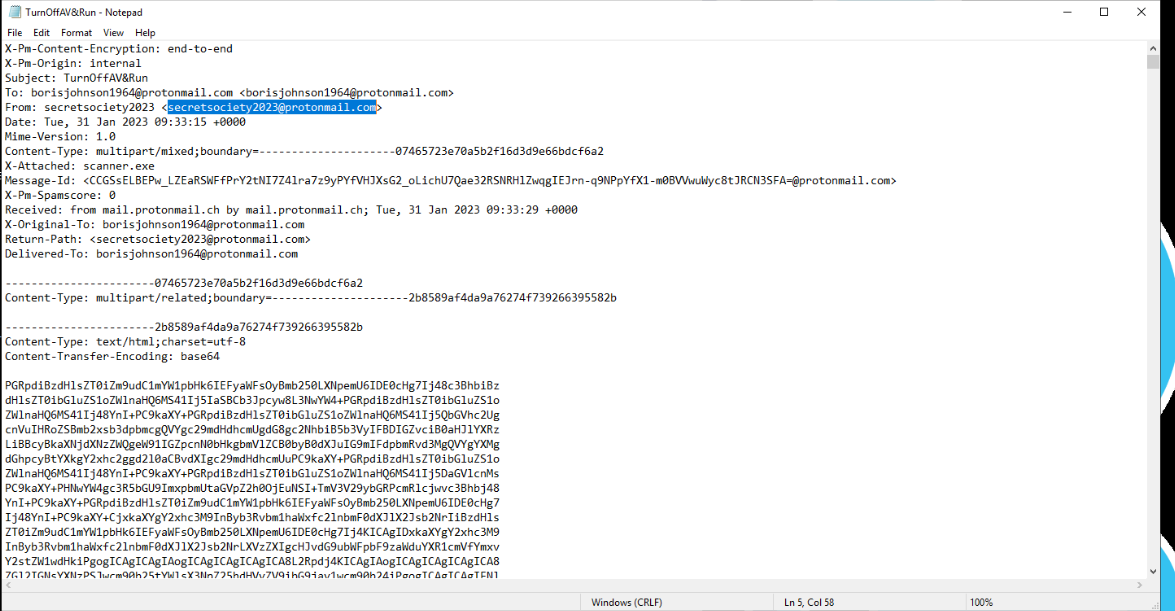
I opened the email in Notepad to inspect its raw headers. Thunderbird could have shown the same fields, but reading the file directly is my preferred way to check them.
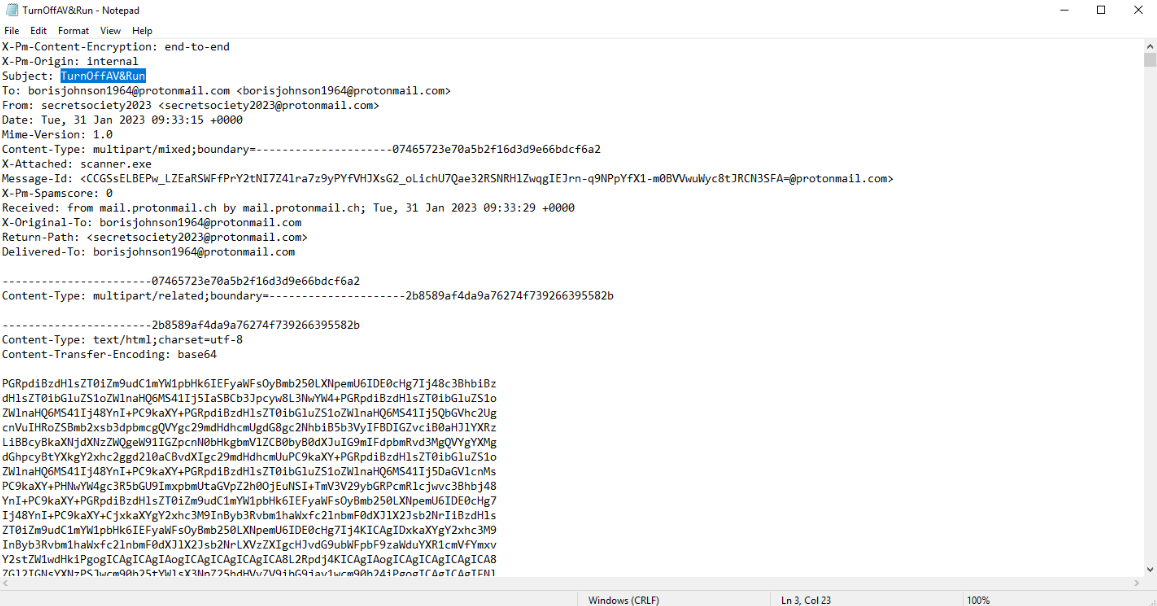
The From field contained secretsociety2023@protonmail.com, and the subject was TurnOffAV&Run. The sender field is what the message claims; I did not establish the sender’s identity from that field alone. The visible headers also named scanner.exe as the attachment.
Answer (Q7): secretsociety2023@protonmail.com.
Answer (Q8): TurnOffAV&Run.
Q9. The decoded href
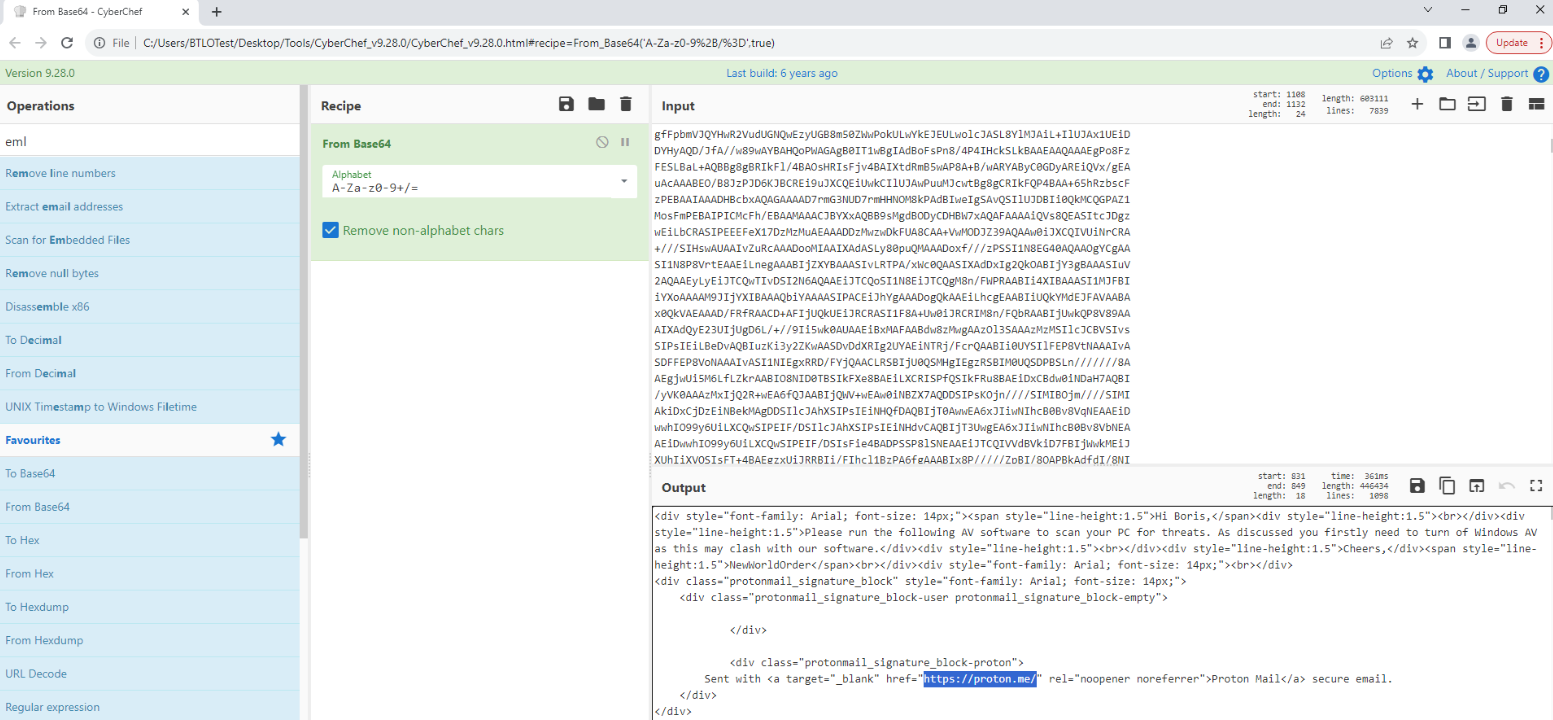
Q9: Utilize CyberChef. After uploading the Base64 contents of the email into CyberChef, what is the defanged output of the href? (Format: hxxps[://]domain[.]tld/)
The message was multipart MIME. Its headers and boundaries were plain text, while individual content blocks were Base64-encoded. I worked through those blocks in CyberChef rather than treating the entire email as one Base64 string.
The decoded HTML included a message presenting the attachment as antivirus software and asking the recipient to turn off Windows AV because it might clash with other software. It also contained the href requested by Q9:
hxxps[://]proton[.]me/The href was in the Proton Mail signature, so I recorded it as an extracted link rather than a malware delivery indicator.
Answer (Q9): hxxps[://]proton[.]me/.
Examining the memory image
Q10. Memory image size
Q10: A memory dump is a snapshot of a computer’s memory that contains data about any running processes at the time the capture was taken. What is the size, in GB, of the memory dump of the infected Windows machine? Round to the nearest hundredth (Format: X.XX)
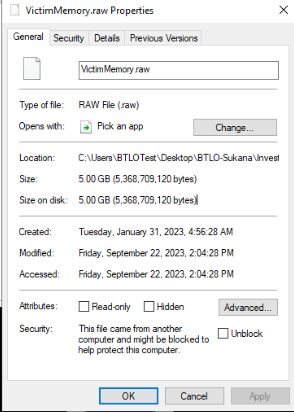
The properties of VictimMemory.raw showed an exact size of 5,368,709,120 bytes. Windows displayed 5.00 GB, using a binary-sized unit. Dividing the byte count by one billion gives 5.36870912 decimal GB, or 5.37 GB to two decimal places. That accounts for the apparent disagreement with the answer.
Answer (Q10): 5.37 GB.
Q11. IP ownership from the memory connections
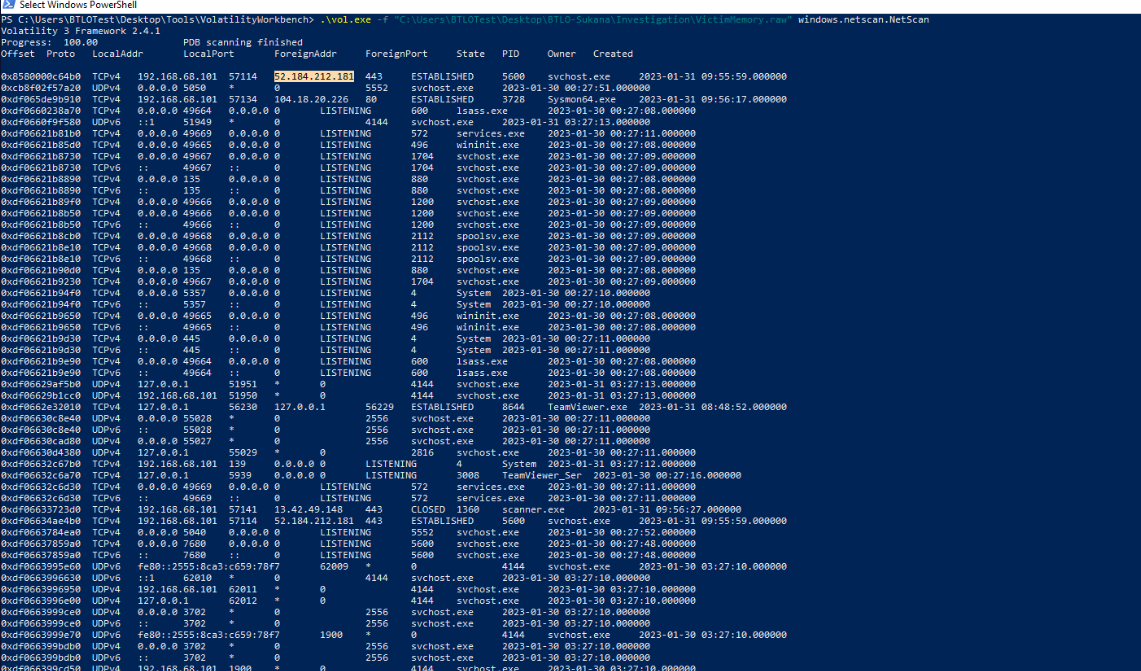
Q11: Utilize Volatility. Looking at the network connection of the memory dump, what is the ISP for the frequent foreign address ending in .181? (Format: ISP)
I opened PowerShell in the Volatility workbench folder and used the network scanner:
.\vol.exe -f "C:\Users\BTLOTest\Desktop\BTLO-Sukana\Investigation\VictimMemory.raw" windows.netscan.NetScanVolatility analyses captured RAM. Here, the scan supplied connection records from the memory image, including the foreign address ending in .181 that the question asked about: 52.184.212.181.
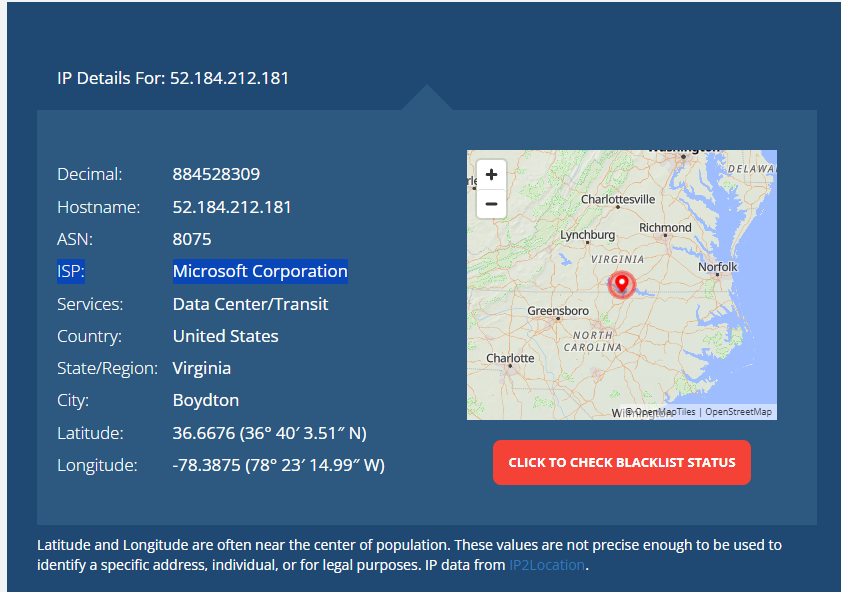
My recorded IP lookup listed Microsoft Corporation as its ISP. That answered the ownership question. It did not establish that this address was an attacker-controlled endpoint, and I kept it separate from the network IOC in the Intezer report.
Answer (Q11): Microsoft Corporation.
Q12. The evidence Volatility analyses
Q12: On the topic of Volatility, what kind of digital evidence does it analyze from computers. Keep in mind, this volatile memory very common within computers (Format: XXX)
Answer (Q12): RAM.
Checking the report’s network indicator in Wireshark
Q13. The network IOC’s destination port
Q13: Utilize Wireshark. What is the destination port for the Network IOC on the Intezer File Scan Report? (Format: Port)
I returned to the Intezer report for its network IOC, 13.42.49.148, then opened dump.pcap in Wireshark. In Statistics > Conversations > TCP, I located the matching address and read its port.
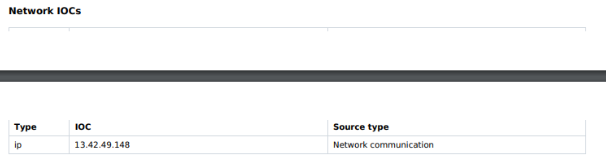

The row showed a conversation from 192.168.122.208:49182 to 13.42.49.148:443. It contained five packets and 431 bytes. TCP port 443 was the requested answer; that short conversation alone did not prove a successful C2 session or data exfiltration.
Answer (Q13): 443.
The memory screenshot used local address 192.168.68.101, while this capture used 192.168.122.208. I used each source for the question it supported rather than assuming the two addresses described the same interface or collection moment.
Interpreting the report and related-sample data
Q14. The reported technique and severity
Q14: According to the Intezer File Scan Report, what is the MITRE ID and severity for the first TTPs? (Format: TXXXX, Severity)
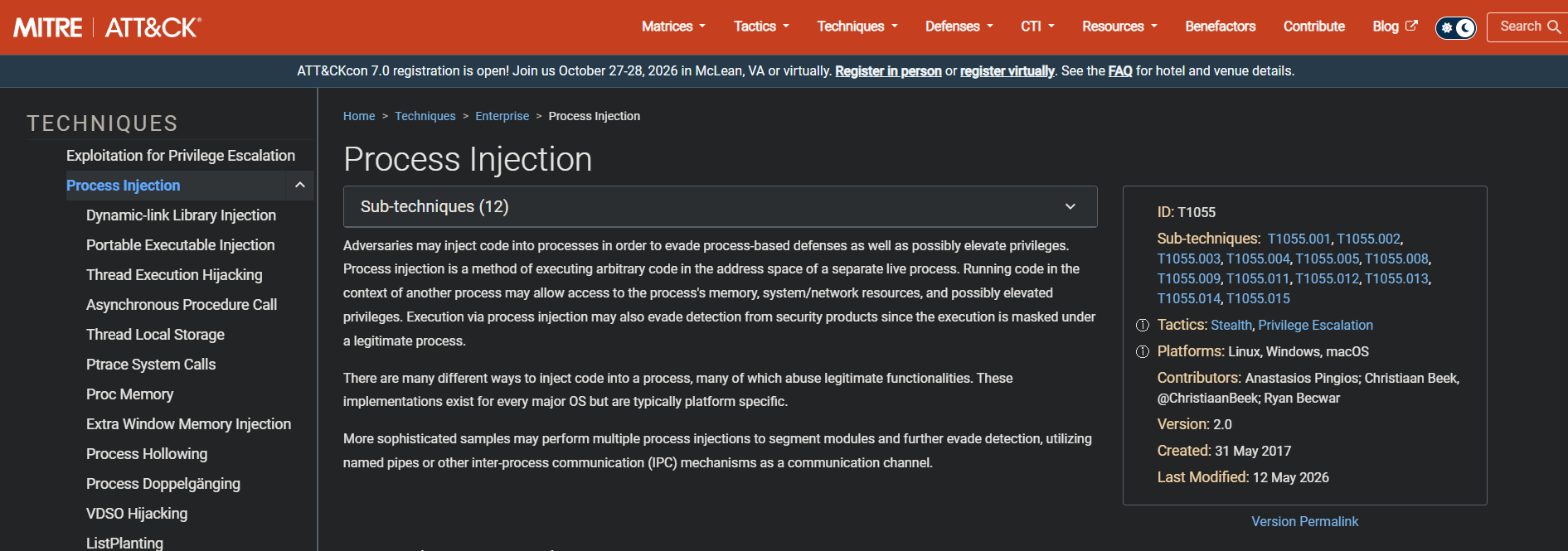
The first behaviour listed in the supplied report was code injection using CreateRemoteThread, with severity High. I mapped the behaviour to Process Injection, T1055. The severity came from Intezer’s report, not from MITRE.
Answer (Q14): T1055, High.

I took this behaviour from the supplied report; I did not independently reconstruct the injection from memory. The retained report excerpt also displays scanner.exe(196) on both sides of the injection description, so I would not use that excerpt to claim a particular cross-process target.
Q15. The related sample’s first-seen timestamp
Q15: Utilize Timeline Explorer. Let us look at the related sample CSV file we got from Intezer. This is an additional file sample known to be related to the main sample. When was this Generic Malware first seen? (Format: XXX, XX Month YYYY HH:MM:SS XXX))
I next opened the related-samples CSV in Timeline Explorer. Its First Seen field read:
Fri, 08 May 2020 02:39:58 GMT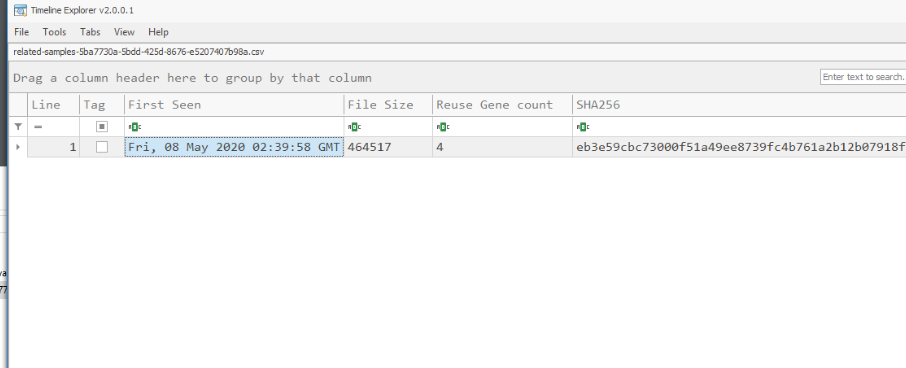
That timestamp belongs to a related sample in the report’s dataset. It is not the infection time of the victim machine.
Answer (Q15): Fri, 08 May 2020 02:39:58 GMT.
Q16. Mapping user execution
Q16: Using Virus Total, the malware is clearly related to the Trojan family. An adversary may rely upon a user opening this malicious file in order to gain execution. What is the MITRE ID that corresponds to this tactic? (Format: TXXXX.xxx)
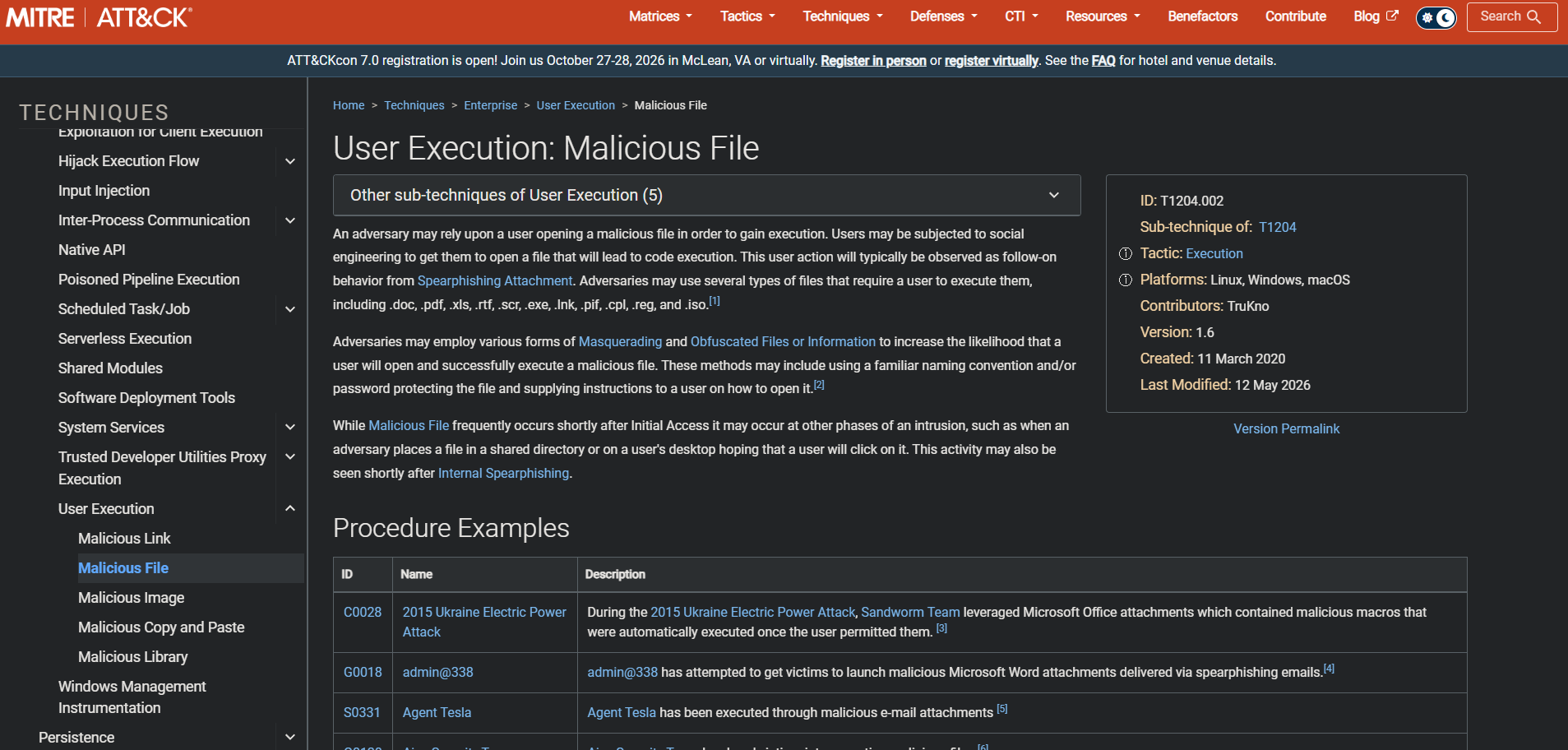
For Q16, I mapped the described reliance on a user opening a malicious file to User Execution: Malicious File, T1204.002. This is an ATT&CK sub-technique; the question’s use of the word “tactic” should not change that terminology.
Answer (Q16): T1204.002.
ATT&CK reference screenshots
Finding scanner.exe in the collected MFT
Q17. The malware file’s creation timestamp
Q17: Utilize Timeline Explorer (TE). After using MFTECmd, the command line MFT parser, to upload the CSV $MFT in TE. Locate the FileName (FN) (0x10) creation timestamp for the malware file (Format: YYYY-MM-DD HH:MM:SS)
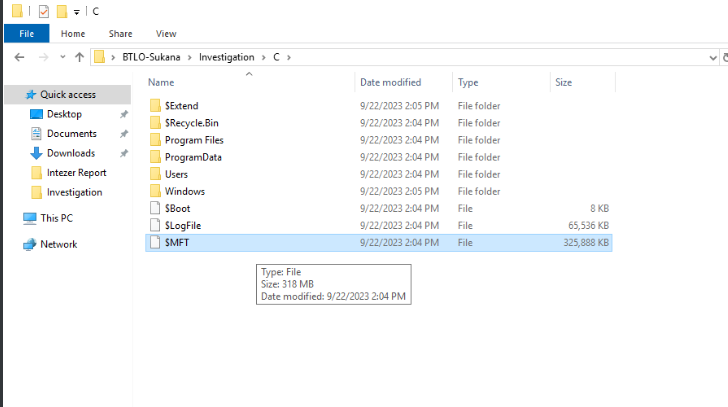
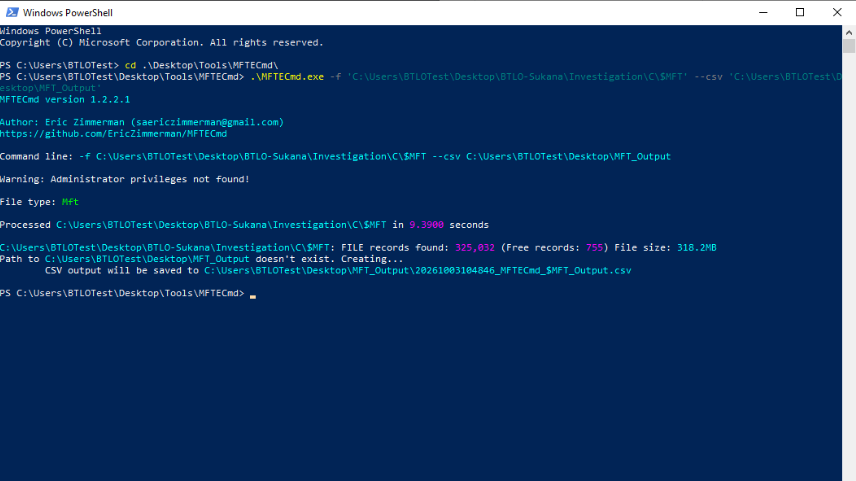
The filesystem question took more steps. I located the collected $MFT under the evidence directory’s C folder, opened PowerShell in the MFTECmd folder and exported it to CSV:
.\MFTECmd.exe -f 'C:\Users\BTLOTest\Desktop\BTLO-Sukana\Investigation\C\$MFT' --csv 'C:\Users\BTLOTest\Desktop\MFT_Output'The command uses straight single quotes so PowerShell treats $MFT as part of the literal path. MFTECmd’s documentation describes -f as the input file and --csv as the output directory.
I opened the export in Timeline Explorer and searched for scanner. That search also returned legitimate Windows scanner-related files, so I checked the filename, parent path and size rather than taking the first match.
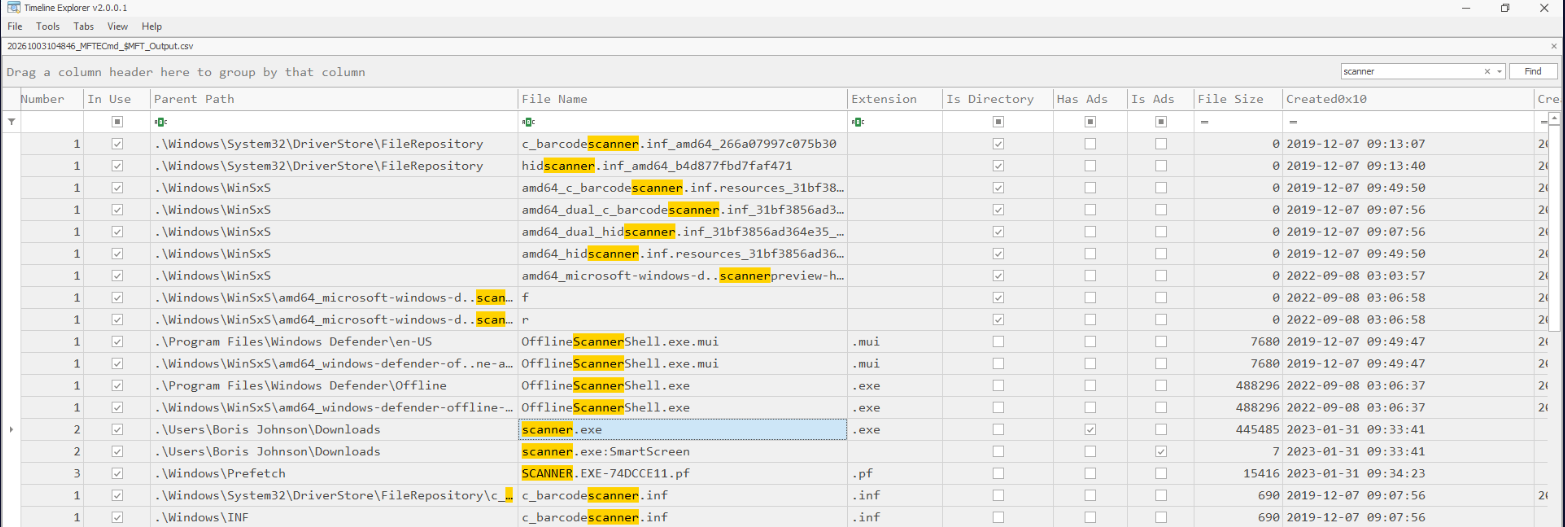
The row I needed was scanner.exe under .\Users\Boris Johnson\Downloads. Its size was 445485 bytes, matching the attachment I had checked earlier. The visible Created0x10 value was 2023-01-31 09:33:41.
Answer (Q17): 2023-01-31 09:33:41.
There is a terminology error in the lab question: it calls the field “FileName (FN) (0x10)”. Microsoft’s NTFS attribute definitions identify 0x10 as $STANDARD_INFORMATION and 0x30 as $FILE_NAME. My screenshot supports the former. I kept the answer and labelled it accurately; a file creation timestamp is also not, by itself, proof of execution at that time.
MFT location and export screenshots
Reading the NTFS boot metadata
Q18. NTFS cluster size
Q18: $Boot. As easily guessed, this file is related to the booting process and contains the NTFS boot sector. Utilizing the same process above, find the cluster size (Format: XXXX)
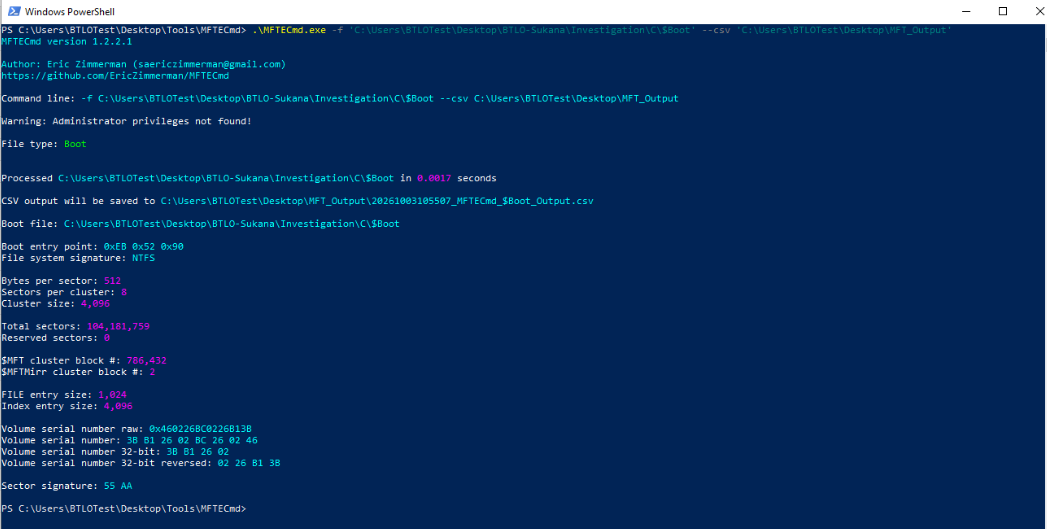
I repeated the export process for the collected $Boot artifact:
.\MFTECmd.exe -f 'C:\Users\BTLOTest\Desktop\BTLO-Sukana\Investigation\C\$Boot' --csv 'C:\Users\BTLOTest\Desktop\MFT_Output'Its output contained one record. Timeline Explorer showed 512 bytes per sector and 8 sectors per cluster, which gives 4096 bytes per cluster.
Answer (Q18): 4096 bytes.

Q19. Bytes per sector
Q19: With the last answer in mind, we can tell the victim’s drive is quite large. If this was a legacy system, what sector size, in bytes, would be required to boot the system? (Format: XXX)
Both answers were in the same artifact: 4096 for the cluster size and 512 for bytes per sector. I did not need a separate lookup. Cluster size alone would not establish the drive’s capacity or a universal requirement for every legacy system; the values here describe the supplied NTFS volume.
Answer (Q19): 512 bytes.
Boot parsing and sector-size screenshots

The separate Autopsy memory exercise
Q20. Waldo’s password in the separate memory image
Q20: Utilize Autopsy. We are going to examine another memory dump provided by Sam Bowne, an instructor at City College San Francisco. This will give us more practice with the tool. What is Waldo’s password? (Format: Password)
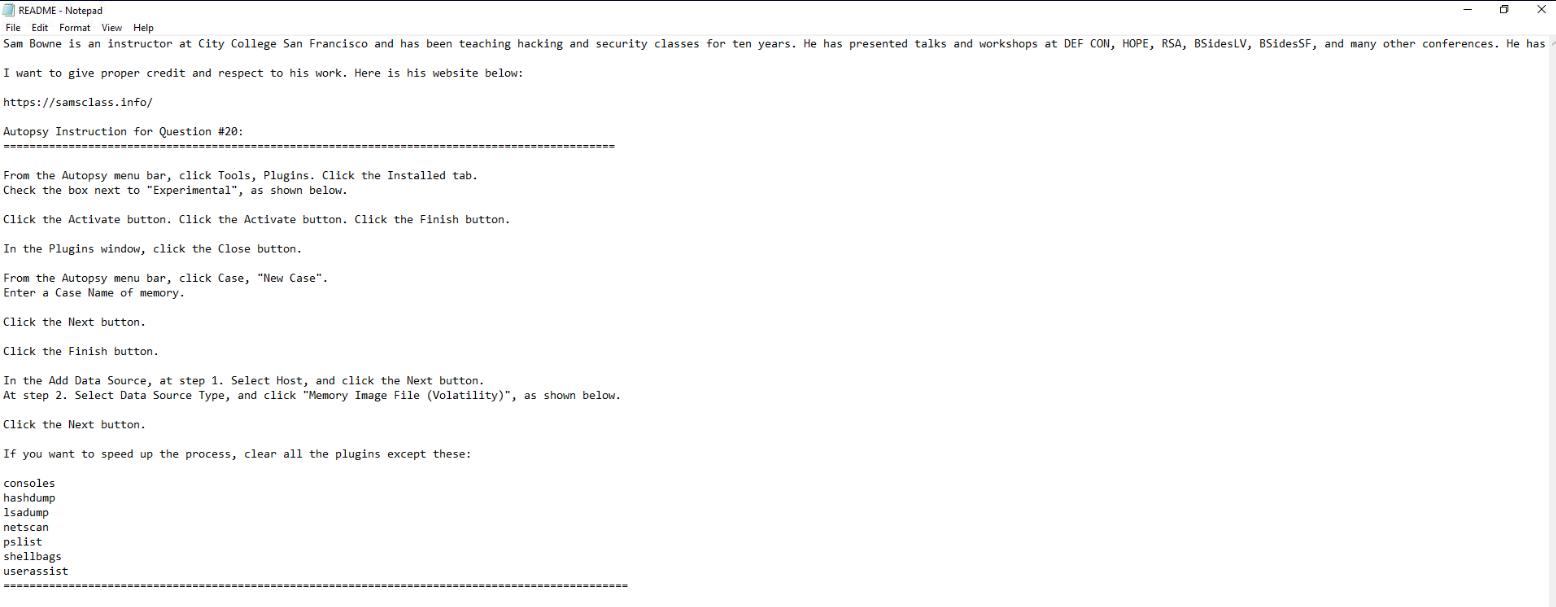
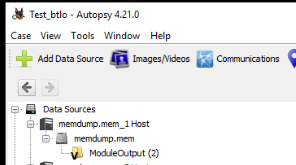
The final question switched to a different memory image, credited in the supplied README to Sam Bowne. I followed its instructions to enable Autopsy’s Experimental plugin, create a case and add the file as Memory Image File (Volatility). The README also listed the plugins to keep if I wanted to reduce processing time.
Processing took long enough that I left it to finish before checking ModuleOutput. In the console output, I found Waldo’s password: Apple123.
Answer (Q20): Apple123.
My saved screenshots show the README and the ModuleOutput directory. I recorded the password in my notes, but did not retain a screenshot of the console text. This exercise is separate from the scanner.exe case, so I did not fold Waldo’s credentials into the victim’s incident.
Autopsy setup and output location
What I took from the investigation
The useful part of this lab was moving between evidence sources without giving them all the same weight. The report gave me a sample hash and a network lead. The attachment size and MFT record helped me recognise scanner.exe again. The email explained the lure, while memory and packet data answered different network questions.
The Talos mismatch was the part that made me slow down. Rechecking the hash preserved the result I actually observed, even though the lab expected an older name. The same habit mattered for the MFT timestamp: finding the right number was only half the work; naming the field correctly mattered too.
Answer reference
| Question | Result | Evidence or qualification |
|---|---|---|
| Q1 | a879d2c1608c4b5cf801c2ab49b54b4139aa13f636fc6495fcaf940591713905 |
SHA-256 in the supplied Intezer report |
| Q2 | 445485 bytes |
PowerShell Length for scanner.exe |
| Q3 | W32.Auto:a879d2.in03.Talos |
Lab-accepted answer from the credited walkthrough; observed Talos name was W32.A879D2C160-95.SBX.TG |
| Q4 | Malicious |
Recorded Talos file reputation |
| Q5 | VirTool:Win32/PoshC2.G |
Defender protection history |
| Q6 | Python |
PoshC2 framework reference |
| Q7 | secretsociety2023@protonmail.com |
Email From field |
| Q8 | TurnOffAV&Run |
Email Subject field |
| Q9 | hxxps[://]proton[.]me/ |
Href in the decoded email signature |
| Q10 | 5.37 GB |
Decimal conversion of 5,368,709,120 bytes |
| Q11 | Microsoft Corporation |
Recorded lookup for 52.184.212.181 |
| Q12 | RAM |
Volatility’s evidence type |
| Q13 | 443 |
TCP conversation matching the report’s network IOC |
| Q14 | T1055, High |
ATT&CK mapping plus severity from the supplied report |
| Q15 | Fri, 08 May 2020 02:39:58 GMT |
Related sample’s First Seen field |
| Q16 | T1204.002 |
User Execution: Malicious File |
| Q17 | 2023-01-31 09:33:41 |
scanner.exe Created0x10, a $STANDARD_INFORMATION timestamp |
| Q18 | 4096 bytes |
Cluster Size in parsed $Boot |
| Q19 | 512 bytes |
Bytes Per Sector in parsed $Boot |
| Q20 | Apple123 |
Written notes from the separate Autopsy console exercise |