
TL;DR
Two AWS log sources, one Splunk instance, and an attack chain that keeps handing you the next question. A misconfigured S3 bucket leaks a WireGuard VPN profile, an attacker tunnels into the VPC with it, assumes the EC2 instance role, builds an IAM backdoor with AdministratorAccess, then pivots over SSH to a second instance and a reverse shell on port 13337. Almost every answer sits at the crossing of CloudTrail, which saw the API calls, and VPC Flow Logs, which saw the packets.
Scenario

Due to a sudden boom in cloud services, a recently formed Australian-based company shifted from on-prem to cloud infrastructure. While moving to the cloud, they unknowingly had a few misconfigurations, which a group of hackers used to attack them. The attackers were successful in attacking and gaining access to their infrastructure. The company does not have an IR team ready to perform cloud-based investigations. They also said they manage their cloud from the browser only, no CLI was configured. Can you help them out? The included readme adds the details that shape the whole investigation: the provided logs are AWS CloudTrail and VPC Flow Logs; the time field should not be used as a reference, because it holds the time the exported logs were added to Splunk (the time inside the events is the real one); Splunk opens from a browser bookmark already configured with All Time and
index=*; and if it is not running,/opt/splunk/bin/splunk startbrings it up.
The investigation
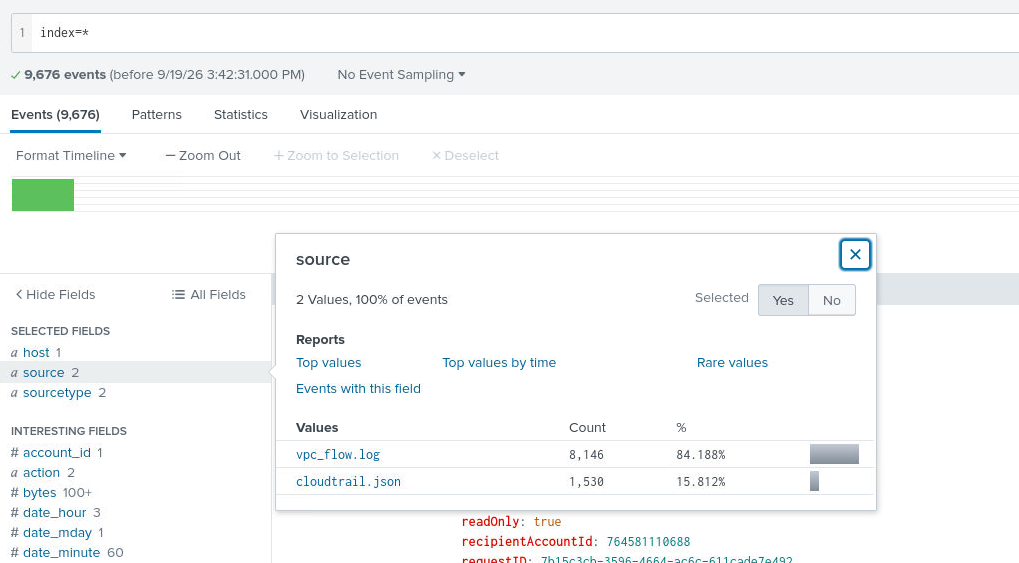
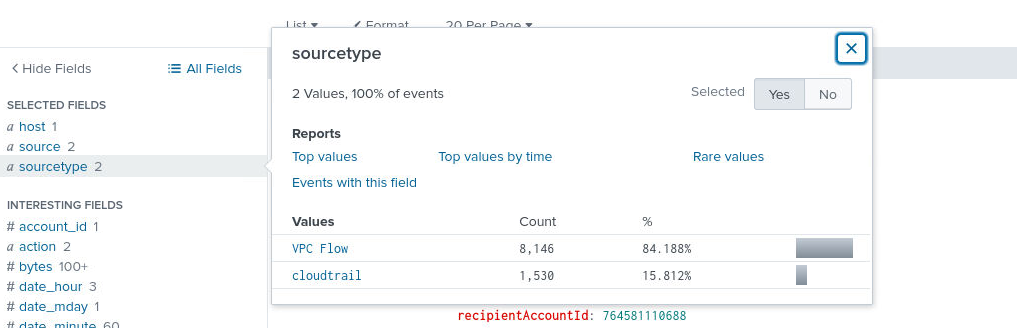
First things first: see what sources and source types we have available. The lab ships two, and they split the work between them. CloudTrail records the API side, who called what, from which sourceIPAddress, under which eventName. VPC Flow Logs record the network side, srcaddr, dstaddr, ports, and whether traffic was accepted or rejected. The investigation below keeps jumping between the two.
Finding the exposed bucket
Question (2 points). Which S3 bucket’s object was accessed by the attacker? (Format: bucket-name)
Answer: developers-configuration
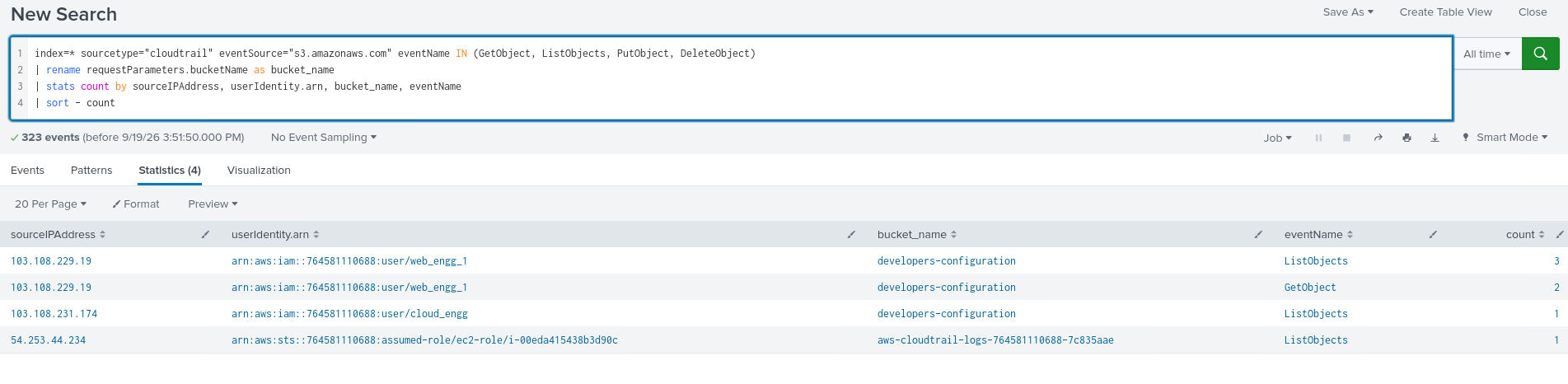
How I got there. To answer that I first had to work out which bucket was actually compromised, so I ran a search that counts the requests made to each bucket through the CloudTrail logs:
index=* sourcetype="cloudtrail" eventSource="s3.amazonaws.com" eventName IN (GetObject, ListObjects, PutObject, DeleteObject)
| rename requestParameters.bucketName as bucket_name
| stats count by sourceIPAddress, userIdentity.arn, bucket_name, eventName
| sort - count
The table that came back put developers-configuration on top, and the reads on it came from an address nobody else in the account used.
The S3 attacker IP
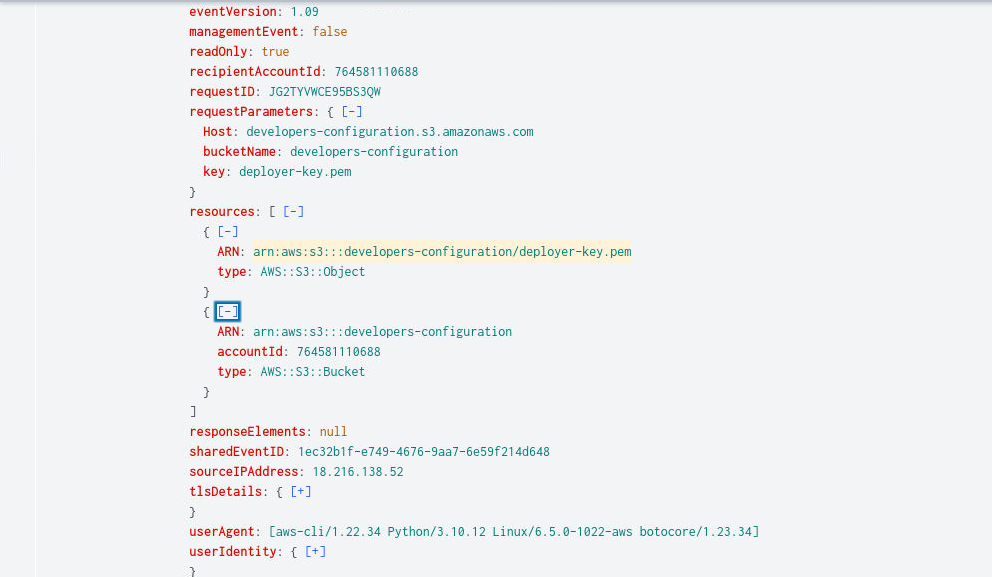
Question (2 points). What was the attacker IP associated in S3 access? [Provide the defanged IP] (Format: XXX[.]XXX[.]XXX[.]XXX)
Answer: 18[.]216[.]138[.]52
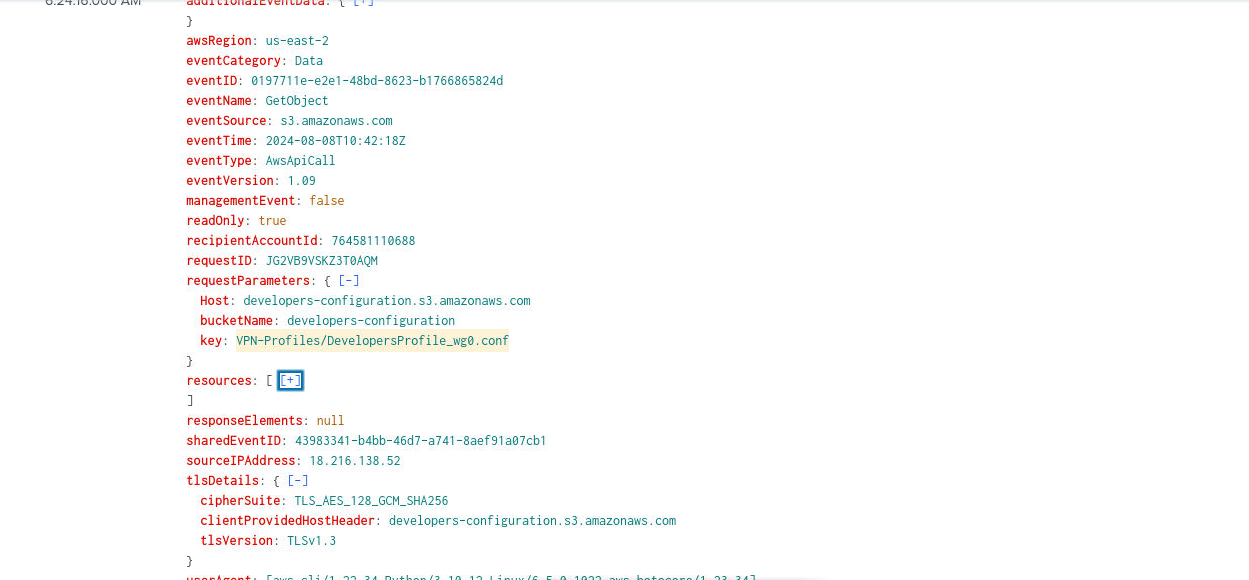
How I got there. I expanded the search to GetObject events only, the requests that download files from a bucket, and went through the results. The requests from 18[.]216[.]138[.]52 jumped out immediately: they pulled files like keys.pem and config files that should never be downloaded by anyone outside the team.
The file that opened the door
Question (2 points). What object/file did the attacker then access/download that would allow access to their environment? (Format: Directory/Filename.extension)
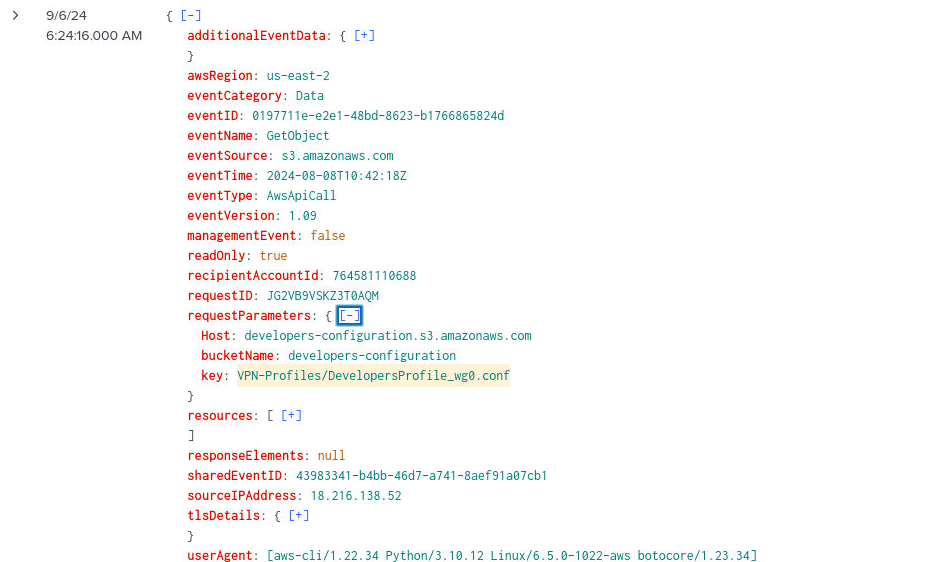
Answer: VPN-Profiles/DevelopersProfile_wg0.conf
How I got there. From the GetObject results we saw earlier, the file that gave the attacker direct access to the VPC was the WireGuard config file, since it holds everything needed to connect into the network directly: VPN-Profiles/DevelopersProfile_wg0.conf.
The software behind the config
Question (2 points). Based on the previous question, what is the software associated with the file? Provide the name of the software used for such type of files. (Format: Name of Protocol/Software (Lowercase))
Answer: wireguard
How I got there. The _wg0 suffix and the .conf extension point at one thing: WireGuard, the VPN software this profile belongs to.
Correction. My original note said Wireguard. The lab’s format string asks for the name in lowercase, and the accepted answer is
wireguard, which the PHK writeup and the inksec.io writeup both give.
The leaked VPN IP
Question (2 points). Using the previously mentioned file, one of the attackers accidentally connected via main system leading to his IP address getting leaked. What is the IP address of the Attacker? [Provide the defanged IP]
Answer: 122[.]161[.]49[.]105
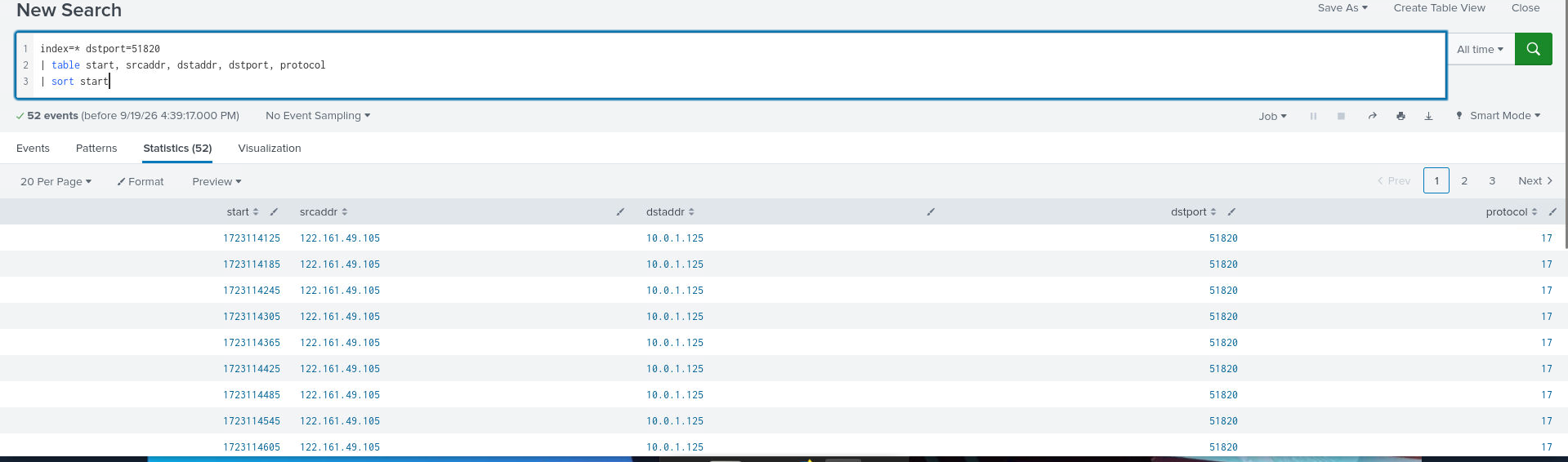
How I got there. Since the attacker downloaded a WireGuard config, I looked for connections on the WireGuard port and checked the source addresses on those flows:
index=* dstport=51820
| table start, srcaddr, dstaddr, dstport, protocol
| sort start
The results showed the attacker connecting from 122[.]161[.]49[.]105.
The first EC2 instance
Question (2 points). What was the Private IP of the EC2 instance to which the attacker connected? (Format: Instance IP Address)
Answer: 10.0.1.125
How I got there. Same query as before, reading the other column this time. The tunnel from 122[.]161[.]49[.]105 lands on 10.0.1.125, so that is the instance the attacker reached through the VPN.
The role worth assuming
Question (2 points). The attacker performed further enumeration while being inside the EC2 instance and found a role that could be used further by assuming it. What was the ARN of the role? (Format: Role ARN)
Answer: arn:aws:iam::764581110688:role/ec2-role
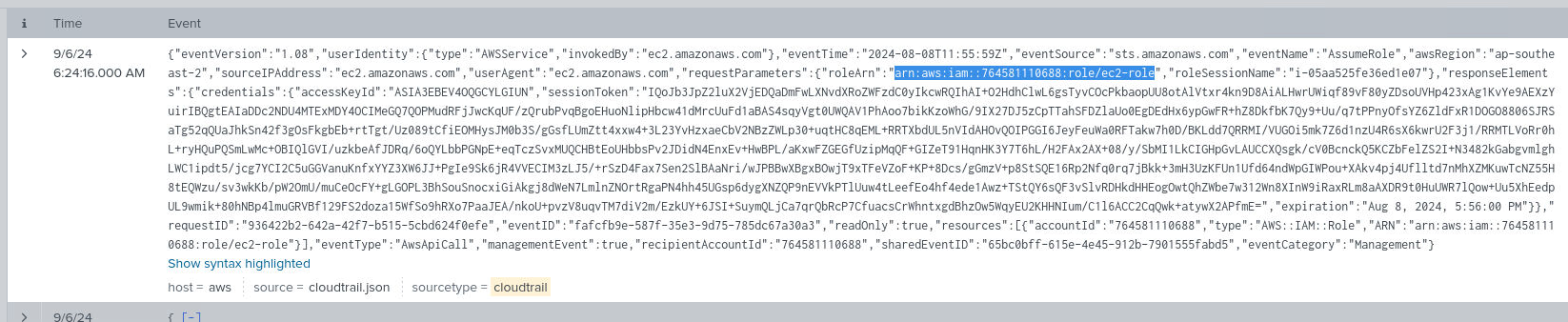
How I got there. I searched CloudTrail for the role activity around the instance, to get a good view of the roles the attacker was working with.
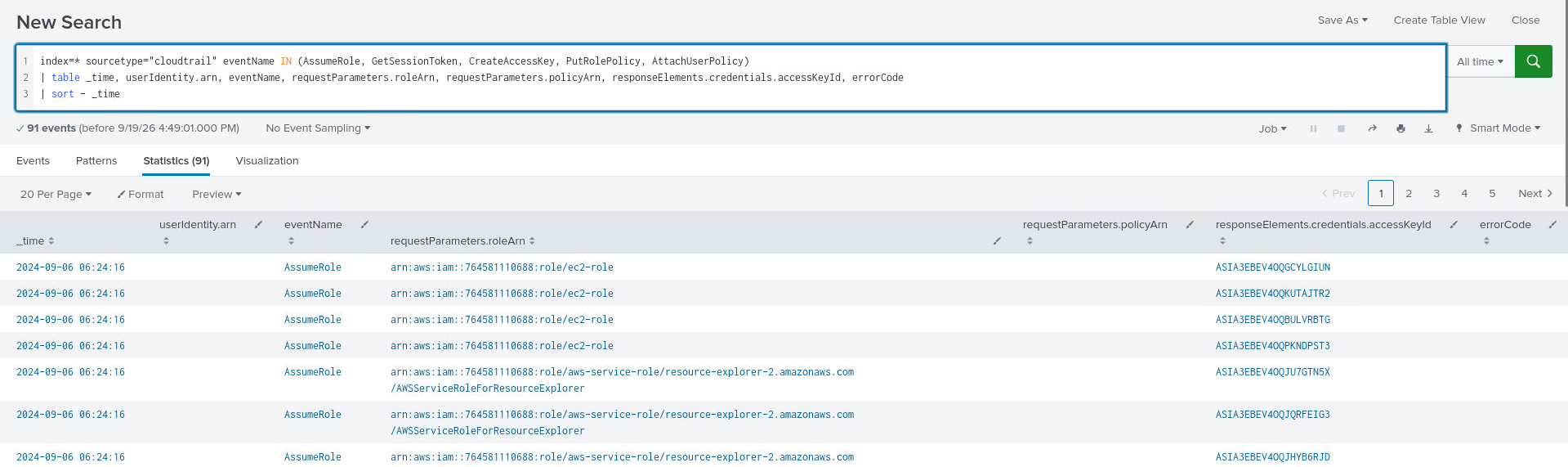
Expanding the latest event gave the answer in its response fields:
arn:aws:iam::764581110688:role/ec2-role. The same event also carried the
instance ID, i-00eda415438b3d90c, which I kept because it was the handle I
needed to track the attacker’s session in the next questions.
Persistence in IAM
Question (3 points). Using the role, the attacker targeted IAM to achieve persistence in the environment. Provide the APIs used for it in order of its usage. (Format: API 1, API 2, API 3)
Answer: CreateUser, CreateAccessKey, AttachUserPolicy
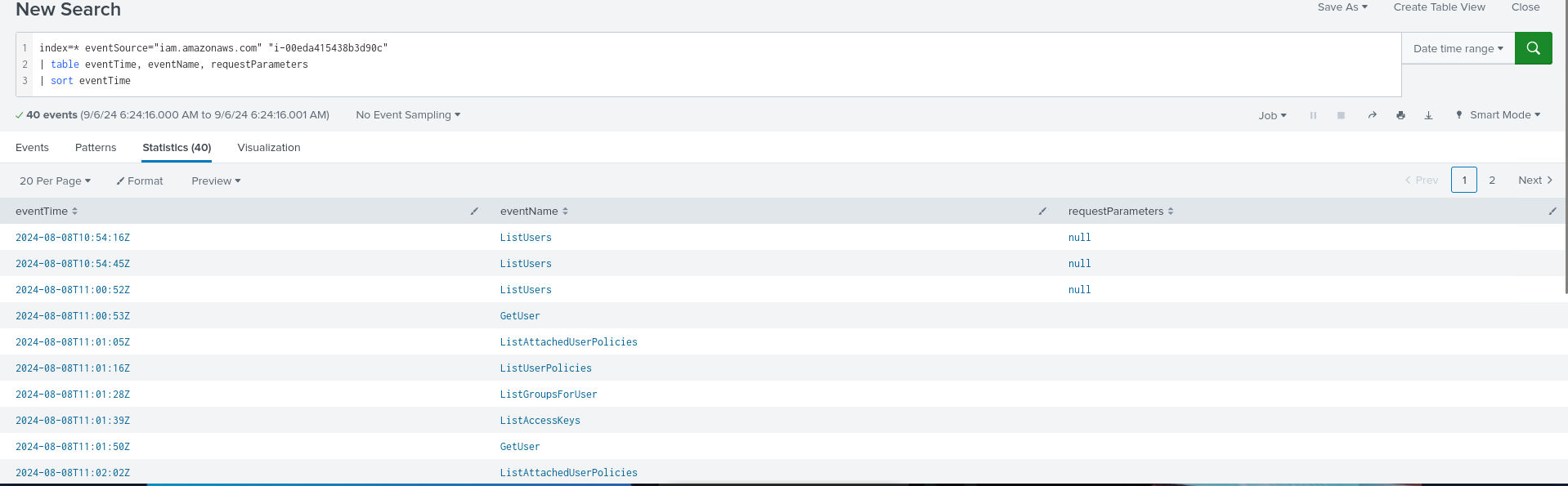
How I got there. Now I needed the attacker’s session in the CloudTrail logs, so I used the instance found before to track it:
index=* eventSource="iam.amazonaws.com" "i-00eda415438b3d90c"
| table eventTime, eventName, requestParameters
| sort eventTime
The first actions are all enumeration, none of them achieve persistence. Scrolling past those, the actions taken to secure persistence stand out clearly.

The rogue identity
Question (2 points). Provide the name of the IAM Identity created during Persistence. (Format: Identity Name)
Answer: web_engg_2
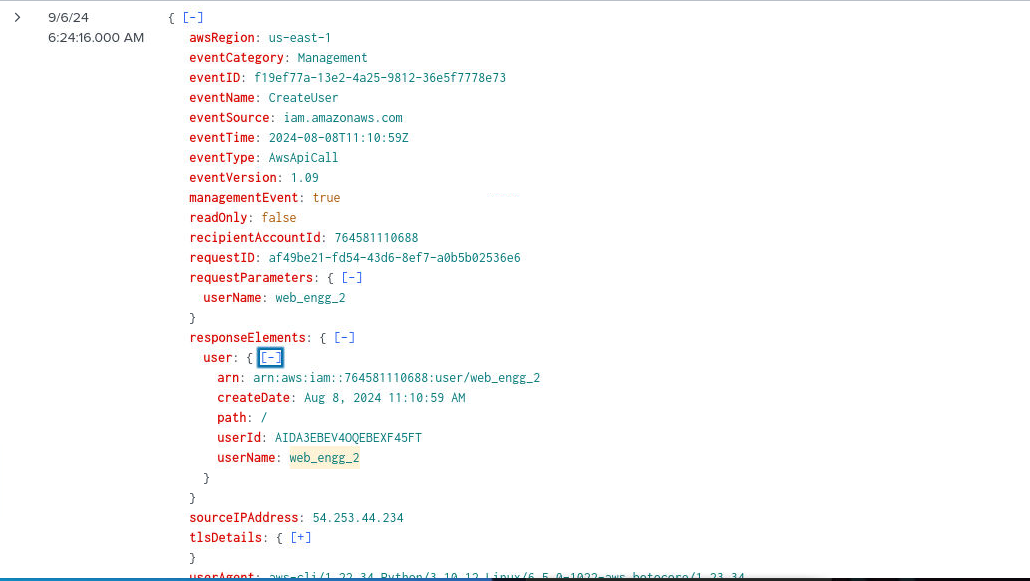
How I got there. Expanding the event with the CreateUser eventName, the response shows the name of the new user: web_engg_2.
The policy attached to it
Question (2 points). What policy was attached to the Identity later? Provide the policy ARN. (Format: Policy ARN)
Answer: arn:aws:iam::aws:policy/AdministratorAccess
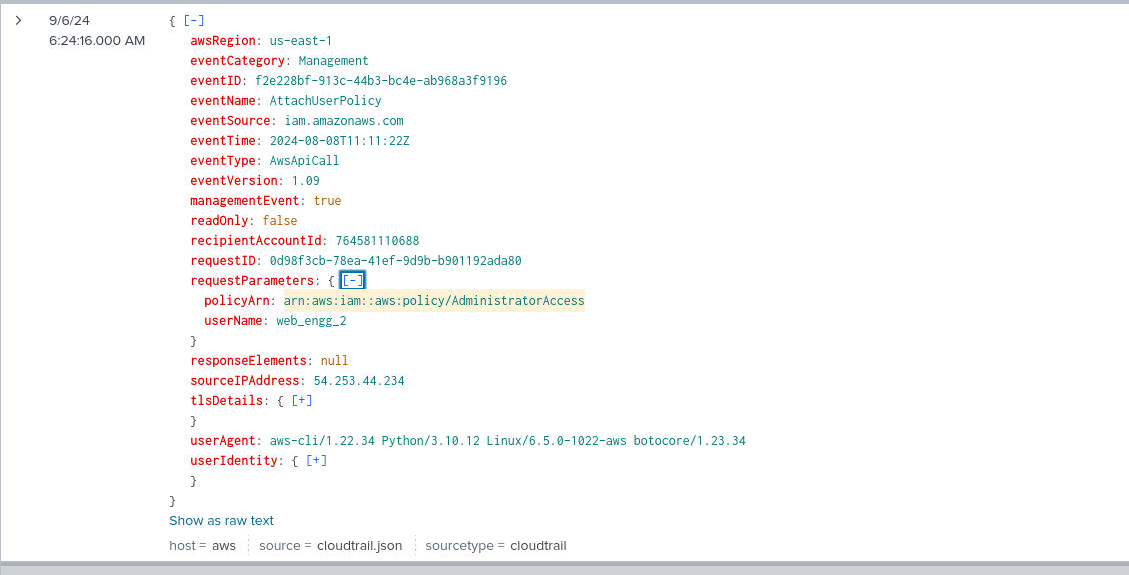
How I got there. Back in the previous view, I expanded the AttachUserPolicy event. The ARN sits in its request parameters: arn:aws:iam::aws:policy/AdministratorAccess.
SSH pivot to the second instance
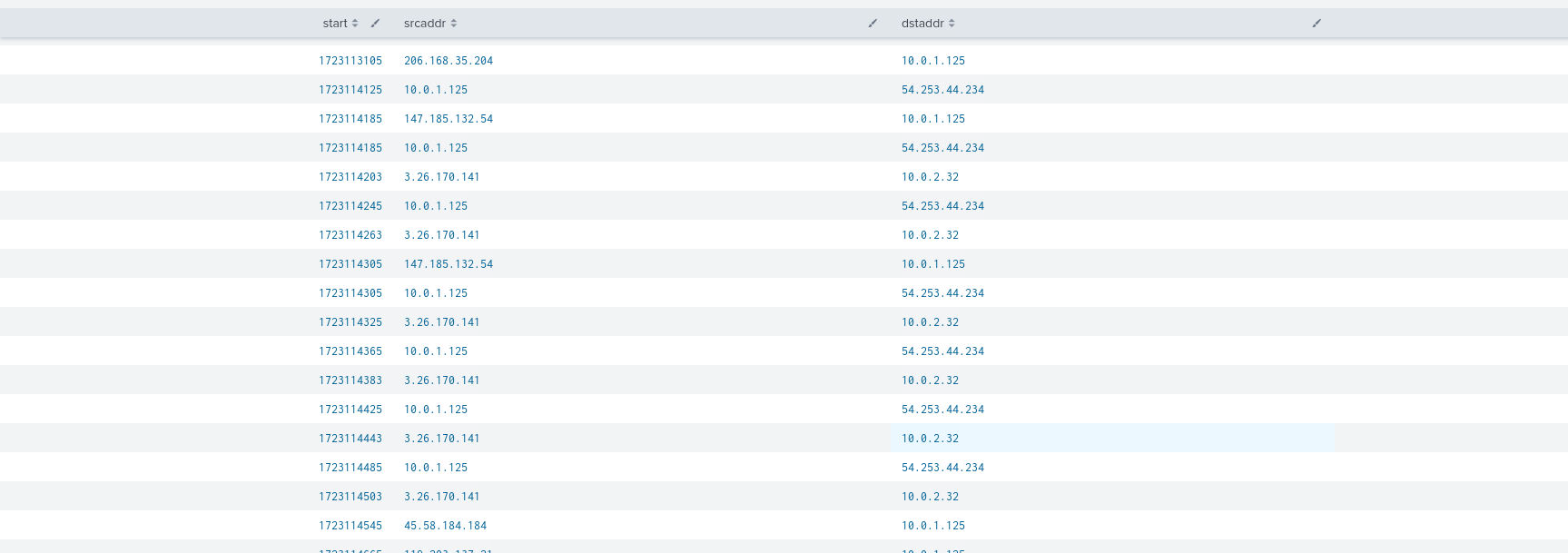
Question (2 points). Another EC2 instance was found to be accessed by the Attacker using SSH. Find its Private IP Address. (Format: IP Address)
Answer: 10.0.2.32
How I got there. SSH runs on port 22, so I filtered the flow logs on it to see which source and destination pairs use SSH:
index=* dstport=22
| table start, srcaddr, dstaddr, dstport
| sort start
The results show the public IP of EC2-1, 3[.]26[.]170[.]141, being used as the hop to reach EC2-2 at 10[.]0[.]2[.]32.
The reverse shell
Question (2 points). From the above EC2 instance, attacker then created a reverse shell. Find the Reverse Shell IP & port. [Provide the Defanged IP] (Format: Attacker IP, Port)
Answer: 3[.]15[.]209[.]50, 13337
How I got there. My notes for this one record only the answer: 3[.]15[.]209[.]50, 13337. No query, no screenshot. What pins it: the flow logs show EC2-2 opening an outbound connection to an external address on port 13337, a port nothing else in the environment uses.
What this lab really tests
Cloud incidents read in two log languages. CloudTrail tells you what the API layer saw, VPC Flow Logs tell you what the network saw, and nearly every question here needs both: the file download lives in CloudTrail, the VPN connection only in flow logs, the IAM persistence back in CloudTrail, the reverse shell only in flow logs again. It also drills habits that decide real AWS cases: trust the time inside the event, not the SIEM’s ingestion time; carry a stable handle like the instance ID from question to question; and treat an account as compromised the moment a WireGuard profile or any config file leaves a public bucket.
Skills and techniques
- Splunk:
stats count by,rename,table,sort, filtering bysourcetype,eventSource,eventName, and VPC Flow Log fields (srcaddr,dstaddr,dstport) - AWS CloudTrail: S3 data events (GetObject), IAM events (CreateUser, CreateAccessKey, AttachUserPolicy),
eventTimevs SIEM ingestion time, instance metadata service at169.254.169.254 - AWS VPC Flow Logs: default-port pivoting (UDP 51820 for WireGuard, 22 for SSH, non-standard ports for C2)
- MITRE ATT&CK: T1530 (Data from Cloud Storage Object), T1552.005 (Cloud Instance Metadata API), T1098.001 (Account Manipulation: Additional Cloud Credentials), T1136.003 (Create Account: Cloud Account), T1021.004 (Remote Services: SSH), T1571 (Non-Standard Port)