
TL;DR
A PrintNightmare run against a Windows print spooler, told through one pcap and two event logs. Seven questions, seven artifacts: the test domain, the SMB-delivered DLL, the drop path, the callback, the share access that triggered the load, the crash, and the shell that follows. Finding the events is easy. The actual test is knowing which log holds the field each question asks for, because the answers sit in four different places.
Scenario

Our security team came to know about the latest exploit on Windows Print Services. As you are part of the detection team, you were asked to submit the artifacts to create detection rules. The red team helped to create a vulnerable setup and a working exploit. As a blue teamer, it’s your turn to analyze the logs to identify the artifacts and submit them to the SOC team.
The investigation
The red team’s test domain
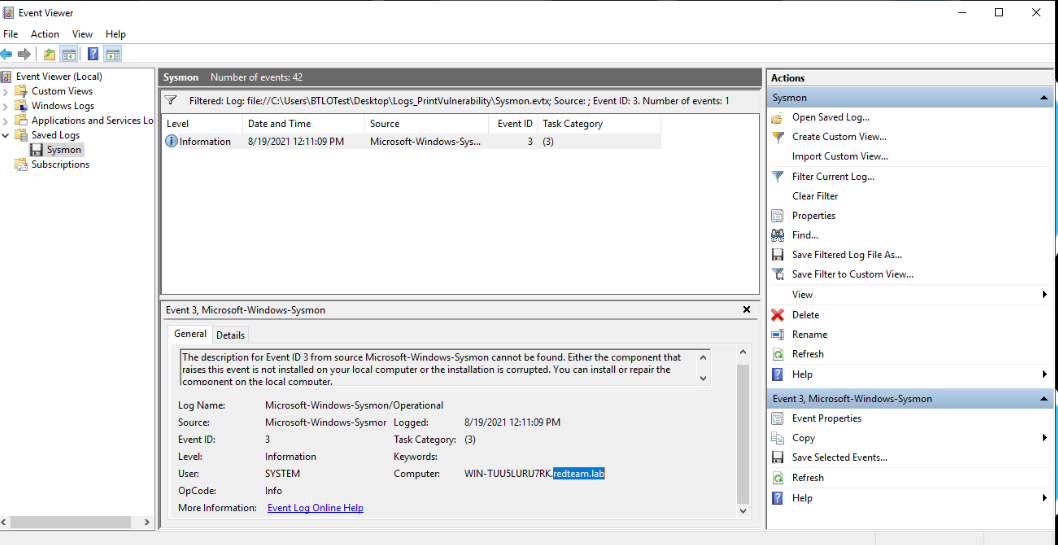
Question (1 point). Submit the Domain name used by the red teamers for their test setup.
Answer: redteam.lab
How I got there. Since we look for a domain name, I went to the Sysmon log in Event Viewer and filtered for event ID 3, the network connection event. Out of 42 events in the log there is only one, and its Computer field does the job: WIN-TU0SLURU7RK.redteam.lab. The host carries its domain as a suffix, so redteam.lab is the domain the red team used for their setup.
The DLL over SMB
Question (4 points). From the network traffic, what is the name of the file that is transferred via SMB?
Answer: printevil.dll
How I got there. Now pivoting to Wireshark. Filter for smb2 and watch for file transfers, and it turns up fast: an SMB2 Create Request for printevil.dll from the attacker’s share, then Read Requests pulling it down. The detail pane confirms it, Filename: printevil.dll.
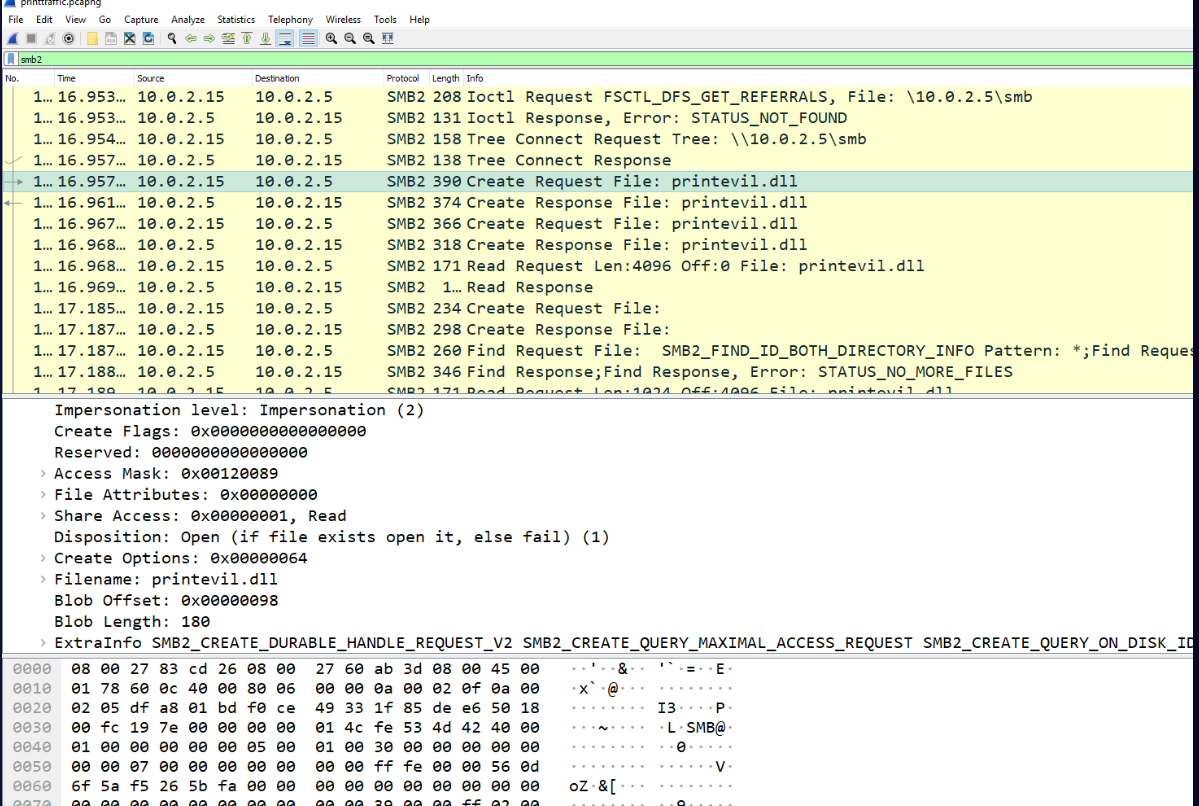
Correction. My original note said printevill.dll, with a second l. The SMB2 Create Request in my own screenshot reads Filename: printevil.dll, so the extra l was a typing slip. The corrected answer is printevil.dll, which Chicken0248’s writeup and inksec.io also give.
Where the DLL landed
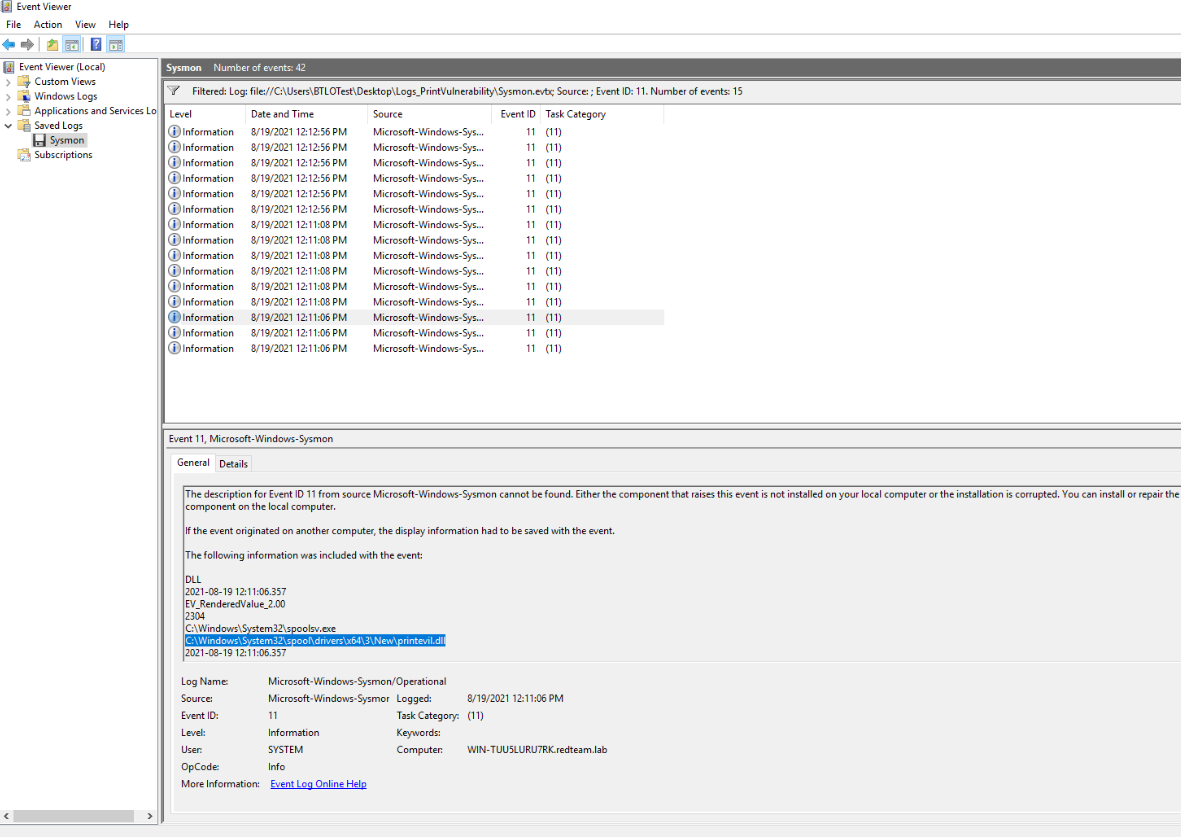
Question (4 points). What is the C drive location where the file from the previous question is copied?
Answer: C:\Windows\System32\spool\drivers\x64\3\New\printevil.dll
How I got there. Since the file was copied over, back to the Sysmon logs, filtered for event code 11 (file created). Fifteen events match. I walked from the first log to the most recent to find the first place the malware got copied over, and the highlighted line in the event detail is the answer, written by spoolsv.exe.
The reverse shell address
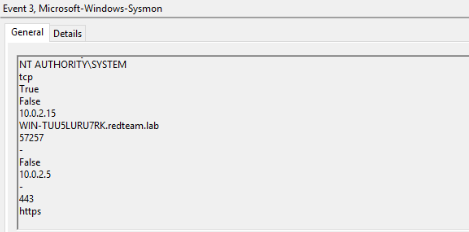
Question (4 points). What is the attacker’s IP:Port for reverse shell?
Answer: 10.0.2.5:443
How I got there. From the earlier event ID 3 filter, both values fall out at once. The single network-connection event records the destination IP and the destination port, 10.0.2.5 on 443, and the port name field in the event reads https.
The spoolss share access
Question (4 points). Submit EventID, AccessMask, ShareName when Accountname=“printuser”, Sourceaddress=Attacker’s IP and Relative Target Name is “spoolss”.
Answer: 5145, 0x3, \\*\IPC$
How I got there. The clue that we have here is the relative target name. That field does not exist in Sysmon, it belongs to the share access audit in the Security log, so I moved there and searched for spoolss. The Security log only has 17 events and the match is immediate: event 5145, a network share object was checked to see whether a client can be granted desired access, with Account Name printuser, Source Address 10.0.2.5, ShareName \\*\\IPC$, Relative Target Name spoolss, Access Mask 0x3.
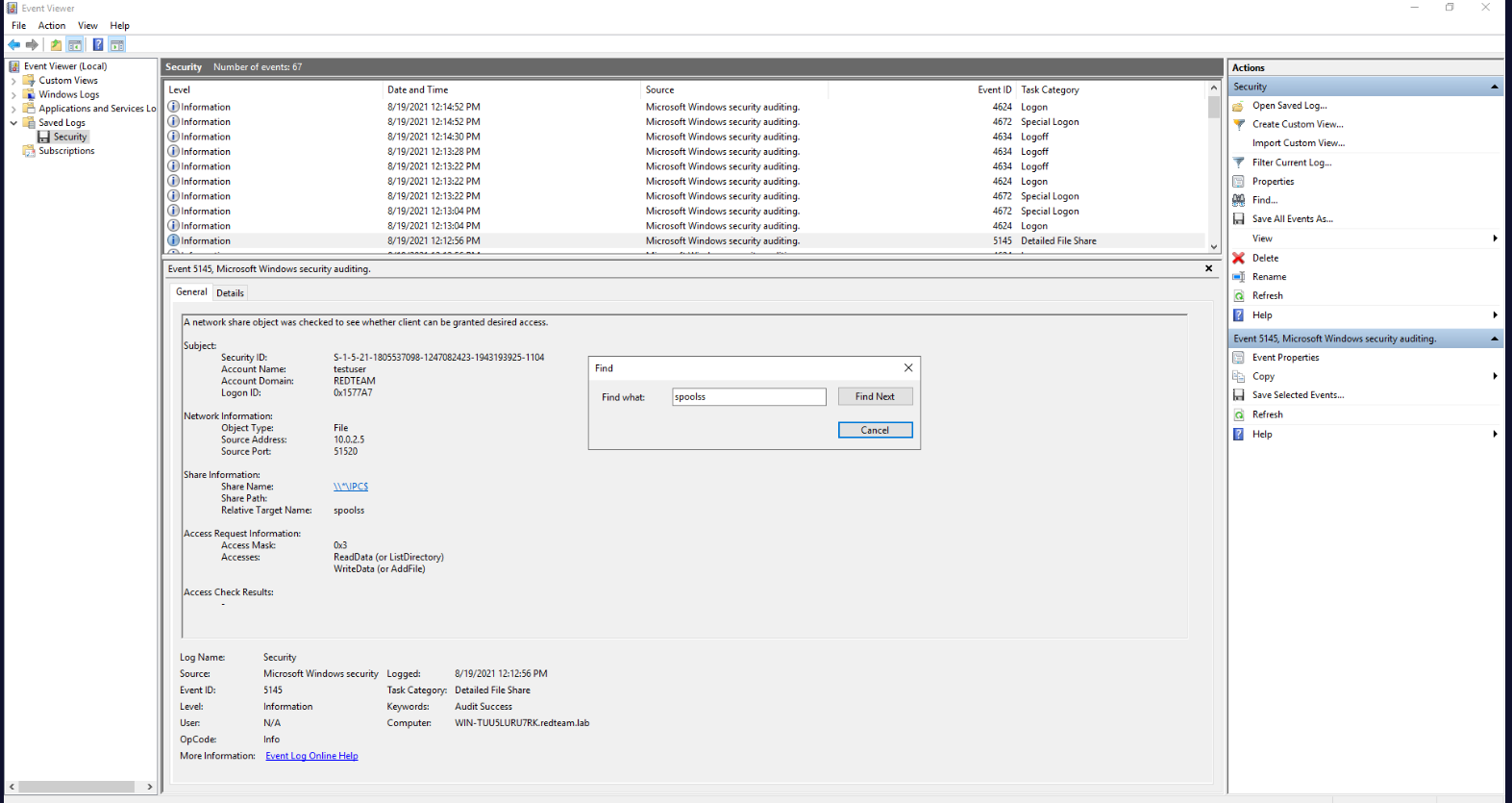
Correction. My original note said 5135. Relative Target Name is a field on event 5145, the network share access check, and my own screenshot shows Event ID 5145 in the event details. 5135 is not a share audit event at all. The corrected answer is 5145, which Chicken0248’s writeup and inksec.io also give.
WerFault.exe and its parent
Question (4 points). Submit Parent Command Line for the process WerFault.exe.
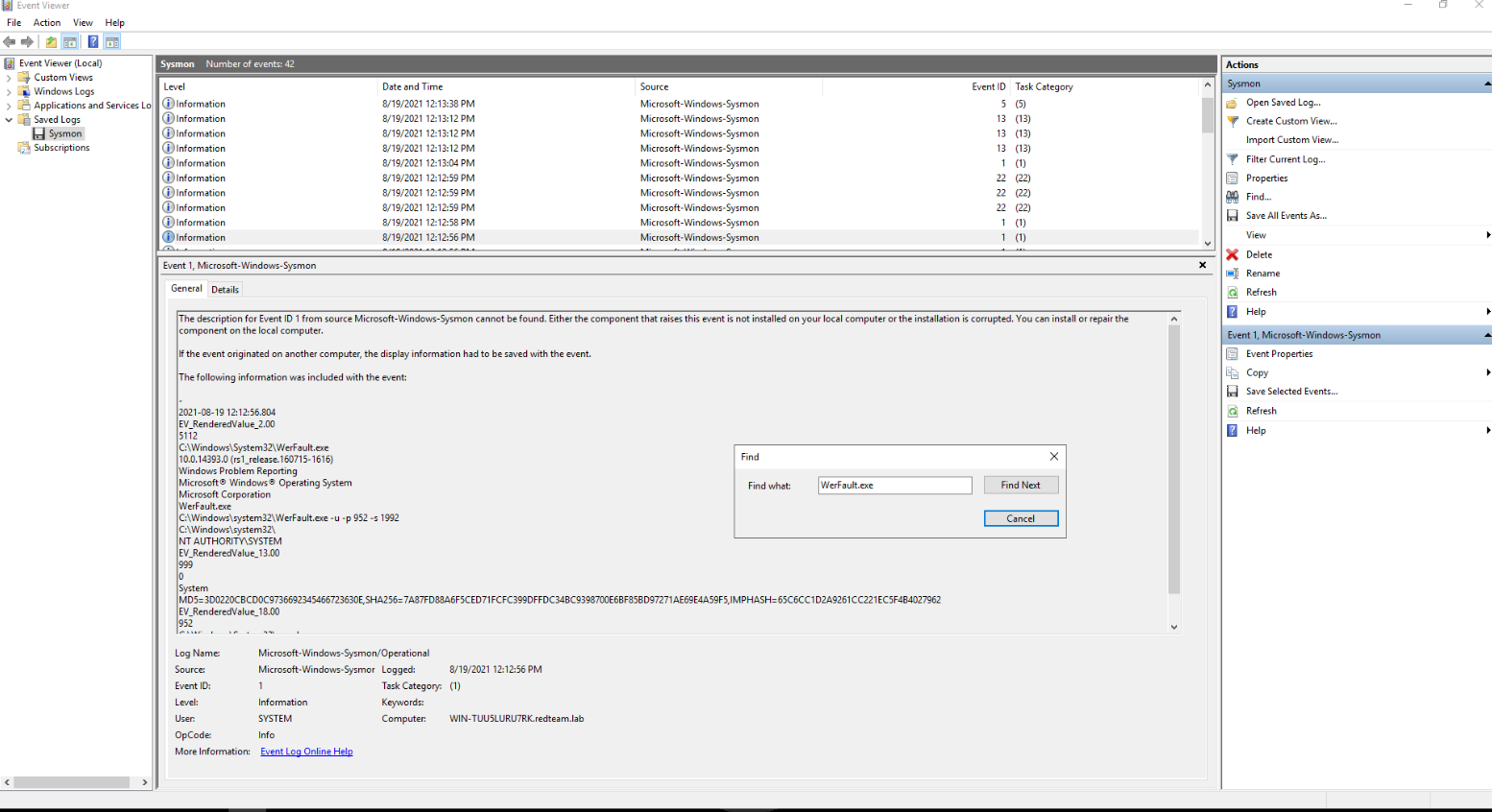
Answer: C:\Windows\System32\spoolsv.exe
How I got there. Back to the Sysmon logs, since we need the parent command line and that is a process creation field. The logs are few, so I simply searched for WerFault.exe, though you could also filter for event ID 1 first. The hit is a Sysmon process creation event for WerFault.exe, running as C:\\Windows\\system32\\WerFault.exe -u -p 952 -s 1992, which is Windows Error Reporting taking care of a crashed process. Its parent command line is the print spooler service, C:\\Windows\\System32\\spoolsv.exe.
Who the shell runs as
Question (4 points). After getting the reverse shell, the attacker tried the command “whoami”, what will be the output of this command? Note: whoami displays user, group, and privileges information for the user who is currently logged on.
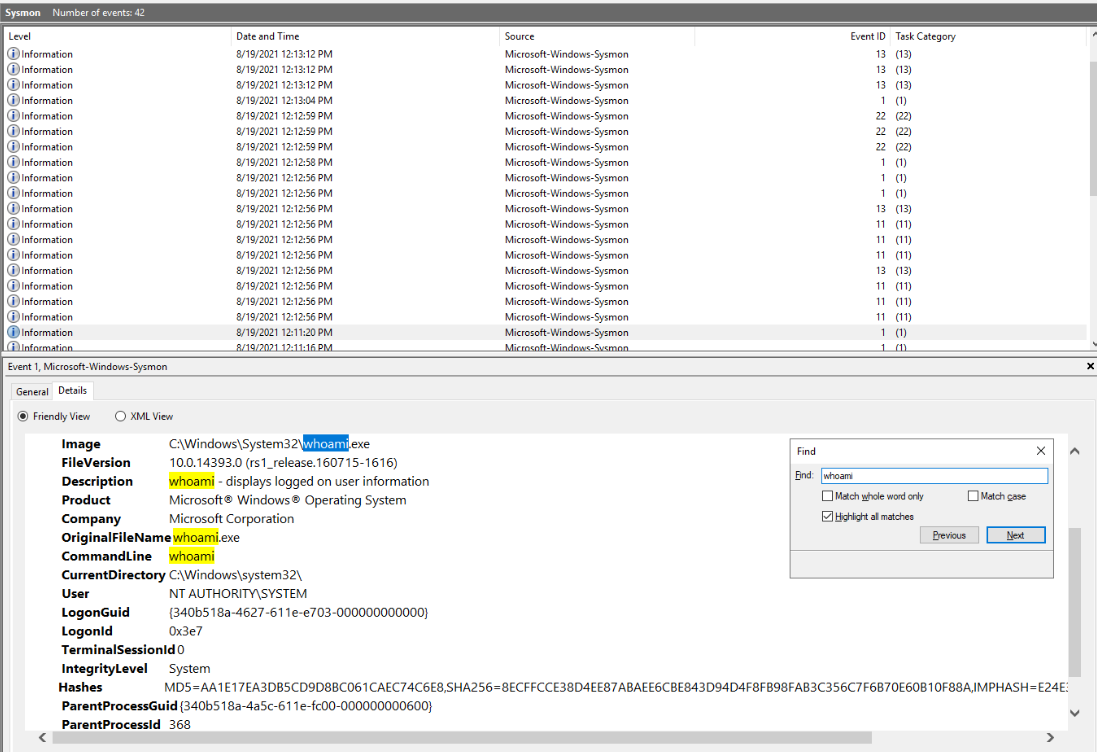
Answer: NT AUTHORITY\SYSTEM
How I got there. One more search, this time for whoami, and we find our log. It is a Sysmon process creation event for C:\\Windows\\System32\\whoami.exe, and the User field reads NT AUTHORITY\\SYSTEM. That is the output the attacker saw in their shell.
What this lab really tests
Whether you can route a question to the right log before you start clicking. Every answer is a single event, but the events live in four places: Sysmon process creation, Sysmon network connections, Sysmon file creation, Security share audits, plus the packet capture for the transfer itself. Each question names a field that only exists in one of them, and picking that source first is most of what a detection engineer does when triaging an incident.
Skills and techniques
- Event Viewer with a saved Sysmon log: event ID 3 (network connection), 11 (file created), 1 (process creation), and the Find search over a small log
- Security log auditing: event 5145 network share access check, reading AccessMask 0x3 and ShareName \\*\\IPC$
- Wireshark:
smb2display filter, reading the File field on SMB2 Create Requests - MITRE ATT&CK, as the lab tags it: T1210 (Exploitation of Remote Services), T1059 (Command and Scripting Interpreter)