
Evidence reviewed and write-up prepared: 10 October 2026.
Lab achievement: View my Domainnance achievement.
Tools: Wireshark, Splunk, Windows Security events, and Sysmon process-creation events.
Investigation summary
I started in Splunk, but the Windows logs did not immediately identify the vulnerable web server. The packet capture was the better starting point: HTTP requests exposed the web login, six command-injection requests, a credentials file, and an internal subnet scan.
Once the investigation reached Active Directory, I returned to Splunk. Process-creation events connected mtyson to one workstation, a renamed Mimikatz script, a credential-dumping command, and a binary downloaded as svch0st.exe. Searches for ticket-related command arguments then found a pass-the-ticket command and a later Golden Ticket command.
The searches that helped most were the ones I changed when the evidence stopped answering the question. Staying in Splunk too early delayed a packet-level answer; keeping only PowerShell and CMD in a later search would have hidden the certutil.exe downloads.
Original lab scenario
Scenario reproduced verbatim from the original lab notes.
A recently formed company working on mid scale workforce claimed to have a secure environment. Taking this as a challenge, a 13 year old kid tried to get into their environment and got succeded. You are onboarded based on your Incident Response skills to investigate.
Phase 1: Finding the web login in the capture
Q1. Recovering the login credentials
Q1: The attacker tried logging into the vulnerable webserver. Can you find the correct credentials that logged in the attacker? (Format: username:password) (3 points)
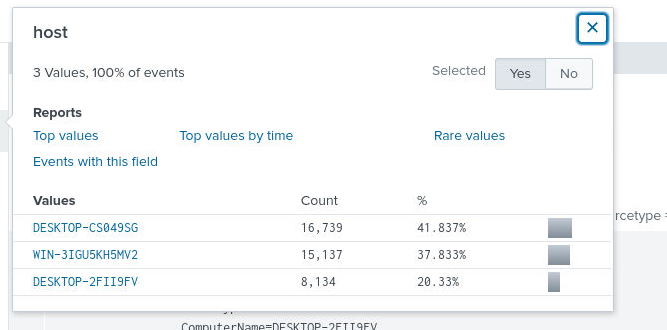
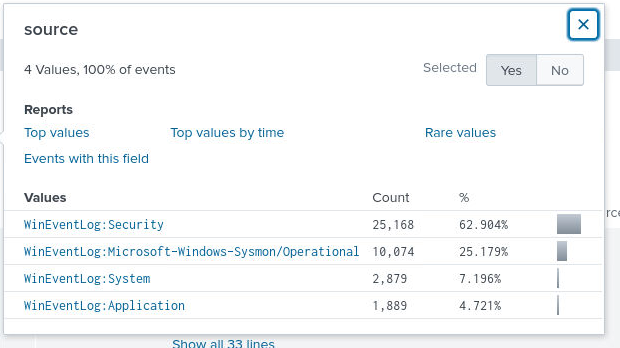
I first opened Splunk and searched across the indexes to see which logs were available. The results included Windows and Sysmon events, but they did not immediately tell me which machine was the vulnerable web server or which address belonged to the attacker.
Initial Splunk survey
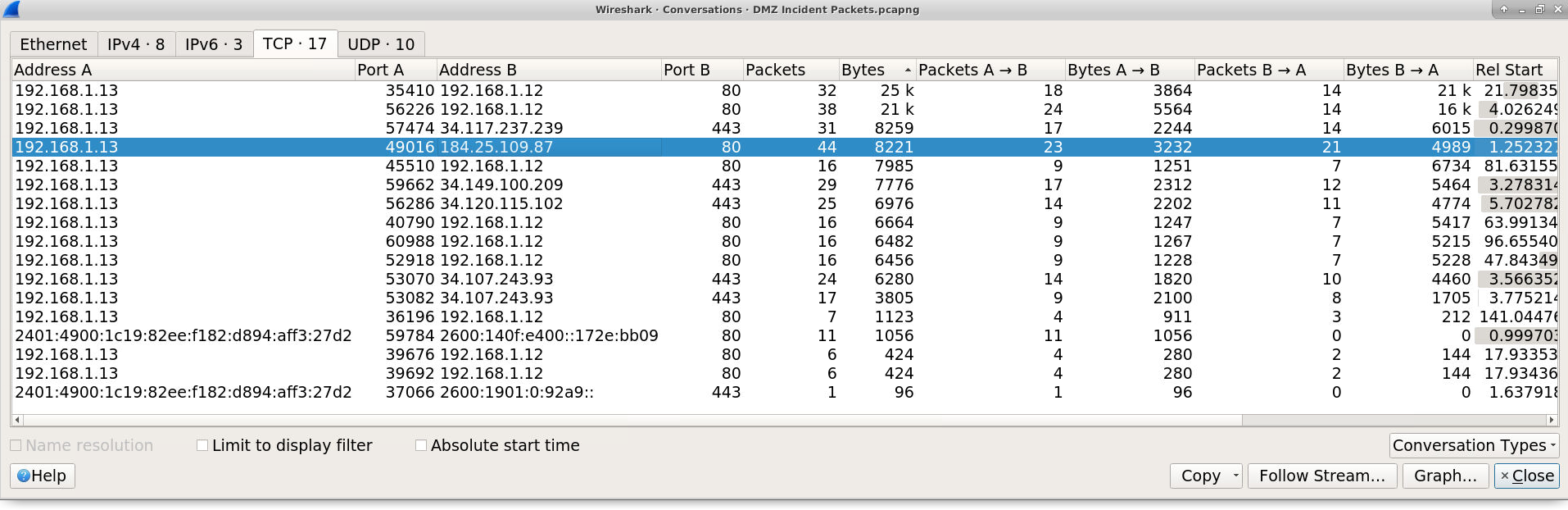
I switched to the PCAP and opened Statistics > Conversations > TCP. A conversation involving 192.168.1.13 on port 80 gave me a candidate to inspect. That address is private; my initial note calling it an external IP meant that it was outside the later 10.0.2.0/24 subnet, rather than a public Internet address.
To find submitted form data, I applied:
http.request.method == "POST"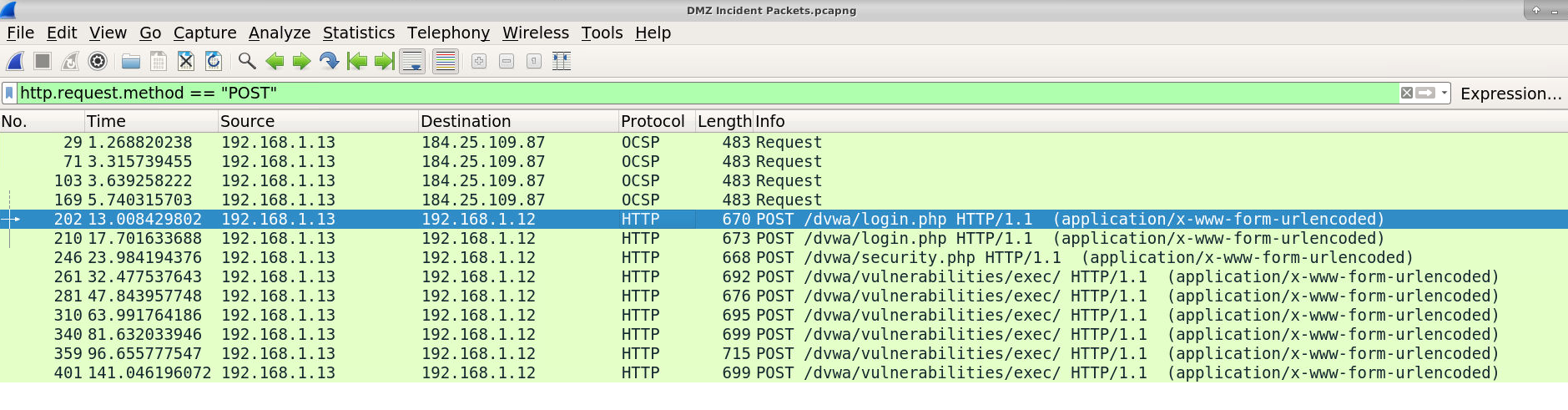
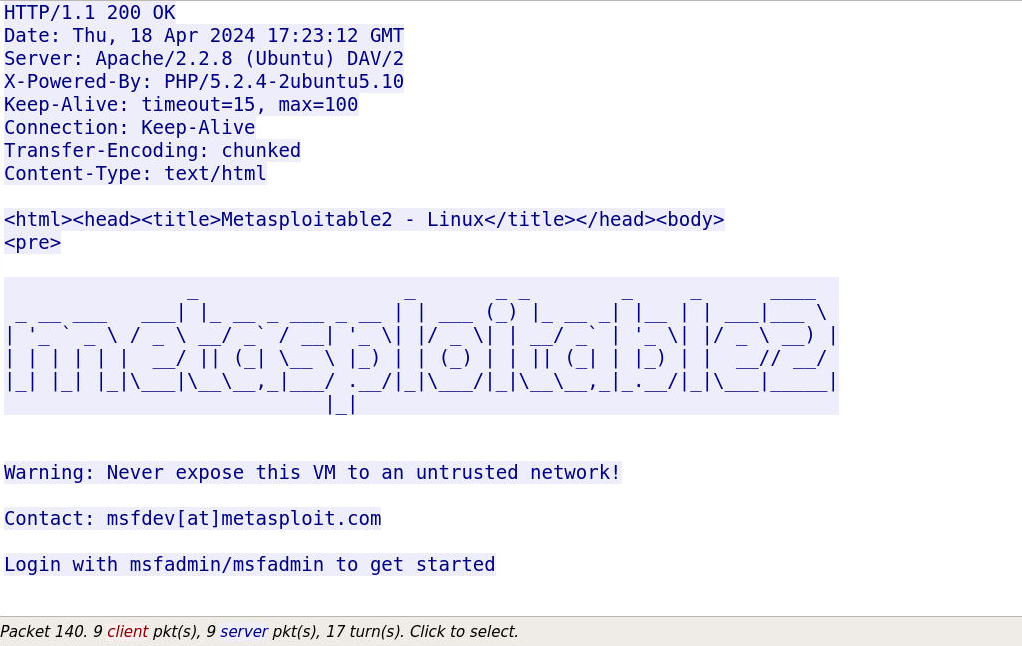
Expanding the login request exposed the username and password. I then followed the HTTP stream to check the exchange in context. The stream identified the Metasploitable2 environment and the DVWA login.
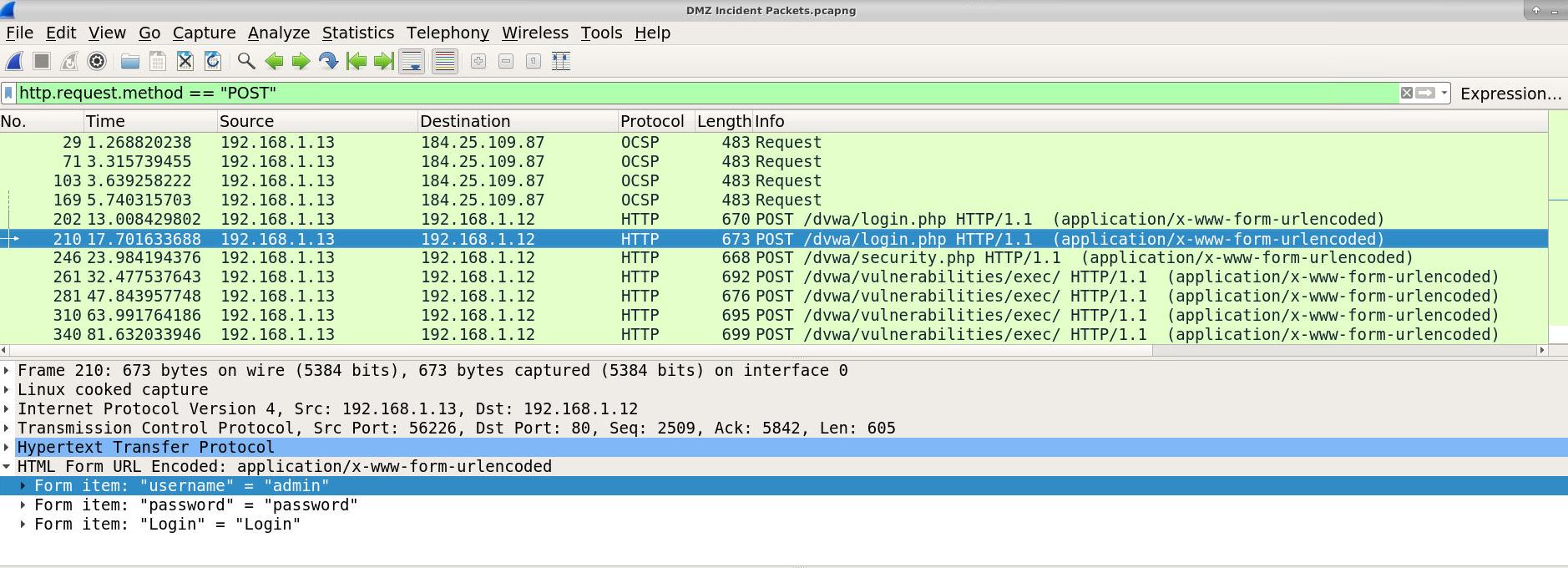
Answer (Q1): admin:password
Q2. Identifying the request source
Q2: What is the IP of Attacker Machine while interacting with Webserver? (Format: X.X.X.X) (3 points)
The same requests supplied the source IP. I did not need a separate attribution search: the address submitting the web requests was visible in the capture.
Answer (Q2): 192.168.1.13
Phase 2: Tracing commands and exposed credentials
Q3. Counting the command-injection requests
Q3: The Attacker was able to execute commands on the WebServer. How many commands were executed? (Format: Count) (4 points)
I initially went back to Splunk for this answer. That was unnecessary: the relevant activity was still in the HTTP stream. Returning to it showed requests under /dvwa/, with the command submissions going to /dvwa/vulnerabilities/exec/.
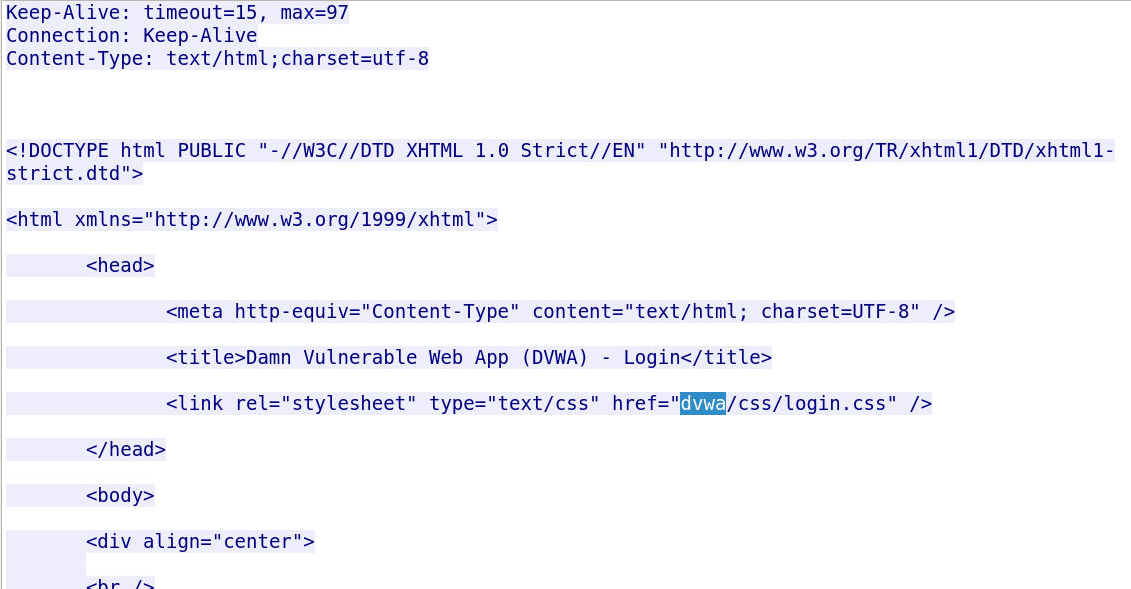
Correction. DVWA is the web application being targeted. Seeing its path does not mean the attacker deployed a new payload, as I initially described it in my rough notes.
I inspected the POST bodies and counted the six requests carrying injected commands. I did not count every POST as a command: the list also includes login and security-setting requests.
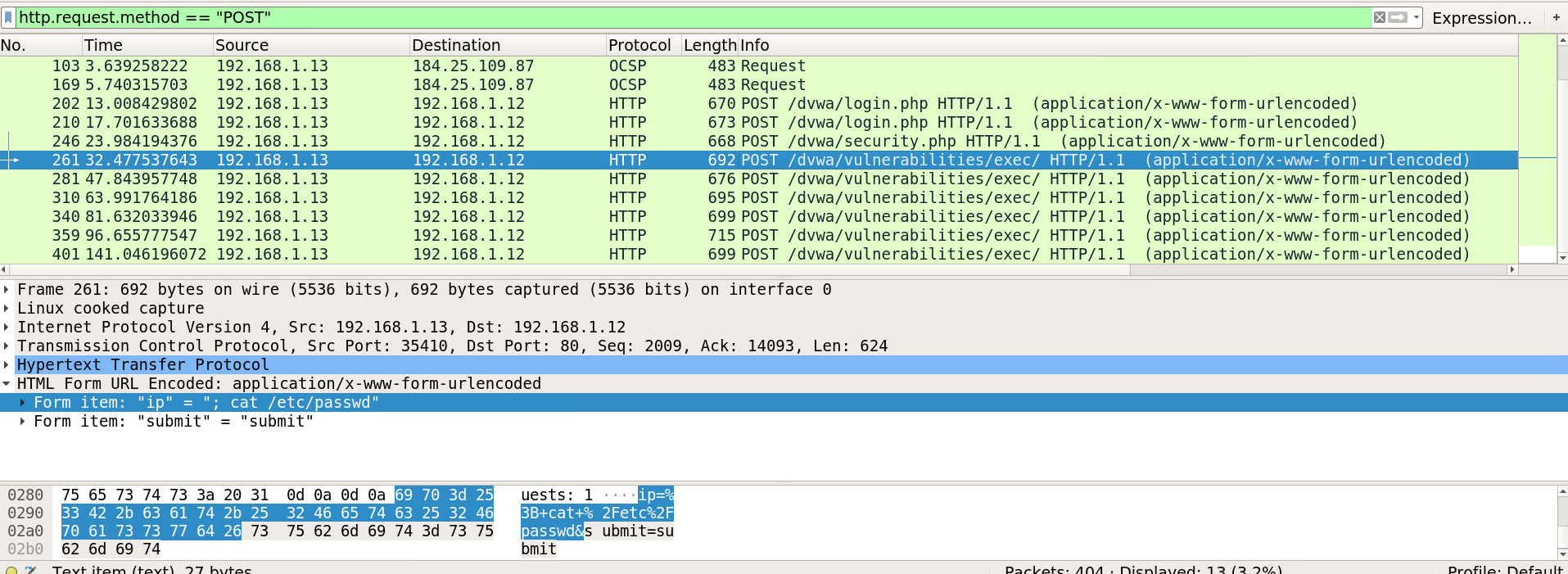
Answer (Q3): 6
Q4. Locating the credentials file
Q4: The Attacker found a useful file in the WebServer. What is the name of the File as mentioned? (Format: filename.extension) (4 points)
One of those requests supplied this value in the ip form field:
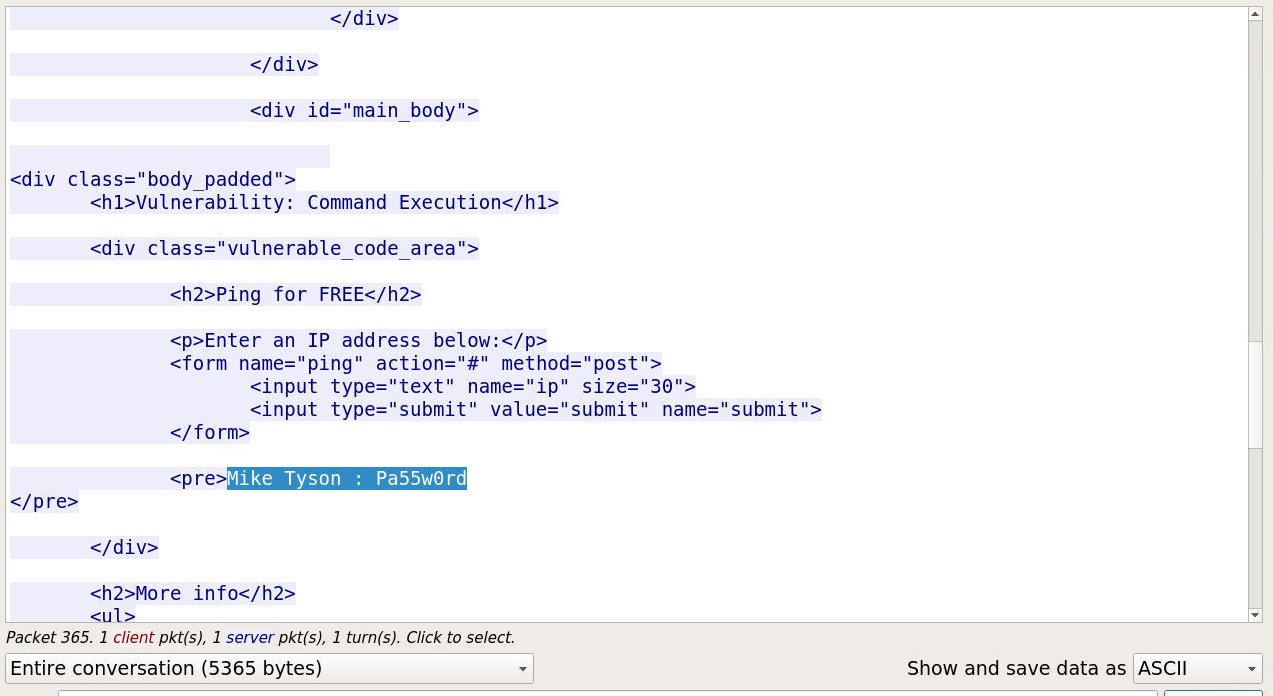
; cat /var/www/dvwa/.credentials.txtThe command identified a hidden file under the DVWA directory. I followed its HTTP stream to inspect the response and determine whether it had returned useful content.
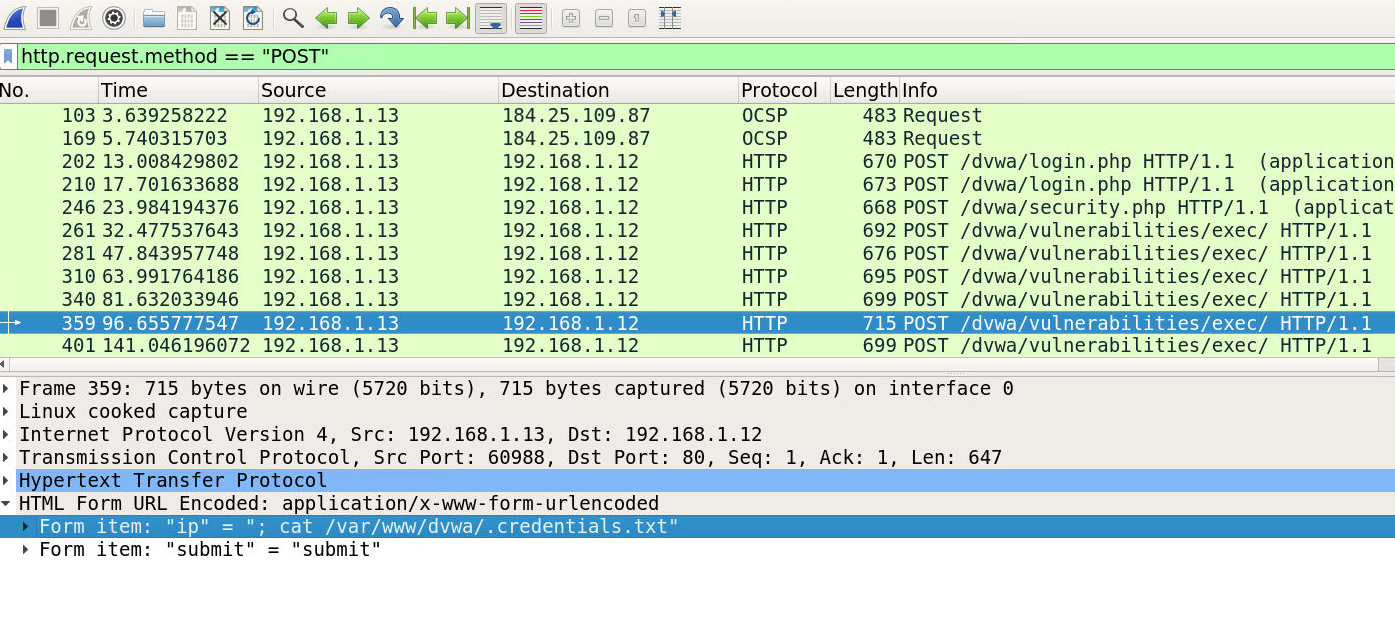
Answer (Q4): credentials.txt — the filename without its leading dot. The captured on-disk name is .credentials.txt.
Correction. My rough answer says credencials.txt. The request screenshot shows .credentials.txt; the write-up uses the spelling in the evidence and makes the leading-dot distinction explicit.
Q5. Reading the exposed account data
Q5: What important data is present inside the file? (Format: Xxxx Xxxxx : Xxxxxxxx) (4 points)
The response contained a named user’s credentials. This was stronger evidence than merely seeing the cat command: the returned content showed what the request exposed.
Answer (Q5): Mike Tyson : Pa55w0rd
Q6. Finding the scanned subnet
Q6: What is the Internal Network Subnet that Attacker found and scanned? (Format: X.X.X.X/XX) (4 points)
The last command in this DVWA sequence contained the network range the attacker scanned. I read the range from that request rather than trying to infer a subnet from the host addresses alone.
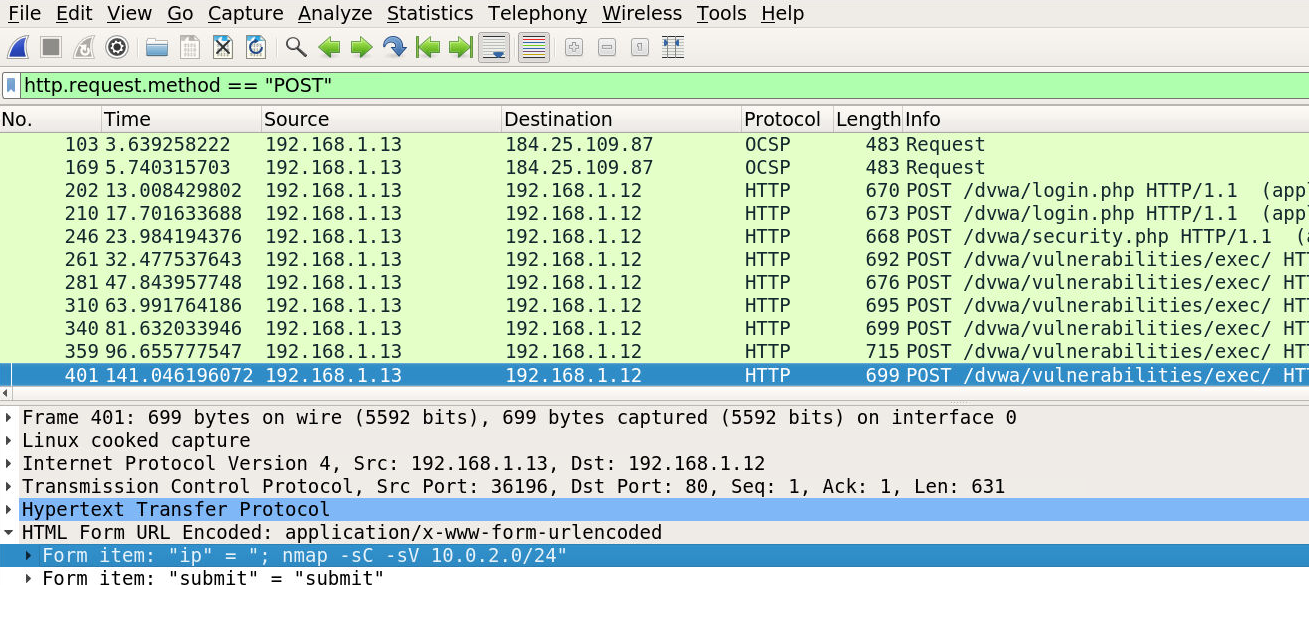
Answer (Q6): 10.0.2.0/24
Phase 3: Following the activity into Windows
Q7. Identifying the Active Directory domain
Q7: Using the help of Splunk, What is the Domain Name of the AD Environment? (Format: domain.tld) (3 points)
At this point, the Windows logs became the more useful evidence source. I searched successful-logon events:
index=* EventCode=4624The Account_Domain values exposed the domain name used by the environment.
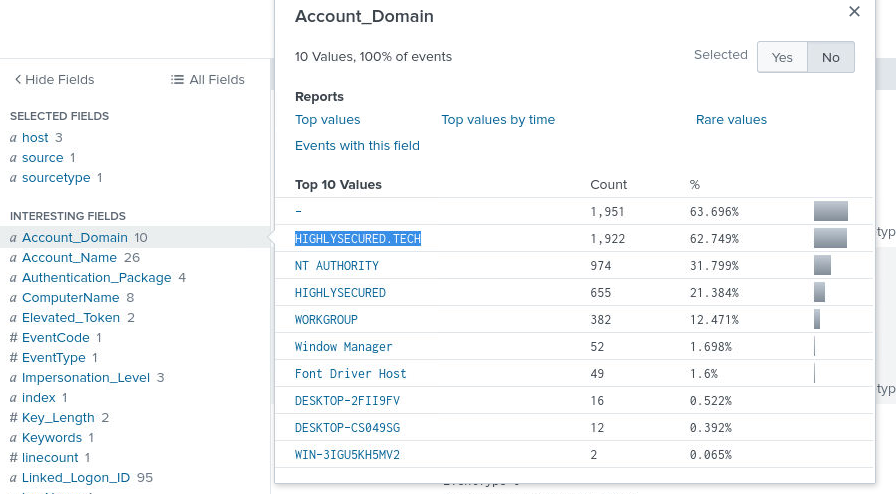
Answer (Q7): highlysecured.tech
Q8. Identifying the workstation used by mtyson
Q8: A user account “mtyson” downloaded a few files into one of the systems. What’s the name of the system? (Format: ComputerName) (3 points)
My first thought was to look for file-creation events using Event ID 11, but I did not find those events in the supplied logs. I changed to Sysmon process creation, Event ID 1, on the assumption that a command or script might record the download activity.
index=* sourcetype="WinEventLog:Microsoft-Windows-Sysmon/Operational"
EventCode=1 "*mtyson*"
The matching events had one ComputerName value, DESKTOP-2FII9FV.highlysecured.tech. The question asks for the computer name, so I used its host portion.
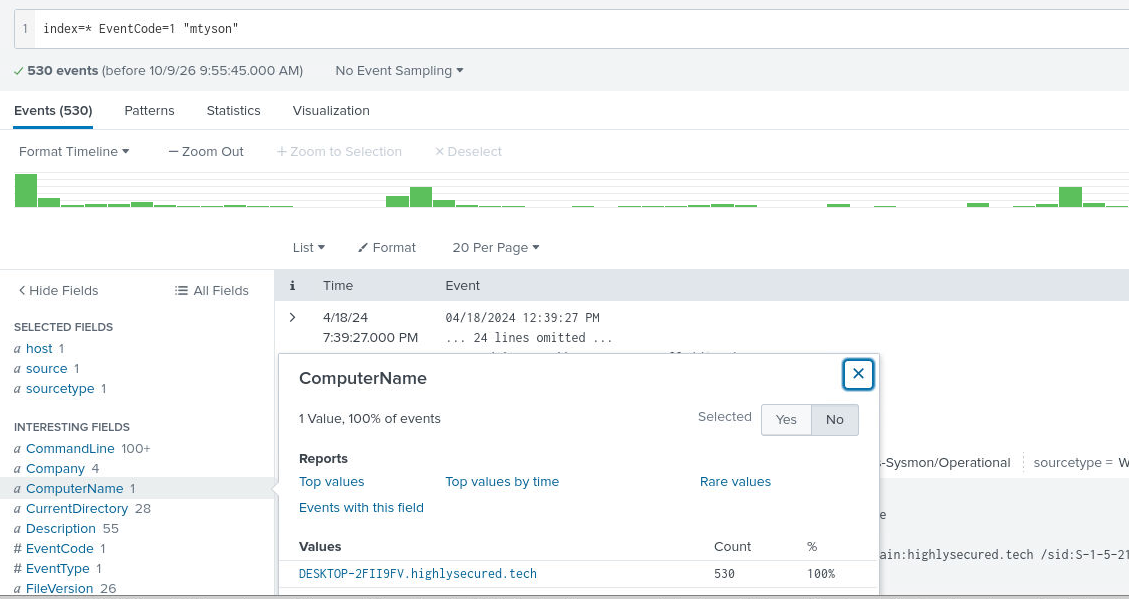
Answer (Q8): DESKTOP-2FII9FV
Q9. Finding the first downloaded script and its saved name
Q9: What is the first file that was downloaded onto the system? Provide the Original & Final Name with extension (Format: ActualName, GivenName) (3 points)
I narrowed the process search to the user and workstation, then checked PowerShell and CMD command lines. Sorting by _time put the oldest matching events first:
index=* sourcetype="WinEventLog:Microsoft-Windows-Sysmon/Operational"
EventCode=1 "*mtyson*" "DESKTOP-2FII9FV"
(Image="*\\powershell.exe" OR Image="*\\pwsh.exe" OR Image="*\\cmd.exe")
| sort 0 _time
| table _time Image CommandLine ParentImage
The first matching download command requested Invoke-Mimikatz.ps1 and wrote it as Troubleshooter.ps1. The URL and -OutFile argument establish the original and saved names. “First” here refers to the supplied matching event sequence, not an assertion that every download on the machine was captured.
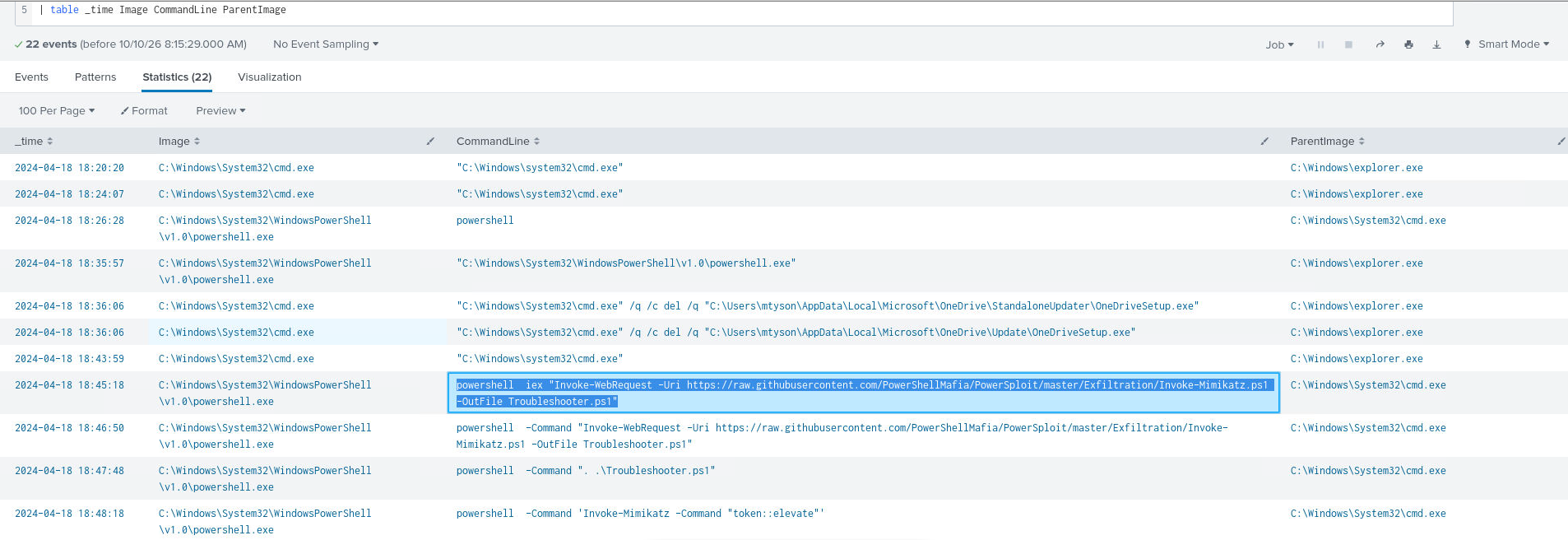
Answer (Q9): Invoke-Mimikatz.ps1, Troubleshooter.ps1
Q10. Identifying the credential-dumping one-liner
Q10: What One-Liner command was used by Attacker to dump credentials? (Format: Command) (3 points)
I continued through the same sorted results. One command loaded the renamed script, enabled the debug privilege, and requested sekurlsa::logonpasswords. That argument answered the question more directly than the tool’s name did.

Answer (Q10):
powershell -Command '. .\Troubleshooter.ps1 ; Invoke-Mimikatz -Command "privilege::debug" ; Invoke-Mimikatz -Command "sekurlsa::logonpasswords"'The command line records the requested action. It does not, by itself, show which credentials the tool successfully recovered.
Phase 4: Widening the search for additional tooling
Q11. Finding the compiled binary’s disguise
Q11: The attacker also downloaded a CompiledBinary and stored it under a legitimate looking name. What is the name under which the file was saved? (Format: Filename.ext) (3 points)
Restricting the search to PowerShell and CMD did not answer this question. I removed that image filter and the username restriction, keeping the workstation as the anchor. After credential-dumping activity, assuming that every later command would use the same account could also hide relevant events.
The broader search returned too much to inspect comfortably. I added download-related strings to the command-line filter:
index=* sourcetype="WinEventLog:Microsoft-Windows-Sysmon/Operational"
EventCode=1 "DESKTOP-2FII9FV"
| where match(CommandLine, "(?i)(https?://|DownloadFile|Invoke-WebRequest|Start-BitsTransfer|urlcache)")
| sort 0 _time
| table _time User Image CommandLine ParentImage
The results included certutil.exe fetching a URL for Rubeus.exe and saving it under a different name. This filter searches several useful download patterns; it is not an exhaustive test for every way to transfer a file.
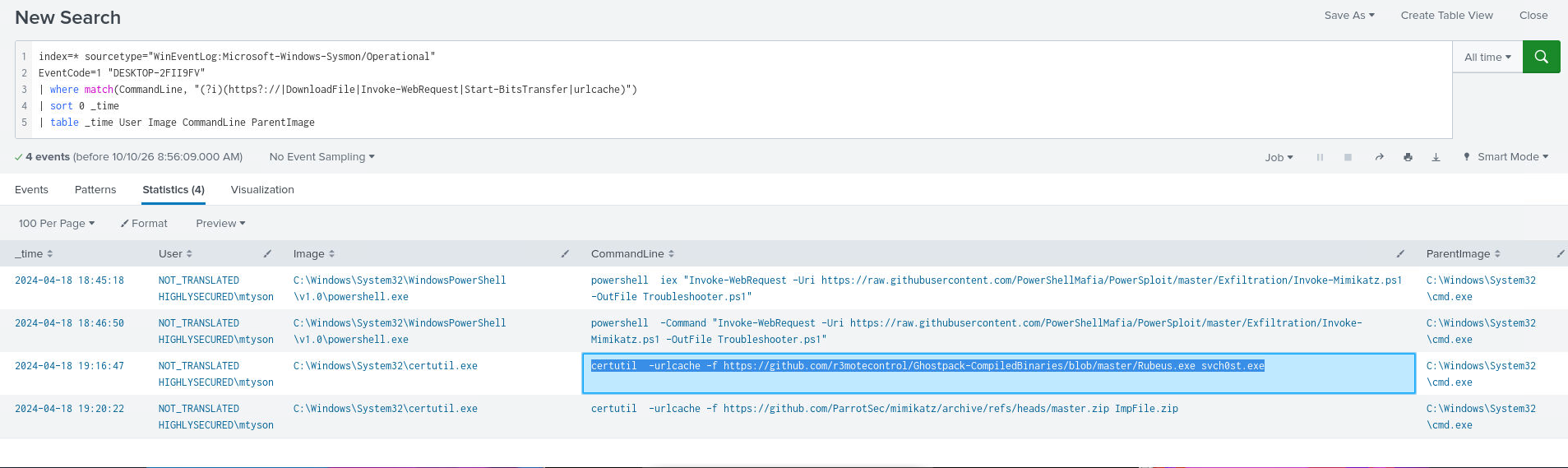
Answer (Q11): svch0st.exe
The character before st is a zero. The process event records the download command and destination name; it is not a separate check of the downloaded file’s contents.
Phase 5: Following ticket use and the Golden Ticket command
Q12. Identifying the ticket passed to Mimikatz
Q12: The attacker claims to have successfully performed lateral movement. What ticket was used to execute the pass-the-ticket attack? (Format: Ticket Name) (4 points)
I asked a narrower question: which command imports a ticket, and which filename does it receive? My notes already showed Mimikatz and a Rubeus download, so I checked their documented command patterns rather than filtering only by executable names. The resulting search looked for ptt, /ticket:, and .kirbi in process command lines:
index=* sourcetype="WinEventLog:Microsoft-Windows-Sysmon/Operational"
EventCode=1 "DESKTOP-2FII9FV"
| where match(CommandLine, "(?i)(\bptt\b|/ticket:|\.kirbi)")
| sort 0 _time
| table _time User Image CommandLine ParentImage
The results included a kerberos::ptt command with the ticket filename. That is the evidence for the submitted ticket, rather than a conclusion drawn from the presence of Kerberos traffic alone.
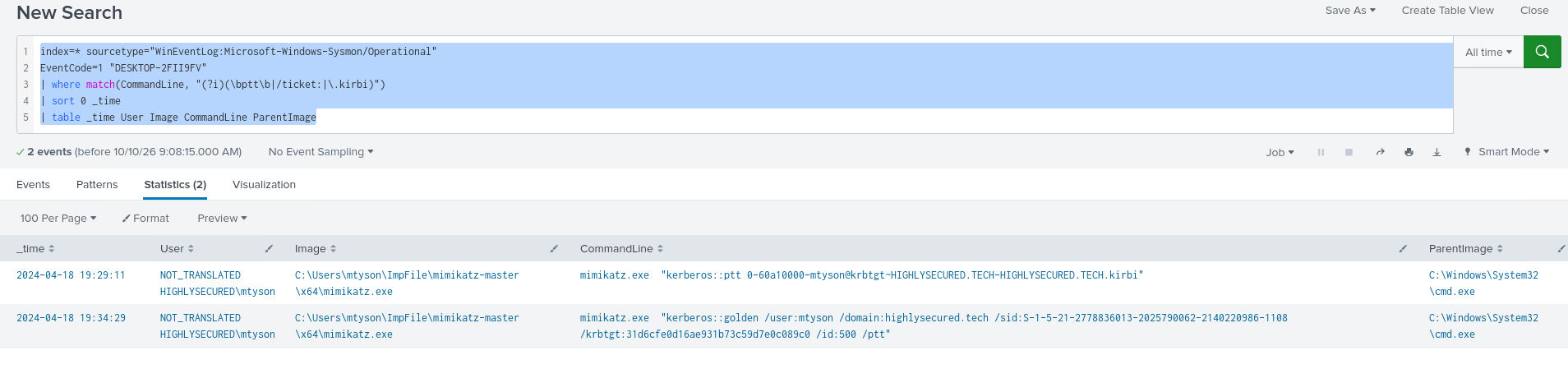
Answer (Q12): 0-60a10000-mtyson@krbtgt~HIGHLYSECURED.TECH-HIGHLYSECURED.TECH.kirbi
Q13. Recognizing the later technique
Q13: It is believed that the attacker has achieved domain-wide compromise. What technique was used? (Format: Xxxxxx Xxxxxx) (4 points)
The next matching process command used kerberos::golden. It was a different operation from importing the existing .kirbi ticket. That argument identifies the Golden Ticket technique, also described by MITRE ATT&CK T1558.001.
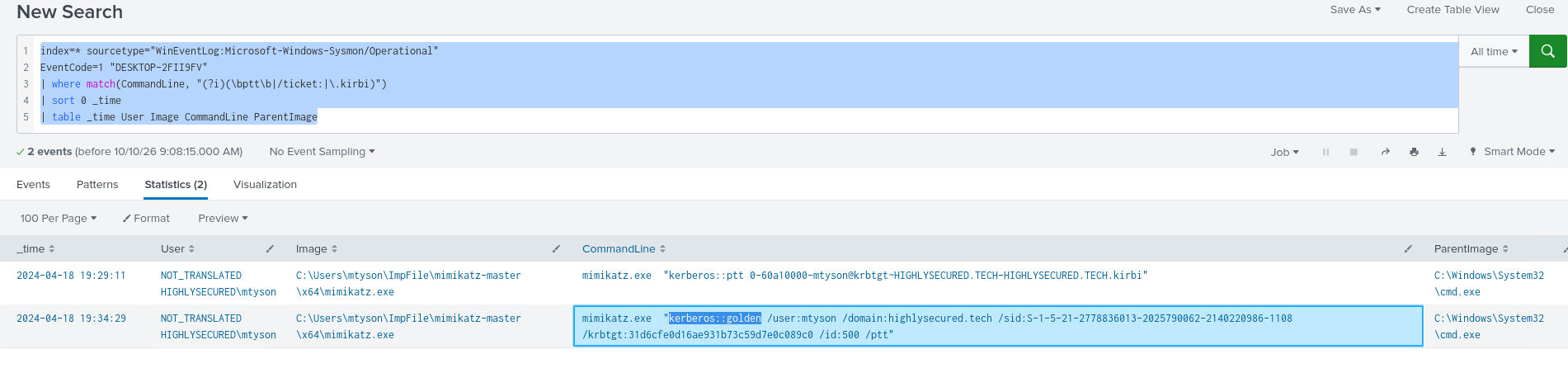
Answer (Q13): Golden Ticket
The lab asks about believed domain-wide compromise. The command is evidence that the attacker invoked the technique; my saved results do not independently demonstrate successful authentication to every domain resource.
Q14. Recording the exact command
Q14: What command was used to perform the attack? (Format: Command) (5 points)
I used the same event to recover the full command line, retaining the SID, hash, account, and options as recorded in the evidence:
Answer (Q14):
mimikatz.exe "kerberos::golden /user:mtyson /domain:highlysecured.tech /sid:S-1-5-21-2778836013-2025790062-2140220986-1108 /krbtgt:31d6cfe0d16ae931b73c59d7e0c089c0 /id:500 /ptt"I have normalized the typographic quotation marks from the rough note to plain command-line quotes. I have not silently changed the SID or other arguments to make the observed command look like a preferred example.
What I took from the investigation
Two changes of scope made the investigation work. The first was moving from Splunk to the PCAP when the Windows logs did not answer a web-server question. The second was widening a process search after a PowerShell-and-CMD filter stopped producing the answer. That brought the certutil.exe activity into view.
The later ticket search was more useful because it followed behavior, not just tool names. It also required care with conclusions: a command to dump credentials, fetch a binary, import a ticket, or forge one records an action being requested. Successful outcomes need their own supporting evidence.
Skills demonstrated: HTTP stream analysis, command-injection reconstruction, Windows log triage, chronological SPL searches, investigation pivots, and Kerberos technique identification from process arguments.
Original working notes: Original Notion notes.