
| Points | Tools used | Notes dated | Rewrite |
|---|---|---|---|
| 25 | Windows Event Viewer, OpenSSH logs, Windows Security logs, Sysmon logs, MITRE ATT&CK, browser-based OSINT | September 2026 | October 2026 |
Summary
The activity began with 192.168.1.33 probing several ports on 192.168.1.43. OpenSSH recorded successful authentication to administrator, and the Security log then showed a new sysadmin account, its addition to Administrators, and deletion of DRB. In Sysmon, I followed the extraction of keylogger.rar, the creation of executables in the 7-Zip folder, and later writes into C:\Users\Administrator\AppData\Roaming\WPDNSE, followed by Run-key values pointing at those files.
The parts that took the most care were separating initial access from credential access, finding the earlier successful login in a newest-first list, and distinguishing the archive’s extraction directory from the folder created later. One registry timestamp also needs care, because the event at my original answer time belongs to services.exe, not directly to either suspicious executable.
Scenario

Test your knowledge of MITRE ATT&CK while investigating the logs from a compromised Windows host! The lab gave me a firewall-log image and saved Windows event logs. I started with the network activity, then followed the attacker through a successful SSH login, account changes, archive extraction, and registry persistence. The questions kept switching between a fact in the logs and the ATT&CK technique that described it, so finding an event was only part of the work. I also had to decide what the event actually demonstrated.
The investigation
Q1. Recognizing the scan
Question, 1 point. Using the firewall log image on the Desktop, what MITRE ATT&CK reconnaissance technique was used? Format: Technique Name, TXXXX.
Answer: Active Scanning, T1595
The first question was more literal than I expected. The “firewall log image” was an actual image on the Desktop, not a log file I needed to import. I opened it and looked at the destination ports.
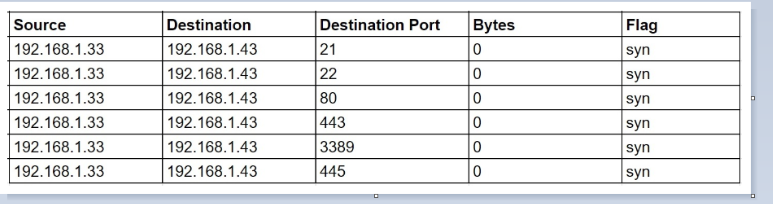
Every row had the same source, 192.168.1.33, and destination, 192.168.1.43. The destination ports changed through 21, 22, 80, 443, 3389, and 445, while the flag column showed syn. That pattern was consistent with a port scan: one host probing a set of services on another host.
I searched for the behavior and matched it to Active Scanning, T1595. The question specifically asked for a reconnaissance technique, so I kept the parent technique rather than adding a narrower classification that the image did not establish. The image shows probes; it does not tell me that every probed port was open.
Q2. Checking listening ports in CMD
Question, 1 point. We can see from the firewall image in Q1 that the IP address 192.168.1.33 checked to see what ports were listening on the other system. What command can we use in CMD to check which ports are listening on the endpoint? Format: command -x.
Answer: netstat -a
The next question moved from the attacker’s view to the endpoint’s view. I needed a command that included listening ports, rather than just established connections. The relevant CMD command is:
netstat -aCorrection. My original note said
netstat -x. Microsoft’s netstat documentation identifies-aas the option that displays active TCP connections and listening TCP and UDP ports. That supportsnetstat -afor the question’s stated purpose. The retained screenshots do not show a CMD run, so this corrects the command syntax without claiming I captured or reran it.
The -x in the question’s answer format is a placeholder for a switch. It should not have become the literal switch in my answer.
Q3. Following the remote login
Question, 1 point. There are ports listening on the endpoint that would enable remote connection, this could potentially make the system vulnerable to intrusion. It’s time to check the logs! Which protocol and port have been used by the attacker to gain access to the system? Format: protocol, port.
Answer: ssh, 22
I found three saved logs to work with: OpenSSH, Security, and Sysmon. My first instinct was to open OpenSSH because I associated SSH with remote access and possible command-and-control activity. That was a lead, not proof of a command-and-control channel. For this question, I needed to find the login that let the attacker into the host.
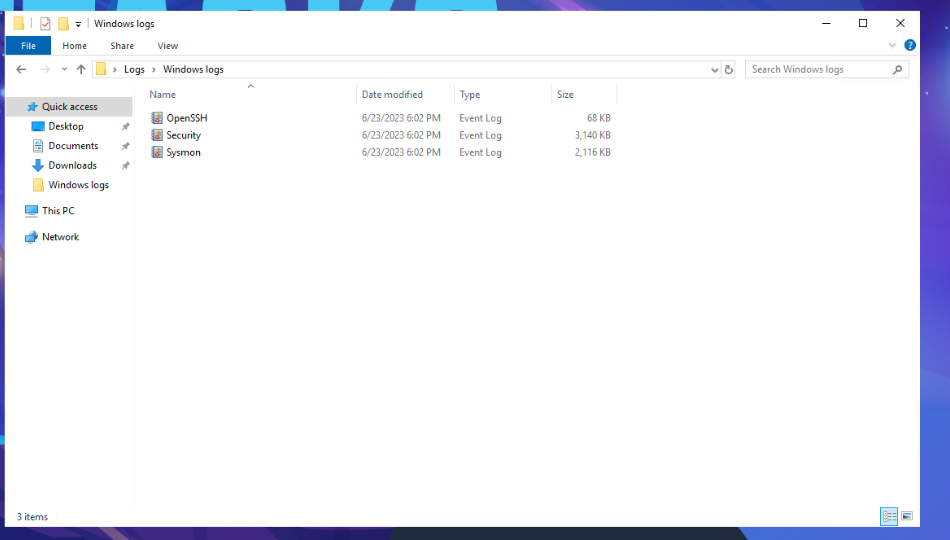
The OpenSSH log contained a successful password-authentication message from 192.168.1.33, the same address in the firewall image. That gave me a connection between the earlier probing and the access activity.
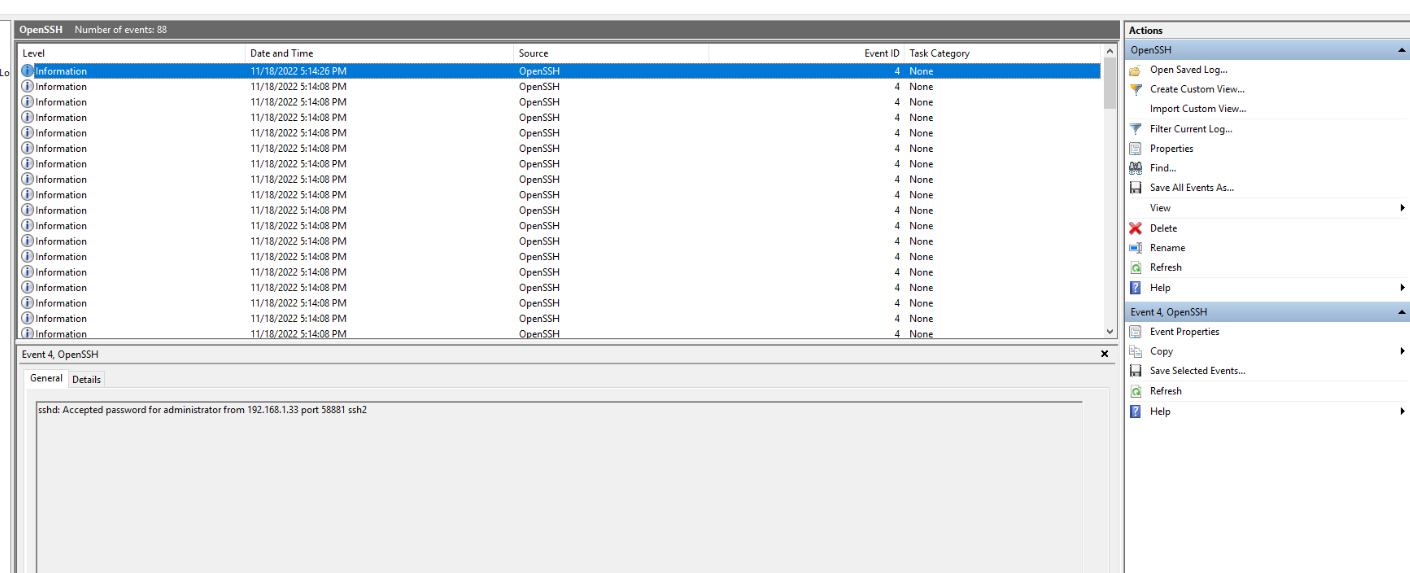
I recorded ssh, 22. SSH is directly identified by the log. Port 22 is the conventional SSH server port and appears among the ports probed in the firewall image. The high-numbered port in the Accepted password message belongs to the remote client connection; I did not treat it as the endpoint’s listening port. The retained authentication message alone does not show the SSH server’s configured listening port. Microsoft’s OpenSSH troubleshooting documentation also treats port 22 as the default, rather than a guarantee for every installation.
Q4. Reading the account name exactly
Question, 1 point. What user account has been accessed by the attacker? Format: Account.
Answer: administrator
I stayed with the same accepted-password event. The account name was in the message itself, immediately after Accepted password for, so I did not need to infer it from the name of the computer or the event’s service user.
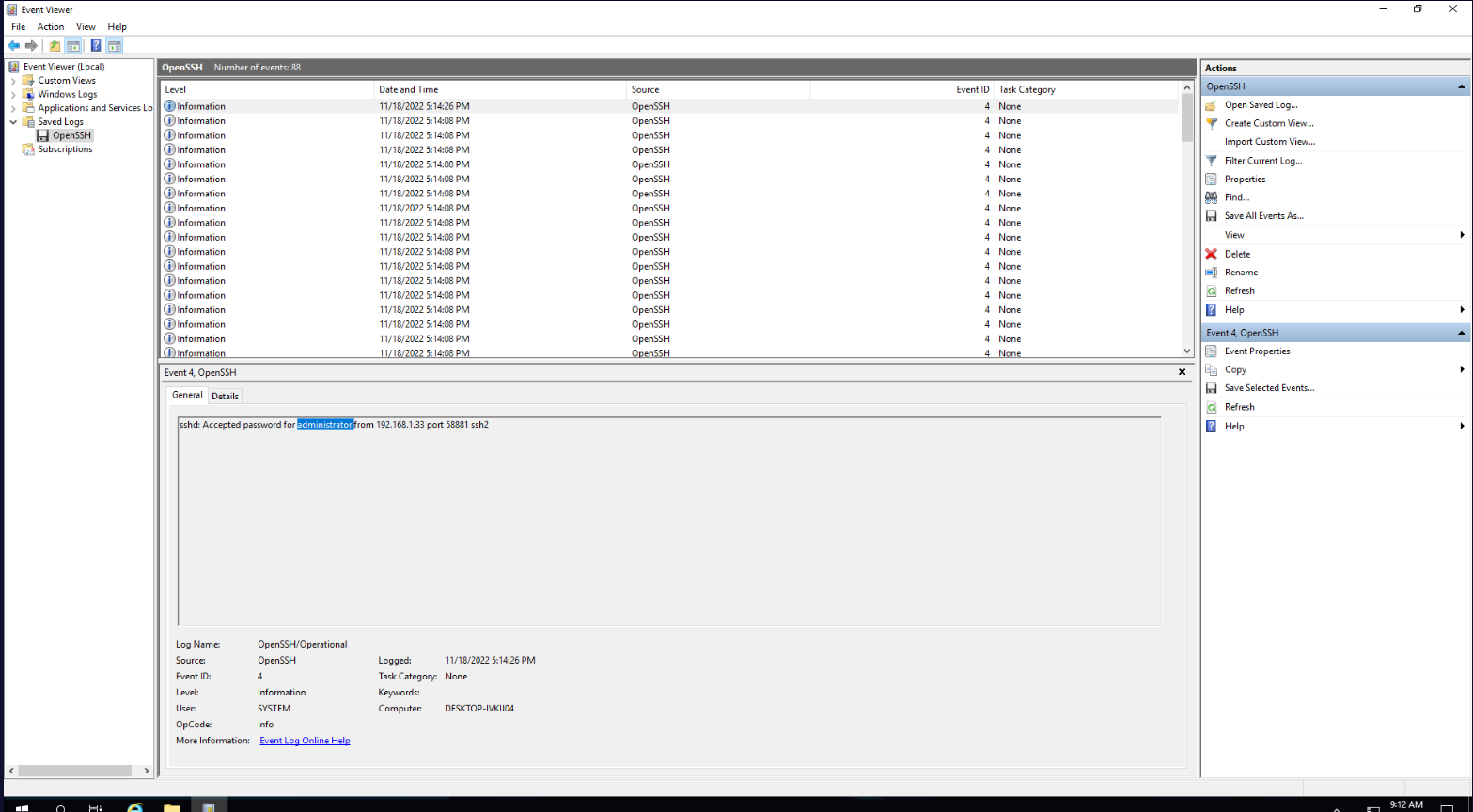
The message reads Accepted password for administrator from 192.168.1.33. That is the account the remote connection authenticated as.
Q5. Finding the earlier successful login
Question, 1 point. What time did the attacker first gain access to this account? Format: MM/DD/YYYY H:MM:SS AM/PM.
Answer: 11/18/2022 5:14:08 PM
This question caught a small but important distinction. I had already found a successful login, but the question asked for the first one. The event selected in the previous screenshot was logged at 5:14:26 PM, and the list was displayed with newer events above older ones.
I moved to the event below it and checked the message, rather than taking the first visible success as the beginning of the activity.
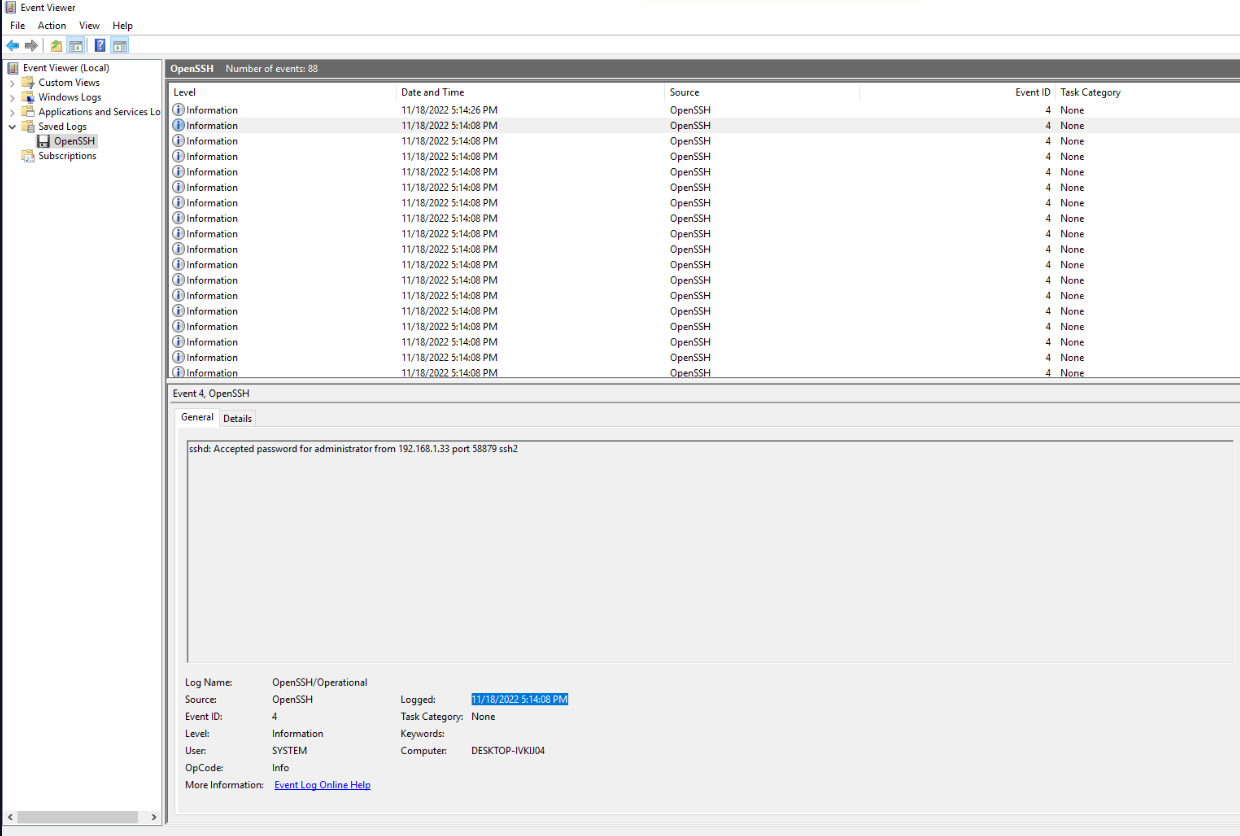
That selected event also says Accepted password for administrator from 192.168.1.33, but its Logged field reads 11/18/2022 5:14:08 PM. This was the earlier successful login I recorded during the investigation. The screenshot corroborates the timestamp and authentication result, though it is not a complete export of all OpenSSH events proving there could be no earlier success.
I kept the timestamp in the Event Viewer format requested by the lab. I have not assigned a timezone that the screenshot does not provide.
Q6. Separating initial access from credential access
Question, 1 point. What MITRE ATT&CK initial access technique did the attacker use? Format: Technique Name, TXXXX.
Answer: Valid Accounts, T1078
I initially mixed this up with credential access. I was thinking about how the attacker obtained the password, but this question asked about the way they entered the system. The successful OpenSSH event made the distinction clearer. The attacker authenticated with an existing account, so the initial-access behavior was the abuse of valid credentials. Valid Accounts, T1078 describes that behavior. Credential access concerns obtaining credentials. Initial access concerns getting into the environment. The successful login belongs to the second question, while the failed password attempts before it belong to the first. Keeping those separate stopped me from using the same answer for two different parts of the attack.
Q7. Interpreting the password attempts
Question, 1 point. What MITRE ATT&CK credential access technique did the attacker use to gain access to the endpoint? Format: Technique Name, TXXXX.
Answer: Brute Force, T1110
I returned to OpenSSH for the credential-access question. My notes interpreted the password failures around the successful login as brute-force activity, and the retained screenshot shows one of those failed attempts against administrator from 192.168.1.33.
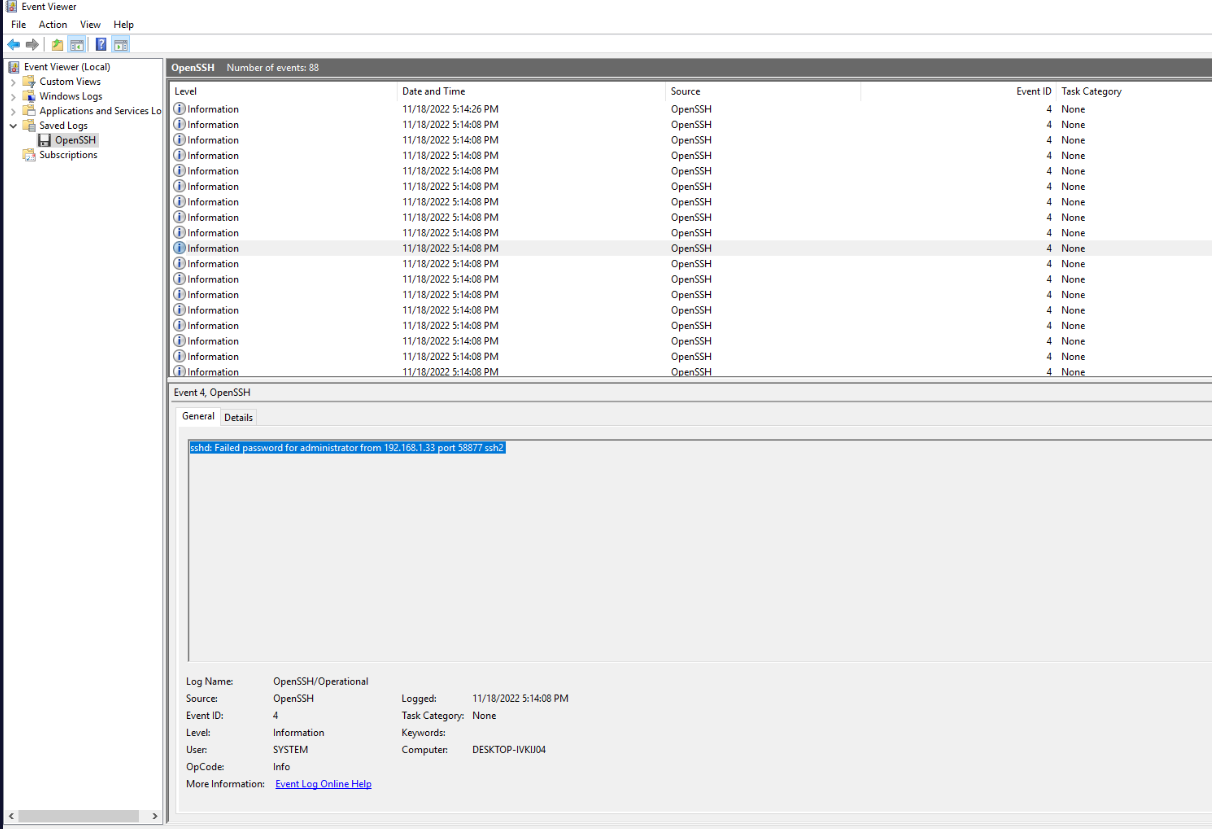
The message is Failed password for administrator from 192.168.1.33 port 58877 ssh2. I mapped the password-guessing interpretation to Brute Force, T1110.
The screenshot captures one selected failure, not the full content of every row in the event list. It supports the authentication-failure finding but does not, on its own, prove the volume or distinguish password guessing from other brute-force sub-techniques. I kept the broader technique recorded in my answer.
Q8. Finding the newly created account
Question, 1 point. What account did the attacker create after gaining access? Format: Account.
Answer: sysadmin
Once I had the login time, I moved to the Security log to look for account changes after access. I wanted the account that was created, so I filtered for Event ID 4720, which Microsoft documents as user-account creation. Microsoft, Security Event 4720
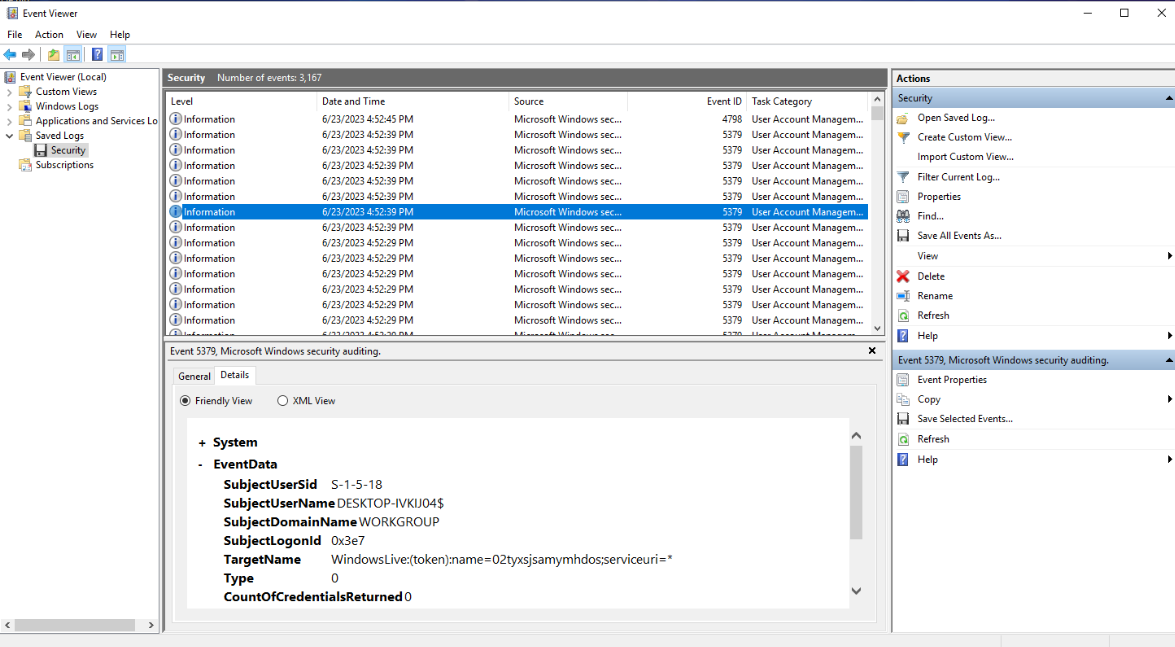
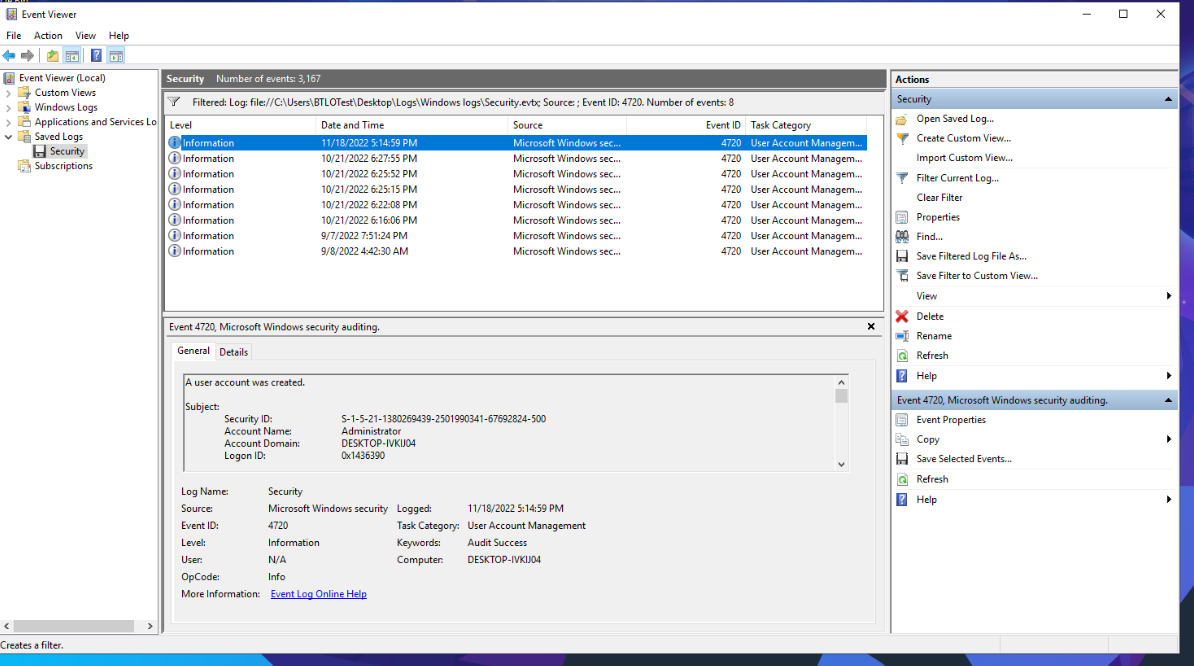
The filter returned several account-creation events, but only one in the list matched the date of this intrusion. I opened the November 18 event and read its New Account section.
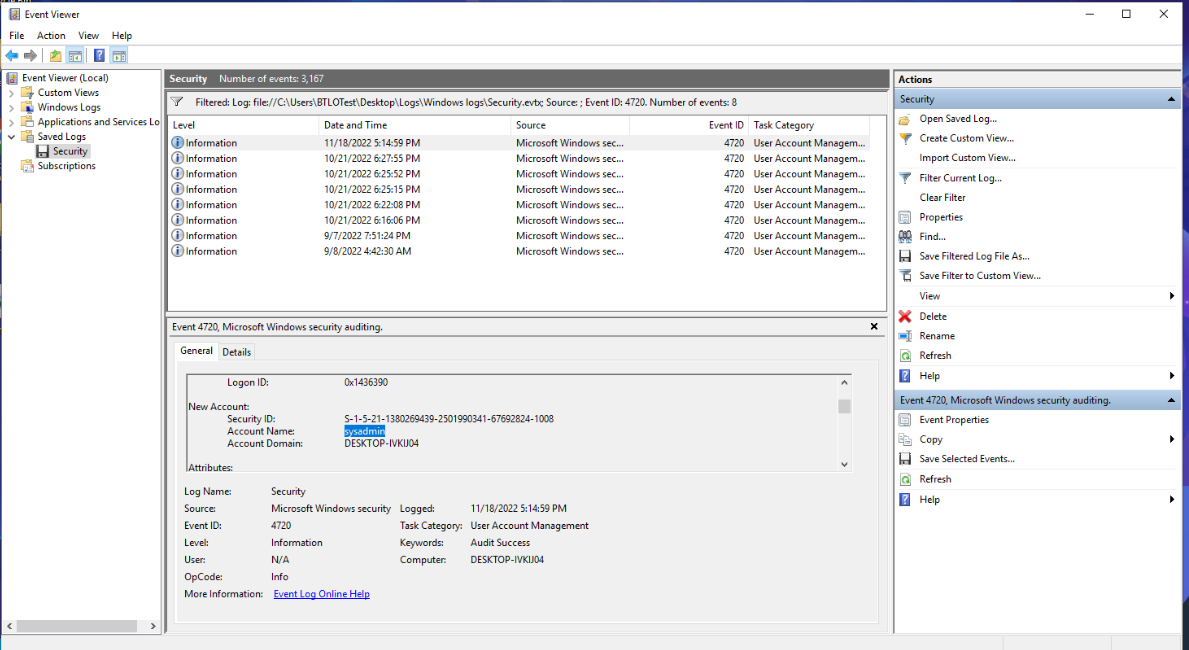
The New Account name was sysadmin, and the Logged field was 11/18/2022 5:14:59 PM. Reading that section mattered because the subject of an account-management event and the account being created are different fields. Here, the question wanted the new account, not the identity responsible for the event.
Q9. Mapping account creation to persistence
Question, 1 point. What MITRE ATT&CK persistence technique is this? Format: Technique Name, TXXXX.
Answer: Create Account, T1136
The account-creation event supplied the behavior for the next mapping. I looked it up and recorded Create Account, T1136, the persistence technique the question asked for.
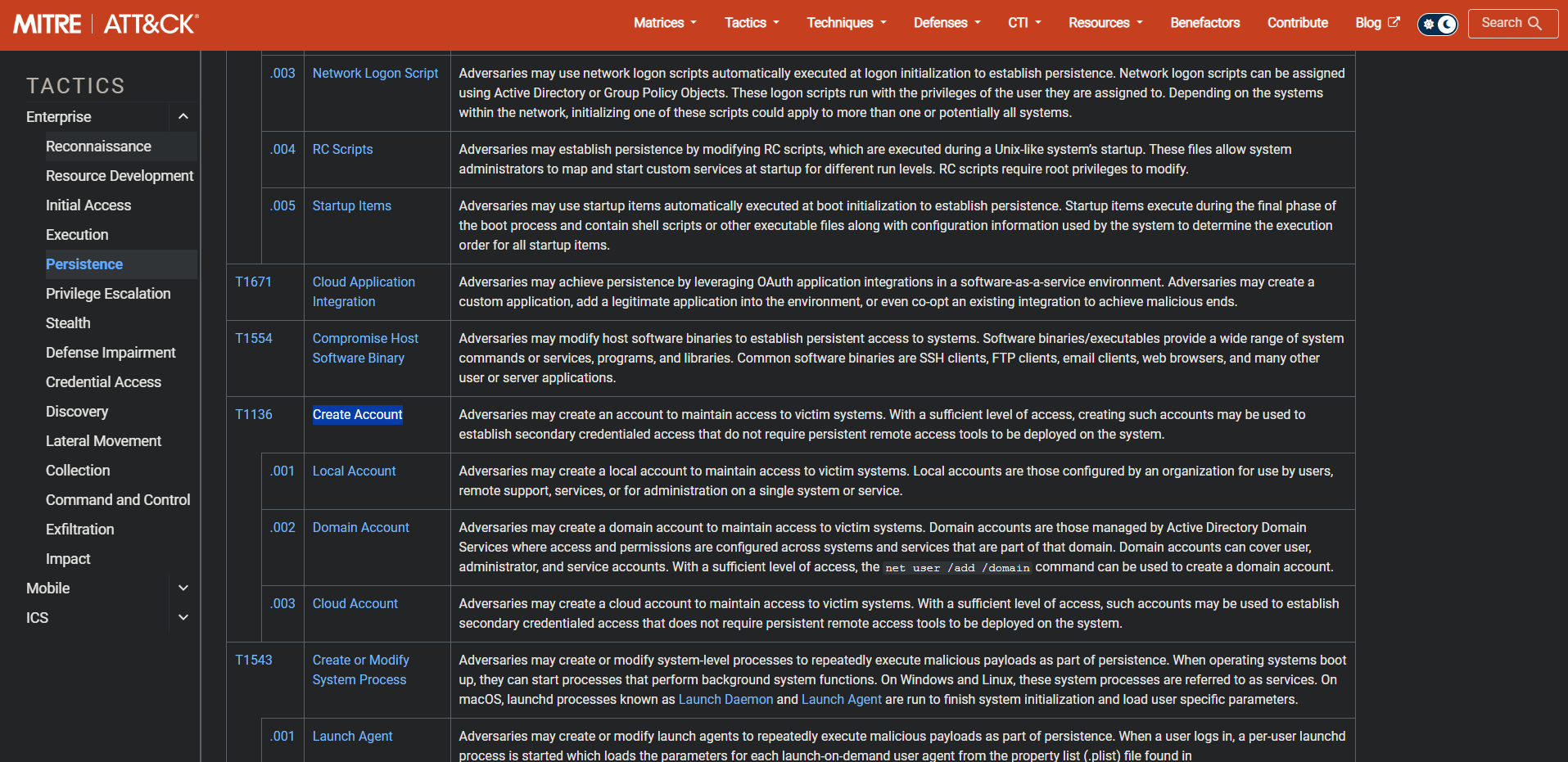
The evidence was the newly created sysadmin account. Its later addition to Administrators was a separate action, so I did not use the group-membership change as the explanation for this answer. The question requested the parent TXXXX technique, and I retained that level of detail.
Q10. Establishing when the account joined Administrators
Question, 1 point. What time did the attacker add his created account to the Administrators group? Format: MM/DD/YYYY H:MM:SS AM/PM.
Answer: 11/18/2022 5:15:33 PM
I next filtered the Security log for Event ID 4732, a member being added to a security-enabled local group. Microsoft, Security Event 4732 There were two events on November 18 in the relevant part of the list, so the timestamp alone was not enough. I needed the one whose Group section identified Administrators.
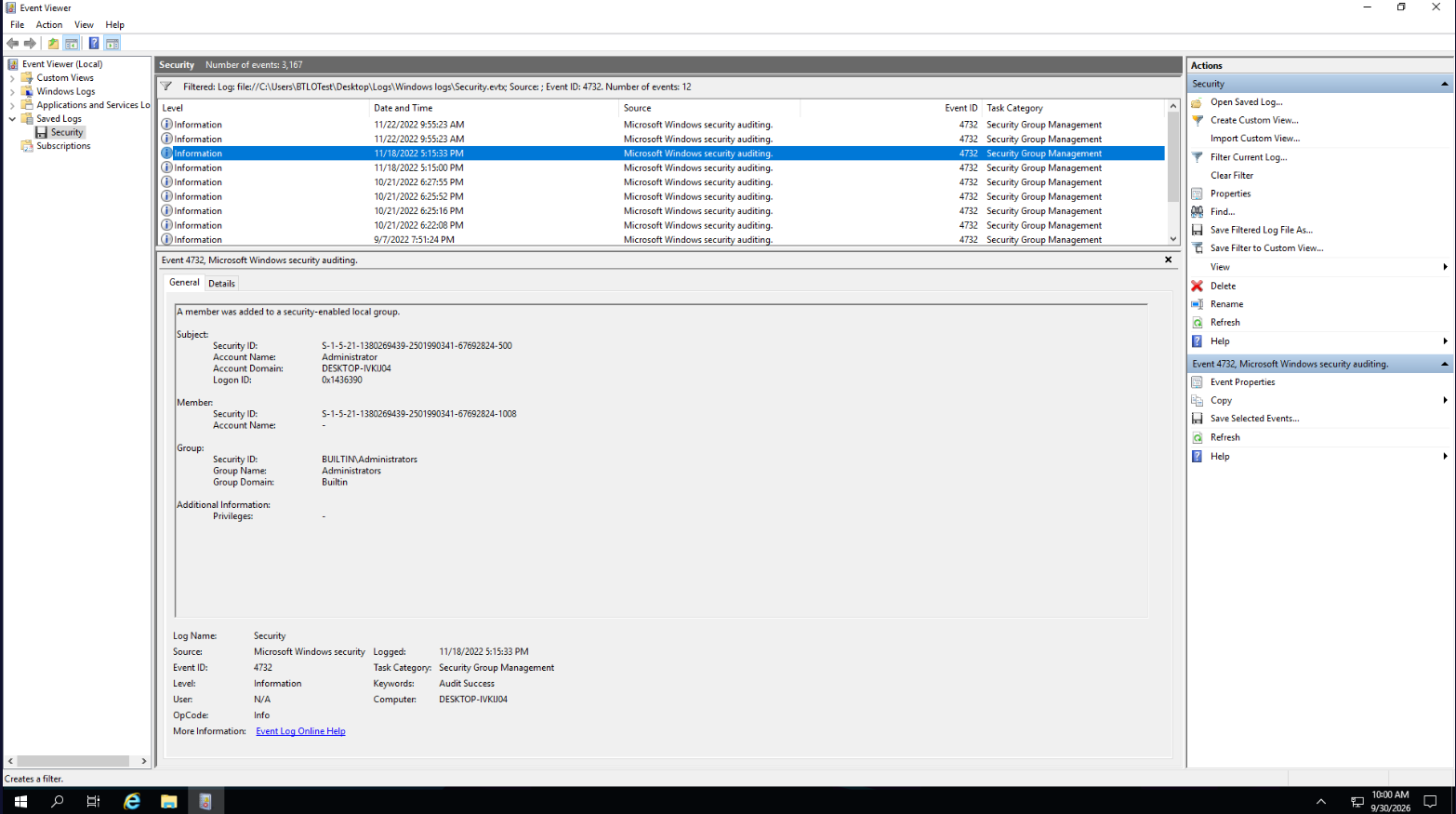
The selected event named BUILTIN\Administrators as the group and showed 11/18/2022 5:15:33 PM in the Logged field. Its Member Account Name was a dash, but its member SID ended in 1008, matching the SID of the sysadmin account in the earlier creation event.
The matching SID connects this membership change to sysadmin, even though Event Viewer does not render the member’s name. The subject, member, and group are separate identities in this event.
Q11. Identifying the deleted account
Question, 1 point. What account did the attacker delete? Format: Account.
Answer: DRB
For deletion, I changed the Security filter to Event ID 4726. Microsoft defines this as a user-account deletion event. Microsoft, Security Event 4726 The filter left two events, and the one on November 18 matched the intrusion timeline.
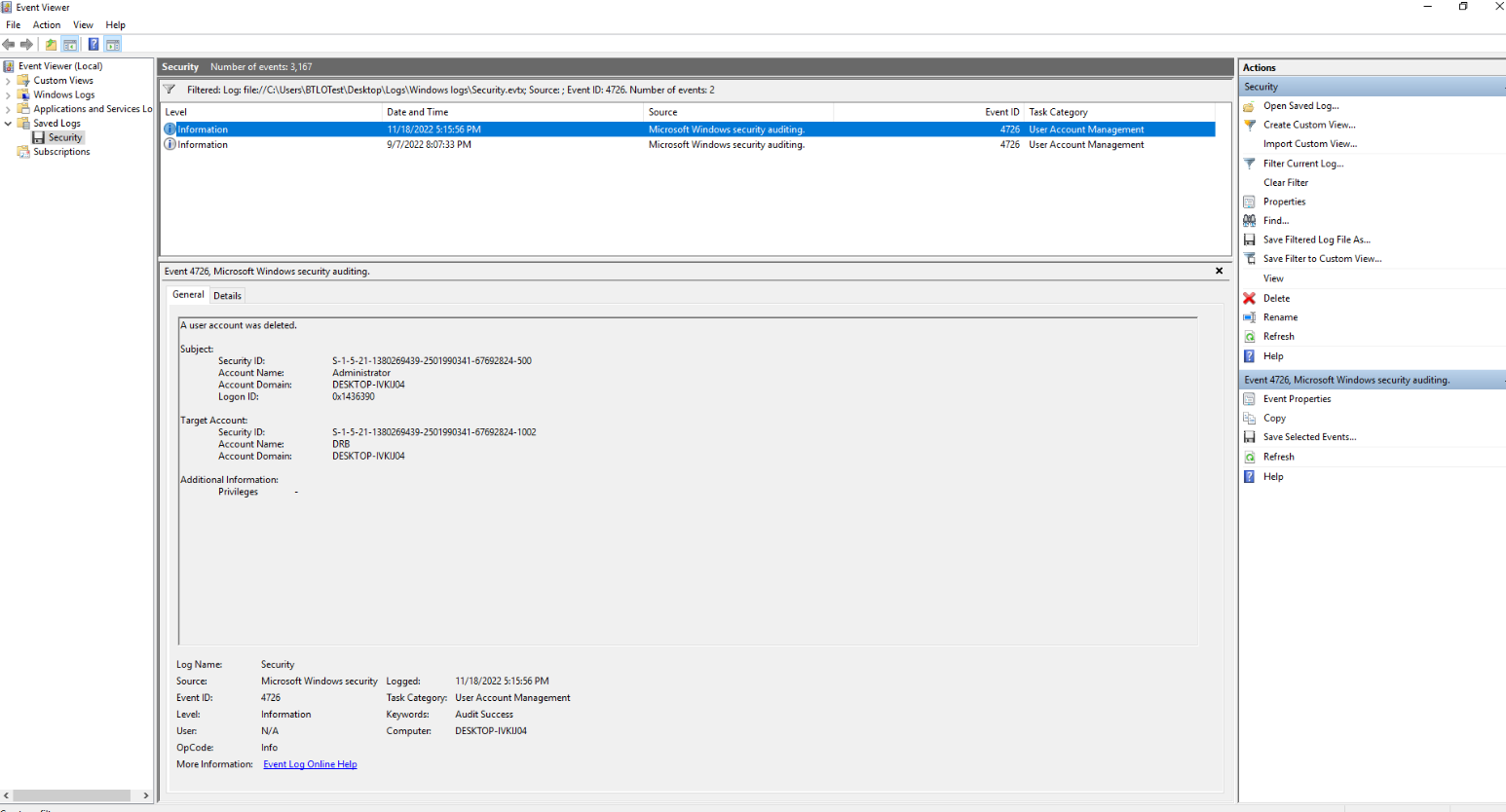
The selected event said A user account was deleted. In its Target Account section, the Account Name was DRB. The Subject Account Name was Administrator, so reading the target section kept me from answering with the account that carried out the deletion.
The Logged field showed 11/18/2022 5:15:56 PM, after the new account had been created and added to Administrators.
Q12. Mapping the deletion to impact
Question, 1 point. What MITRE ATT&CK impact technique is this? Format: Technique Name, TXXXX.
Answer: Account Access Removal, T1531
I used the deletion of DRB for the impact mapping. Removing a user account prevents access through that account, which matches Account Access Removal, T1531.
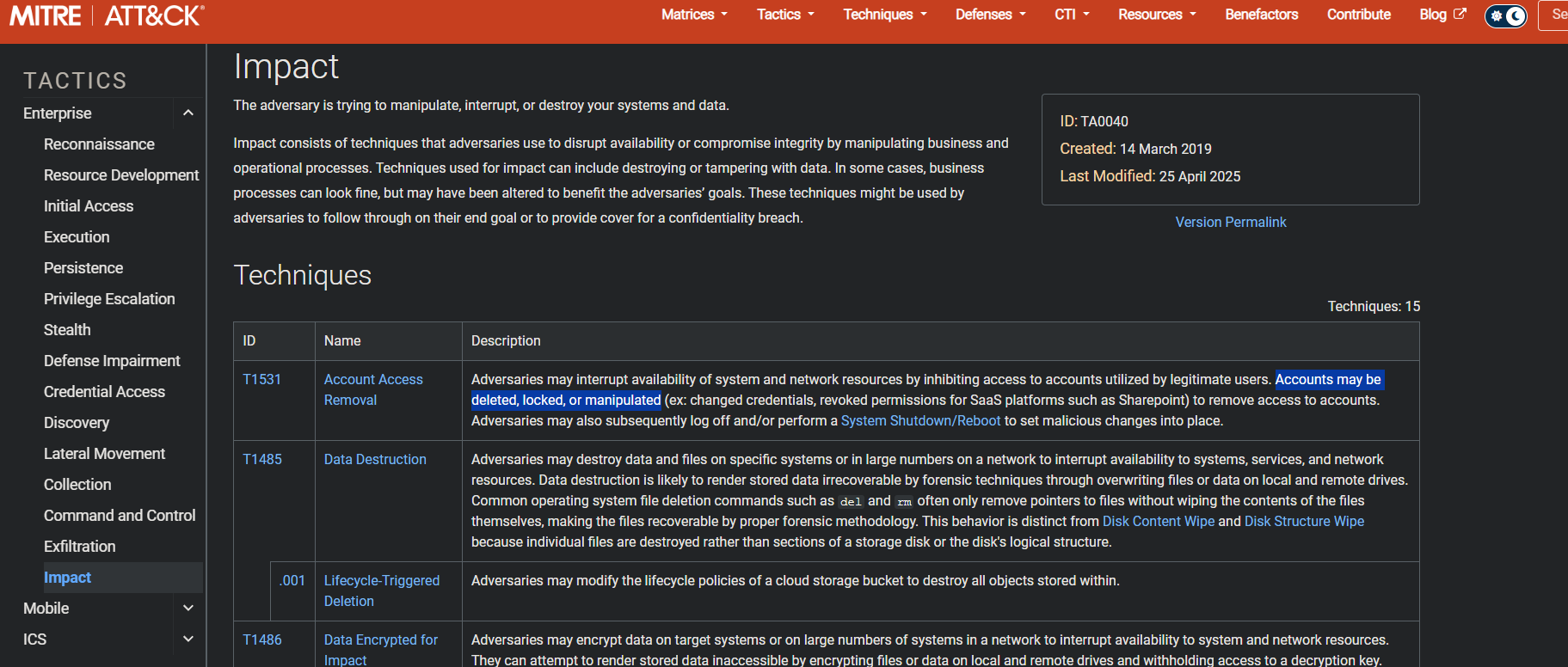
This answer described a different consequence from creating sysadmin. The new account gave the attacker another identity to use; deleting DRB removed an existing user’s access. I kept those actions separate even though both appeared in the same Security log and happened within a short period.
Q13. Finding the historical data-source ID
Question, 1 point. What MITRE ATT&CK detection ID applies to the attacker’s actions here? Format: DSxxxx.
Answer: DS0002
I spent longer on this than I expected. The question asked for a DSxxxx “detection ID”, but I could not find those IDs where I was looking in the current ATT&CK detection pages. My notes eventually led me to the older data-source catalogue.
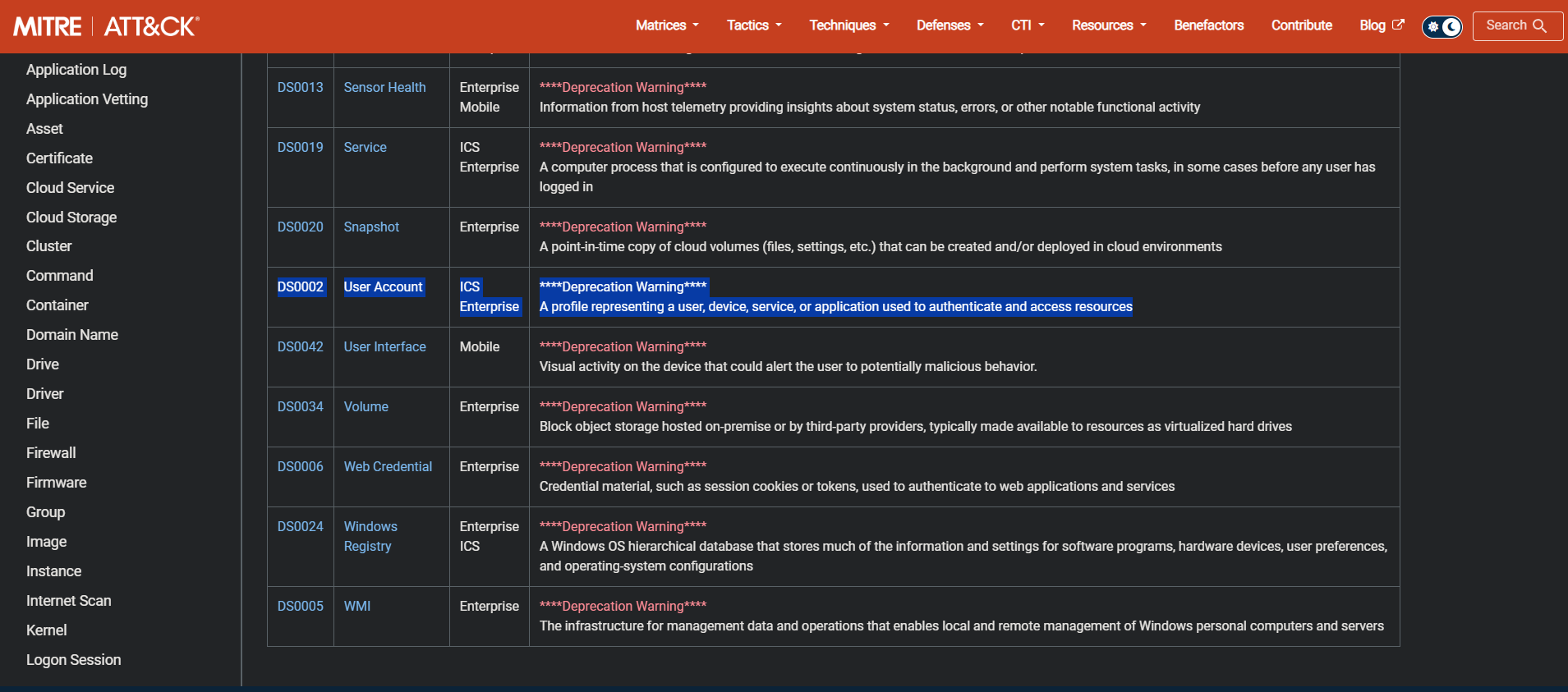
The answer I recorded was DS0002, which is the historical User Account data source. That matches the type of evidence I had just used: account creation, membership changes, and deletion.
The terminology needs to stay accurate. DS0002 is a data-source identifier, not a modern detection-strategy ID. MITRE deprecated Data Sources in ATT&CK v18, released on October 28, 2025, while introducing Detection Strategies and Analytics and updating Data Components. MITRE ATT&CK, October 2025 release notes The legacy catalogue remains accessible, which explains why I could still recover the lab’s historical answer. I kept DS0002 rather than substituting a current detection identifier that the question did not request.
Q14. Locating the extracted archive
Question, 1 point. What’s the name of the compressed file that was extracted? Format: filename.ext.
Answer: keylogger.rar
The questions now shifted to files and process activity. I moved to Sysmon because I wanted the command line associated with the extraction. I filtered for Event ID 1, process creation, and worked through the events around the intrusion time. Microsoft’s Sysmon documentation identifies this event as the place to find process-creation details, including command-line information. Microsoft Sysinternals, Sysmon event documentation
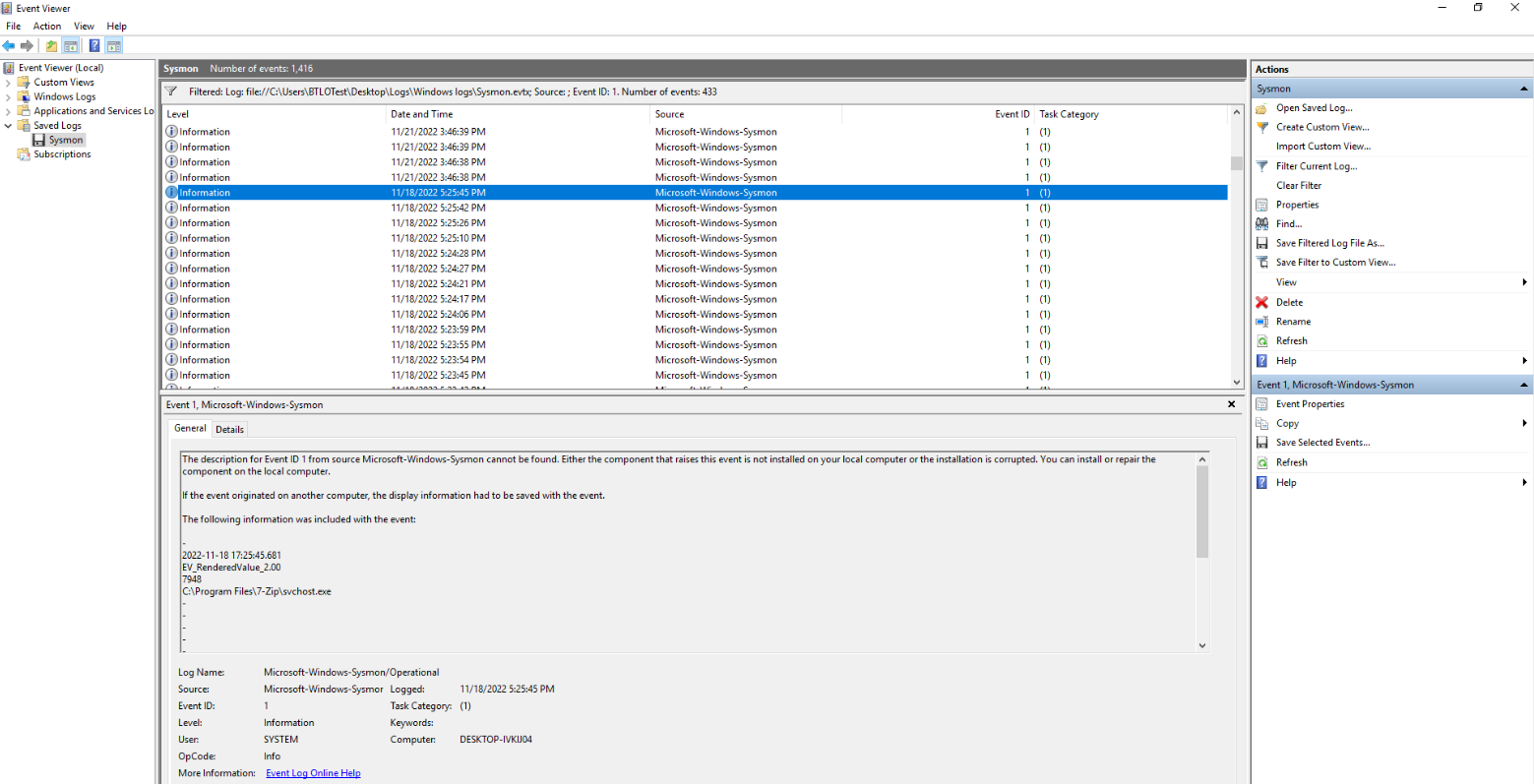
I found 7-Zip activity early, but I still had to search through the process events before reaching the command that named the archive.
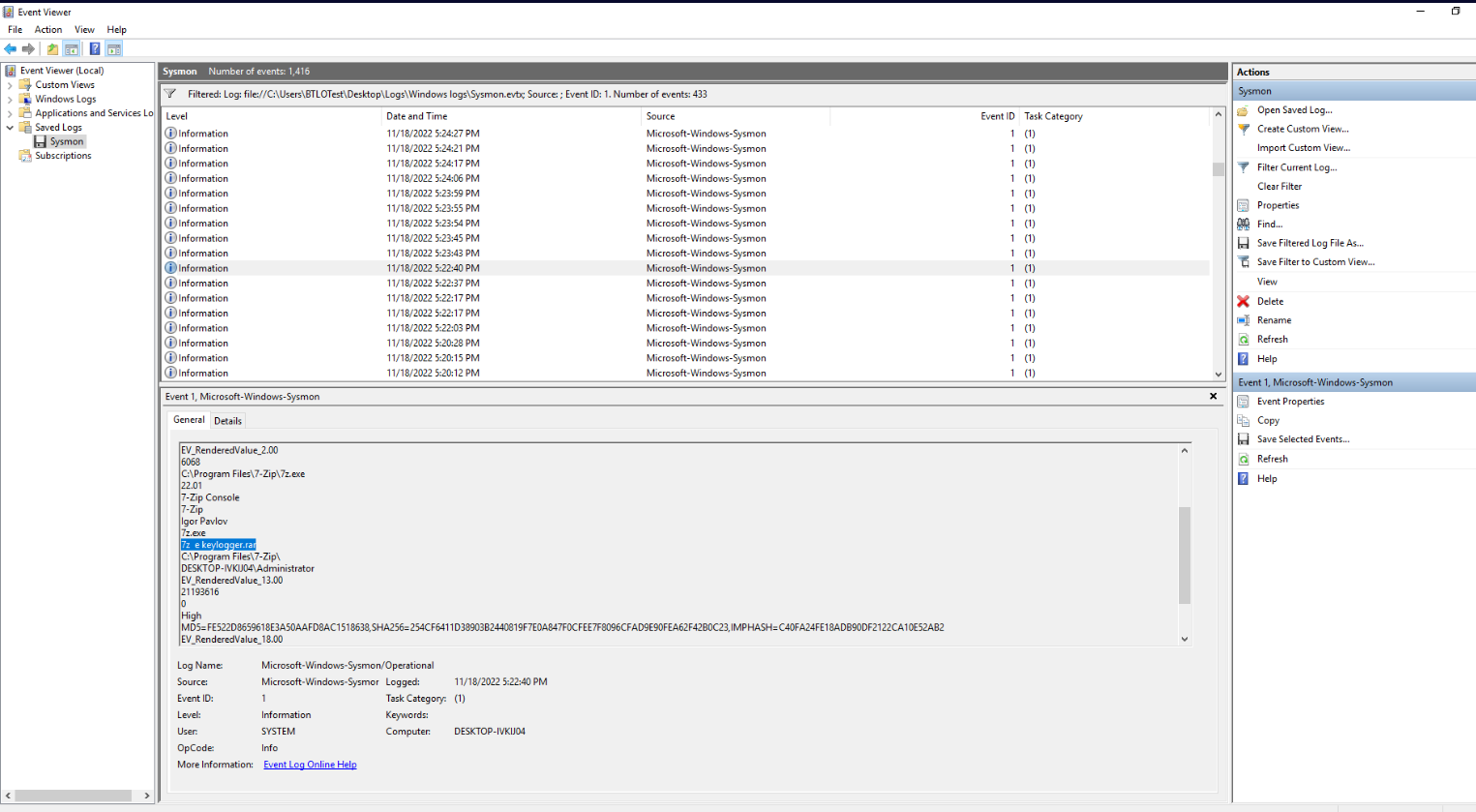
The selected process event showed C:\Program Files\7-Zip\7z.exe, the command 7z e keylogger.rar, and a current directory of C:\Program Files\7-Zip\. Its Logged time was 11/18/2022 5:22:40 PM.
7z e keylogger.rarThat gave me both the exact archive name and a time to use when looking for the extracted files. I did not need to guess from the later executable names.
Q15. Mapping the suspected collection behavior
Question, 1 point. What MITRE ATT&CK collection technique would this file use? Format: Technique Name, TXXXX.
Answer: Input Capture, T1056
My answer mapped the suspected keylogger to Input Capture, T1056. The archive’s name suggested what the lab expected me to investigate, and the later repository search pointed to a keylogger project.
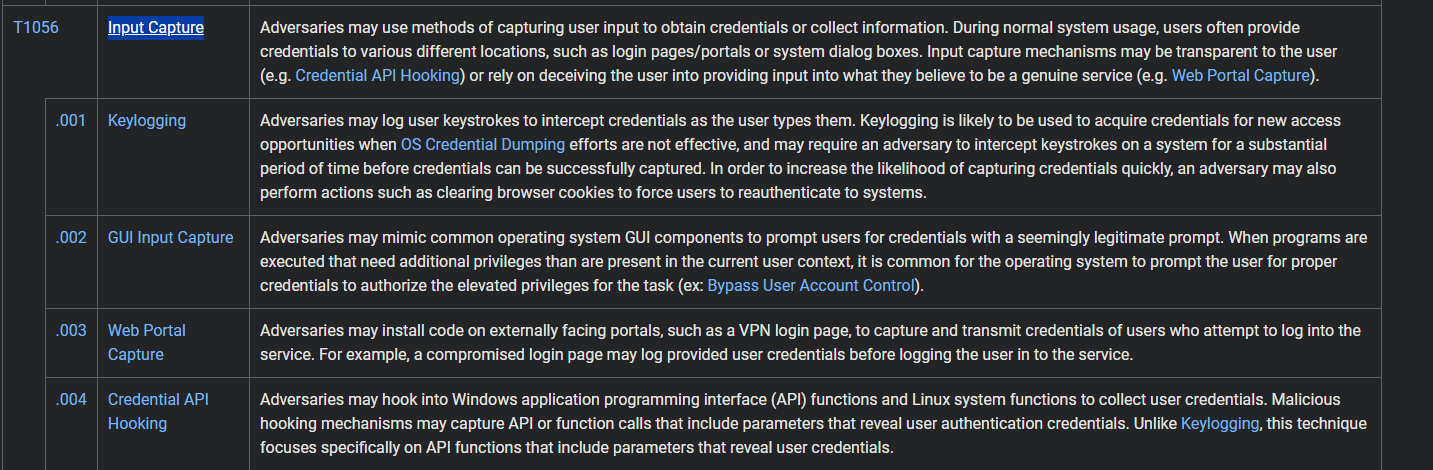
I kept a limit on what that establishes. keylogger.rar is a filename, and the screenshot here is an ATT&CK reference page. Neither is direct proof that the extracted program captured input on this host. The mapping is consistent with the lab’s keylogger context, rather than a claim that I observed keystrokes being collected.
Q16. Choosing the keylogging sub-technique
Question, 1 point. What sub-technique of the previous answer would this file use? Format: Technique Name, TXXXX.xxx.
Answer: Keylogging, T1056.001
Within Input Capture, the answer I recorded was Keylogging, T1056.001. It is the sub-technique that describes capturing keystrokes.
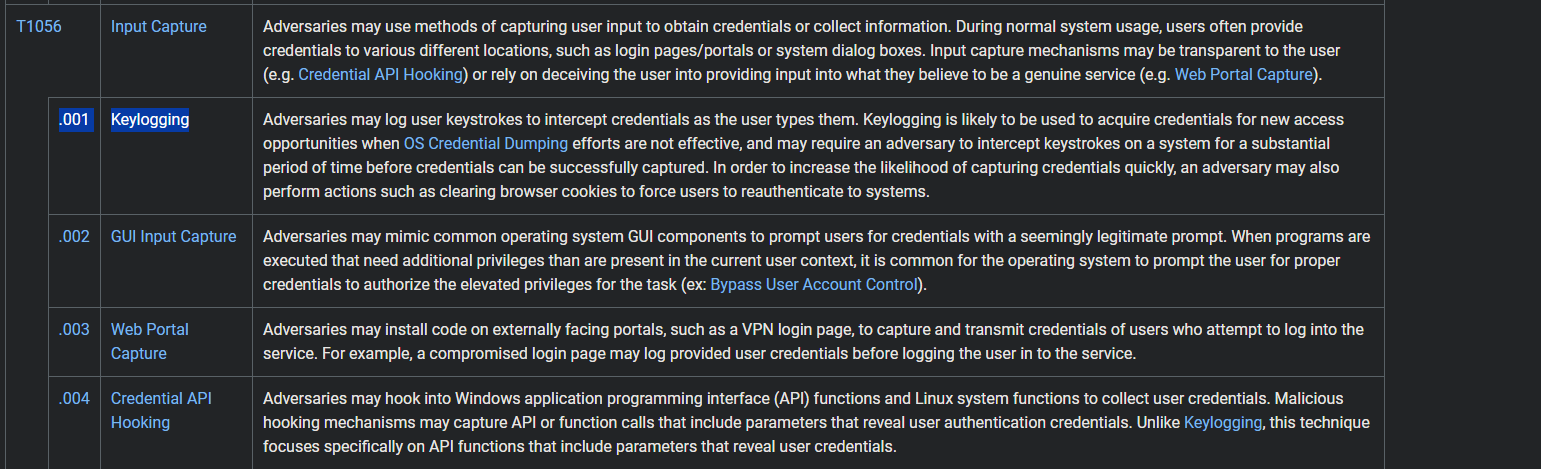
This was a narrower label for the same suspected collection activity. The screenshots identify the ATT&CK sub-technique, but they do not show captured keystrokes. I kept that distinction between identifying the likely behavior and proving it happened on the host.
Q17. Ordering the extracted executables
Question, 1 point. What two files were created from this file extraction (in order of creation time)? Format: filename.exe, filename.exe.
Answer: rundll32.exe, svchost.exe
I switched from process creation to Sysmon Event ID 11, file creation. Microsoft Sysinternals, Sysmon event documentation The archive command ran at 5:22:40 PM, so I looked at file events after that point and checked both their target paths and times.
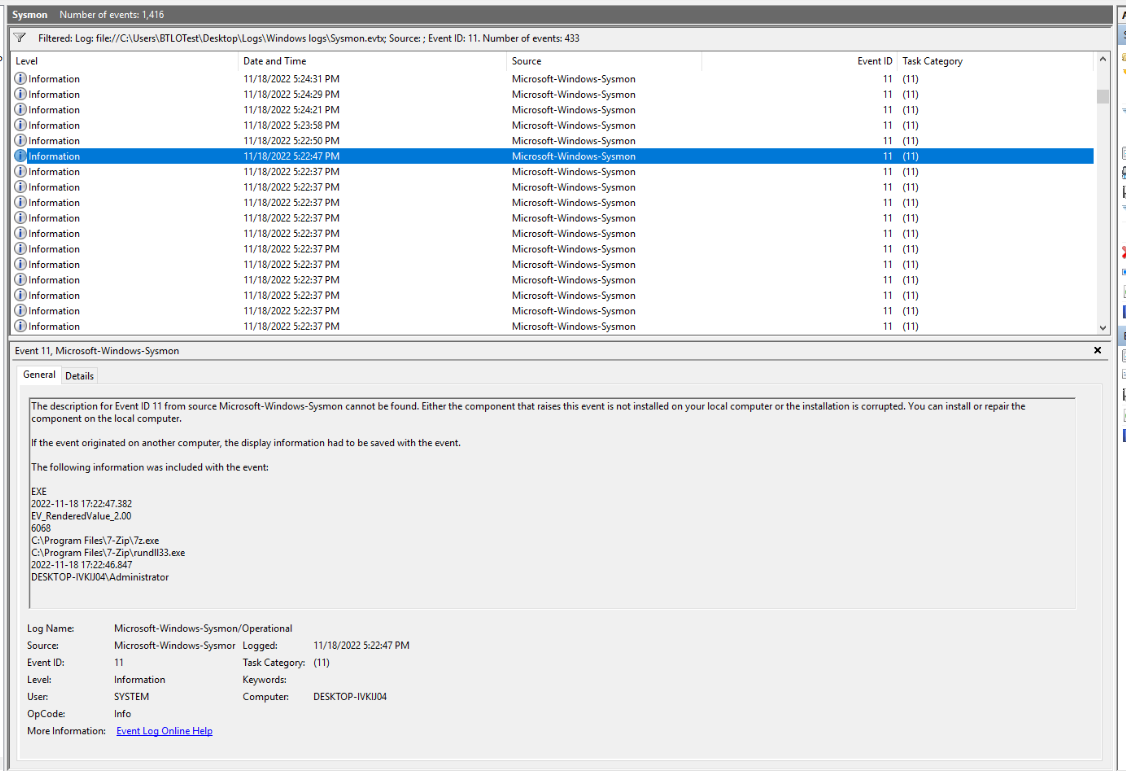
The first relevant event showed C:\Program Files\7-Zip\rundll33.exe at 5:22:47 PM. The creating image was C:\Program Files\7-Zip\7z.exe, which tied this write back to the extraction rather than to later execution.
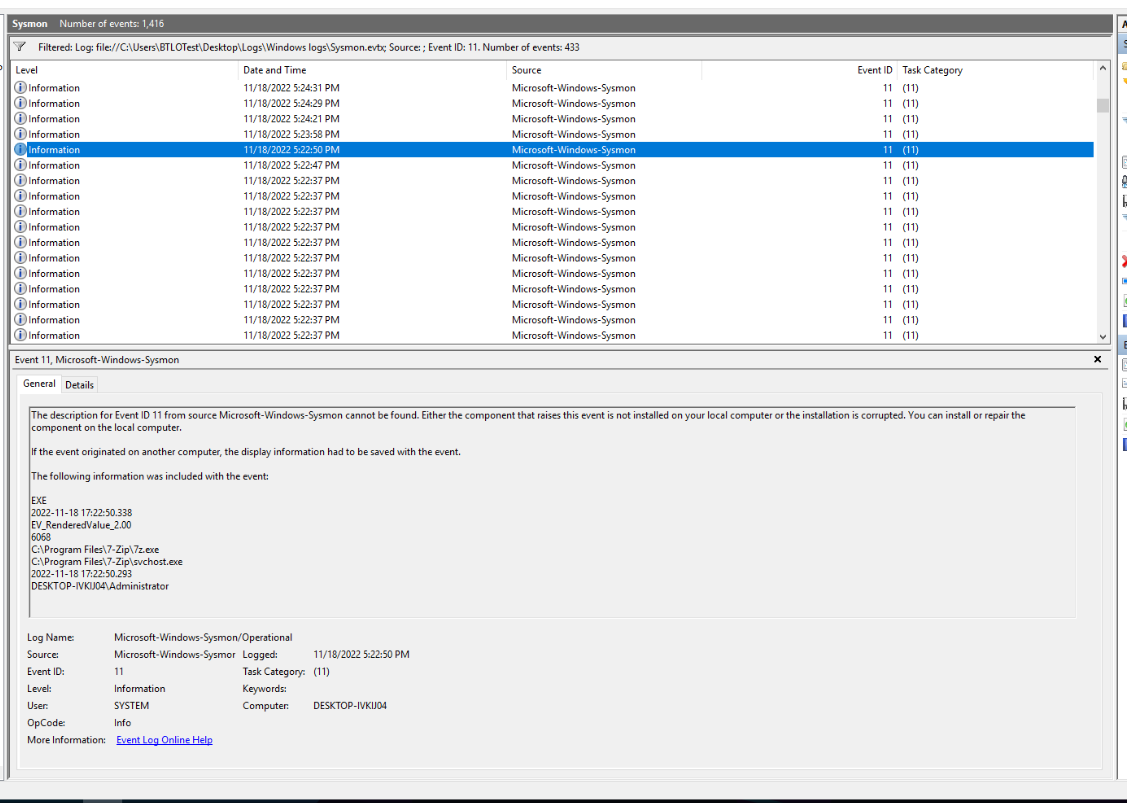
The next file was C:\Program Files\7-Zip\svchost.exe, logged at 5:22:50 PM, again written by 7z.exe. The list displayed the later event above the earlier one, so I used the timestamps to put the answer in creation order.
Q18. Separating extraction from the later output folder
Question, 1 point. What’s the file path of the folder these two files created? Format: C:\...\..\FOLDER.
Answer: C:\Users\Administrator\AppData\Roaming\WPDNSE
This was another question where I had to read the wording twice. It asked for the folder the two files created, not the folder where 7-Zip had extracted them. I remained on Event ID 11 but followed the later writes from the suspicious executables.
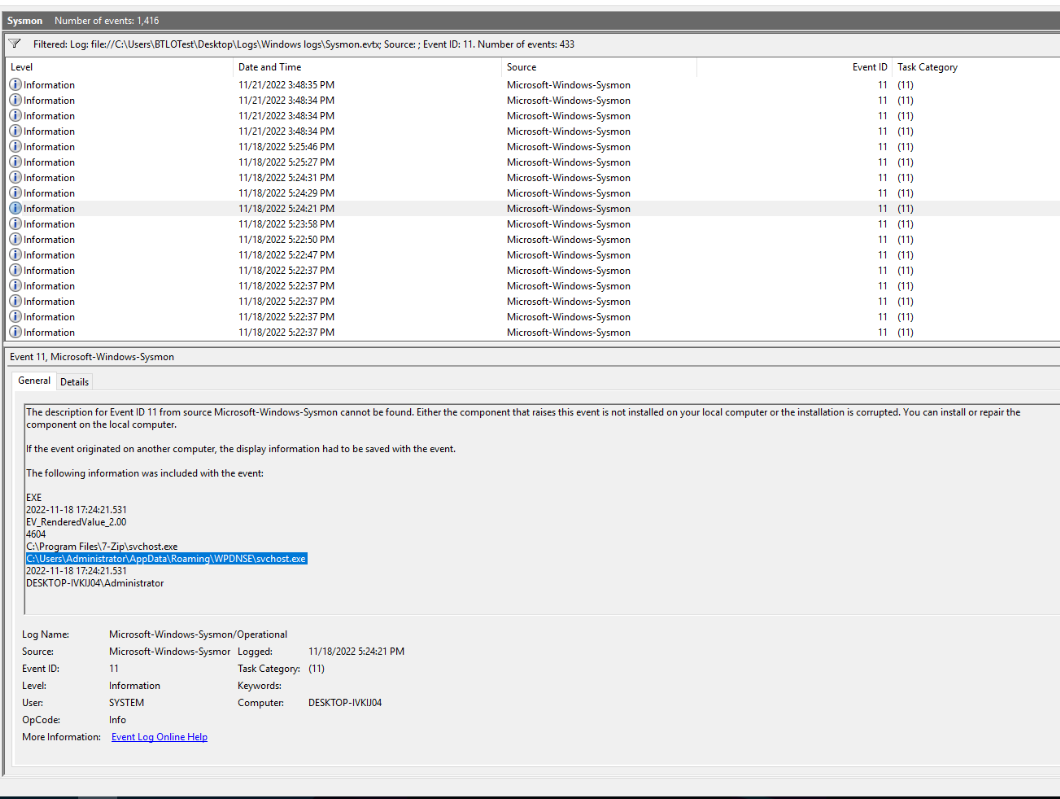
The svchost.exe image in the 7-Zip directory wrote a second svchost.exe into C:\Users\Administrator\AppData\Roaming\WPDNSE. That gave me the first part of the answer.
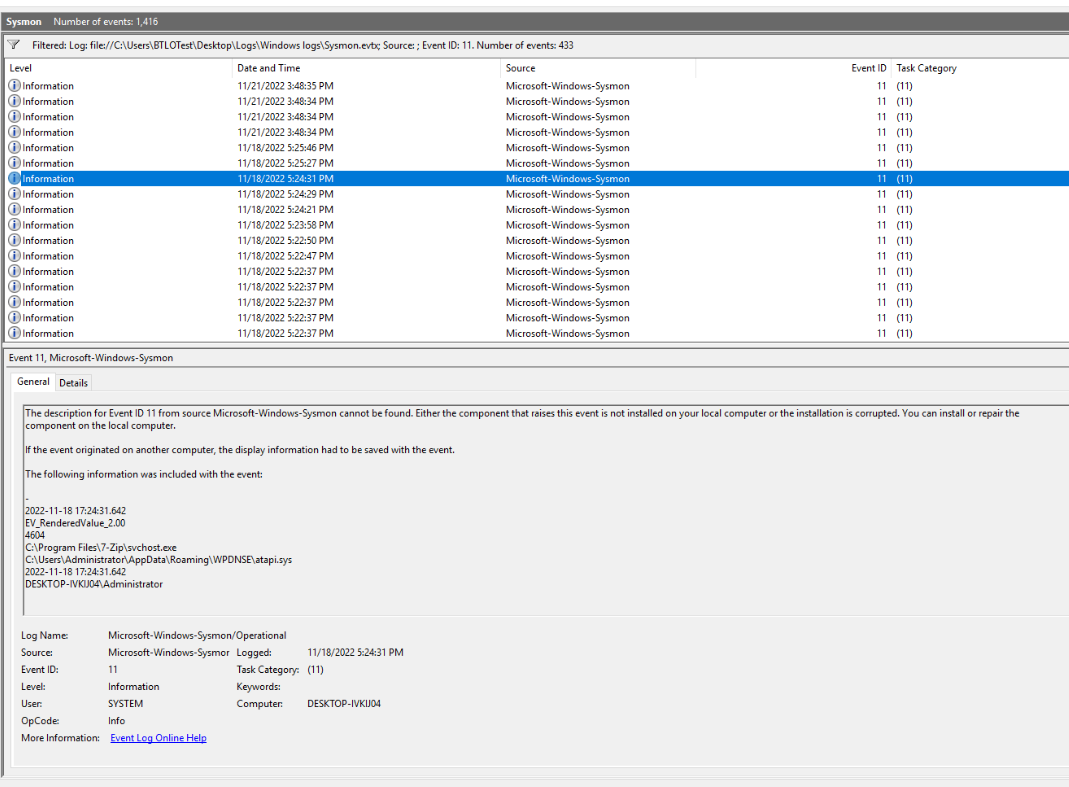
While looking for the other executable, I also noticed a .sys file in the same directory and kept it in mind for the next question.
I eventually found the corresponding rundll32.exe write into WPDNSE as well.
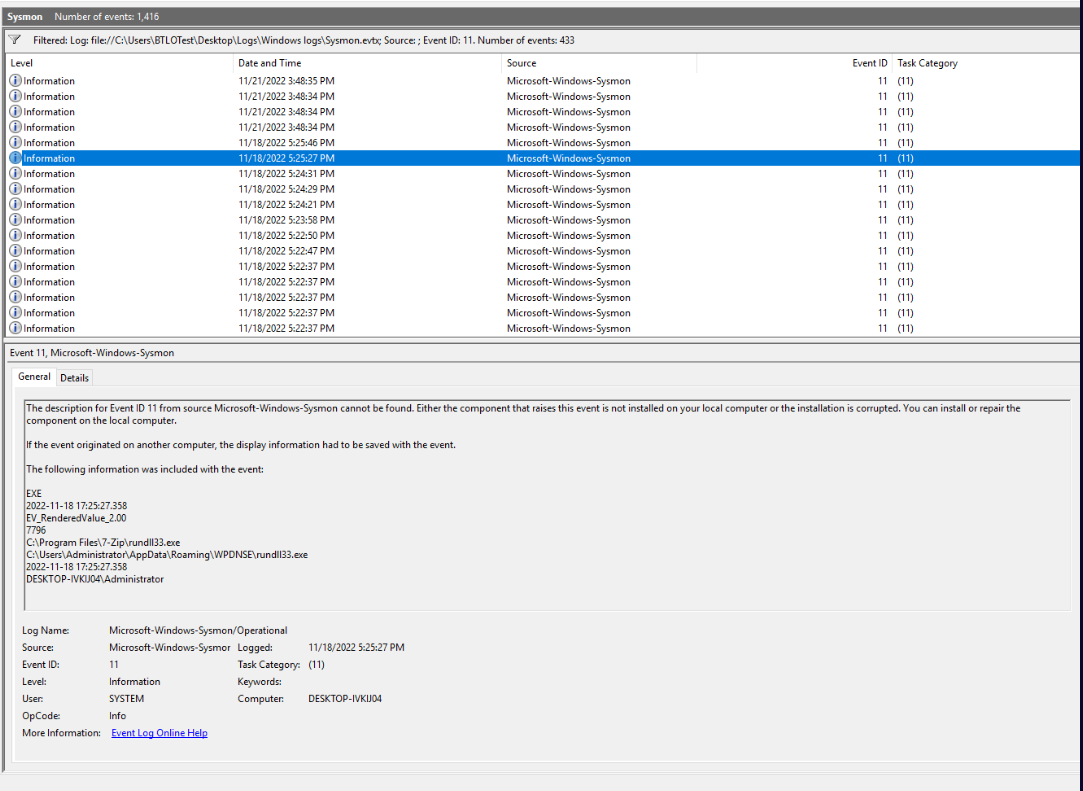
The distinction was visible in the paths. The extraction events had 7z.exe as the creating image and the 7-Zip folder as the destination. These later events had the extracted executables as their creating images and WPDNSE as the destination. Answering with the extraction directory would have described the wrong stage of the activity.
Q19. Recording the .sys file
Question, 1 point. What’s the name of the .sys file created by the malware? Format: file.sys.
Answer: atapi.sys
I had already found this while searching for the WPDNSE writes. The retained file-creation event identified C:\Users\Administrator\AppData\Roaming\WPDNSE\atapi.sys as the target, written by C:\Program Files\7-Zip\svchost.exe.
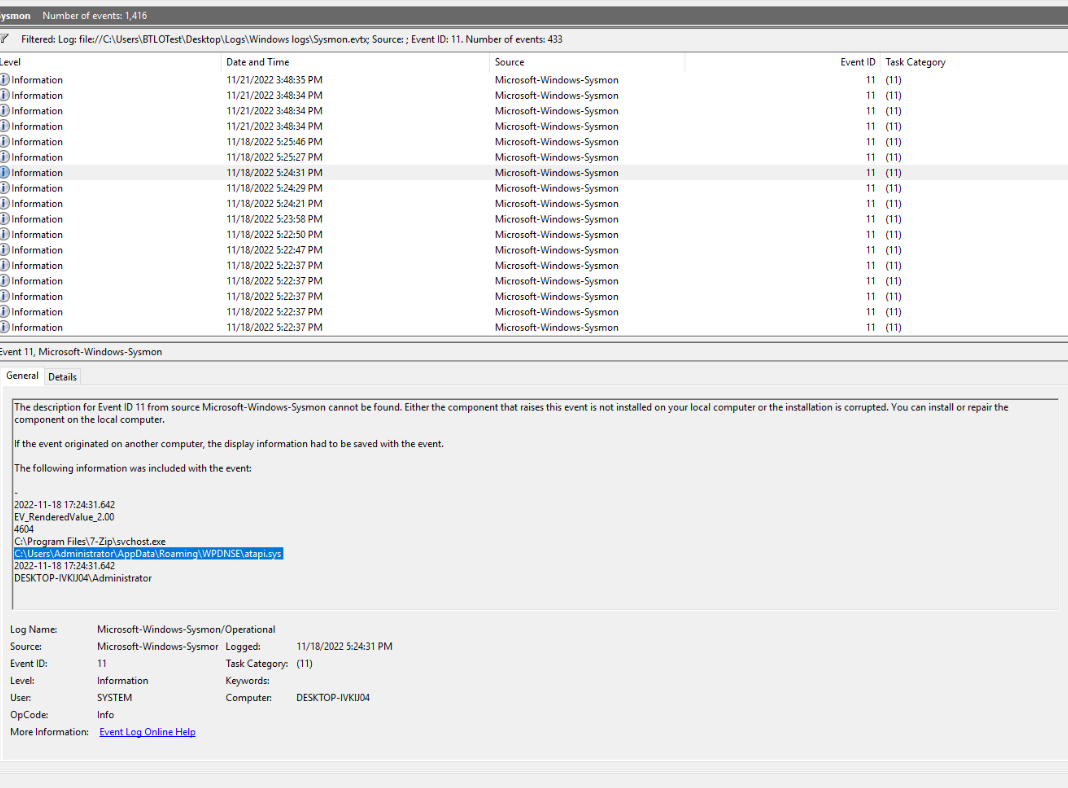
Its Logged time was 11/18/2022 5:24:31 PM. The question only needed the filename, so I recorded atapi.sys. A .sys extension and a driver-like name are not, by themselves, evidence that a kernel driver was loaded. The event I had here was a file write.
Q20. Reviewing the first registry timestamp
Question, 1 point. What time was a registry value first set by the malware? Format: MM/DD/YYYY H:MM:SS AM/PM.
Recorded answer: 11/18/2022 5:24:18 PM
I moved to Sysmon Event ID 13, registry value set, and searched around the executable activity. Microsoft Sysinternals, Sysmon event documentation My notes associated the early registry change with the malware, then used 5:24:18 PM as the answer.
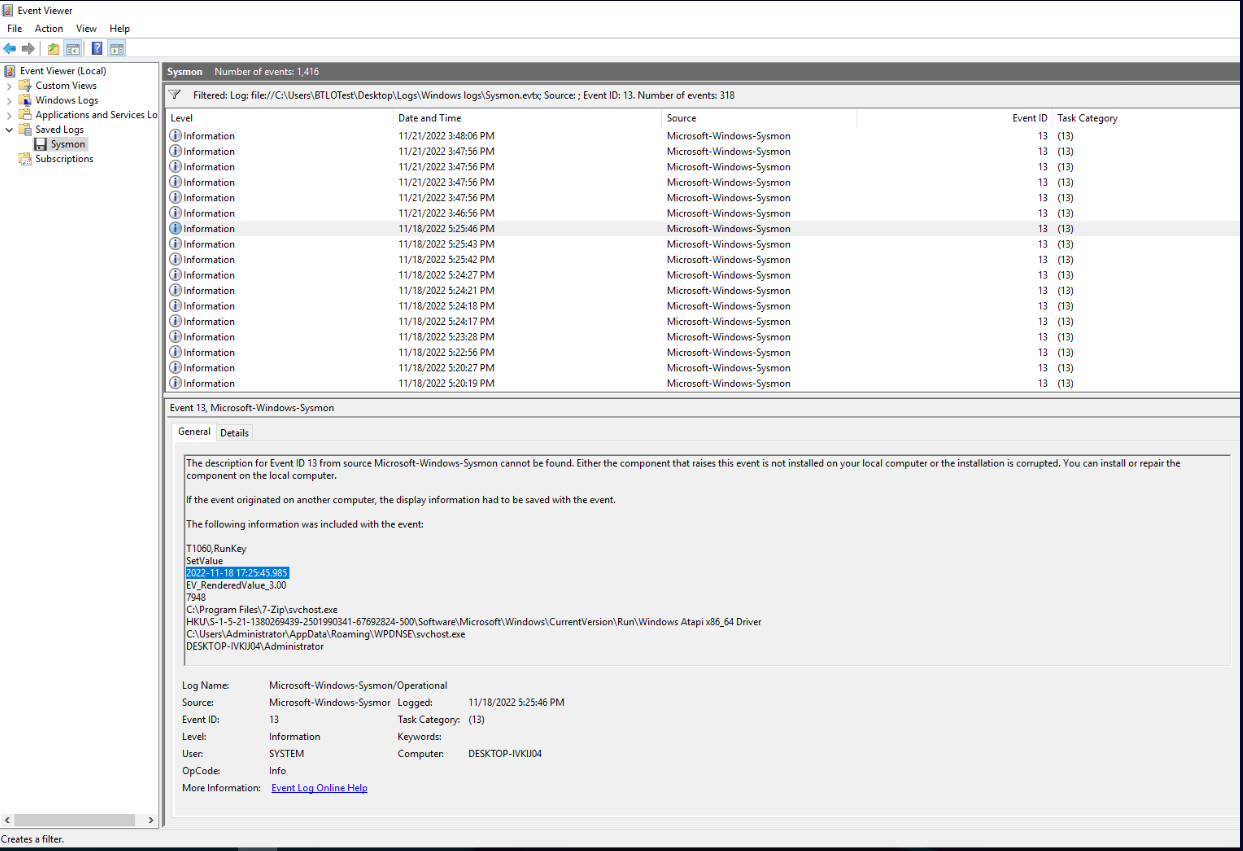
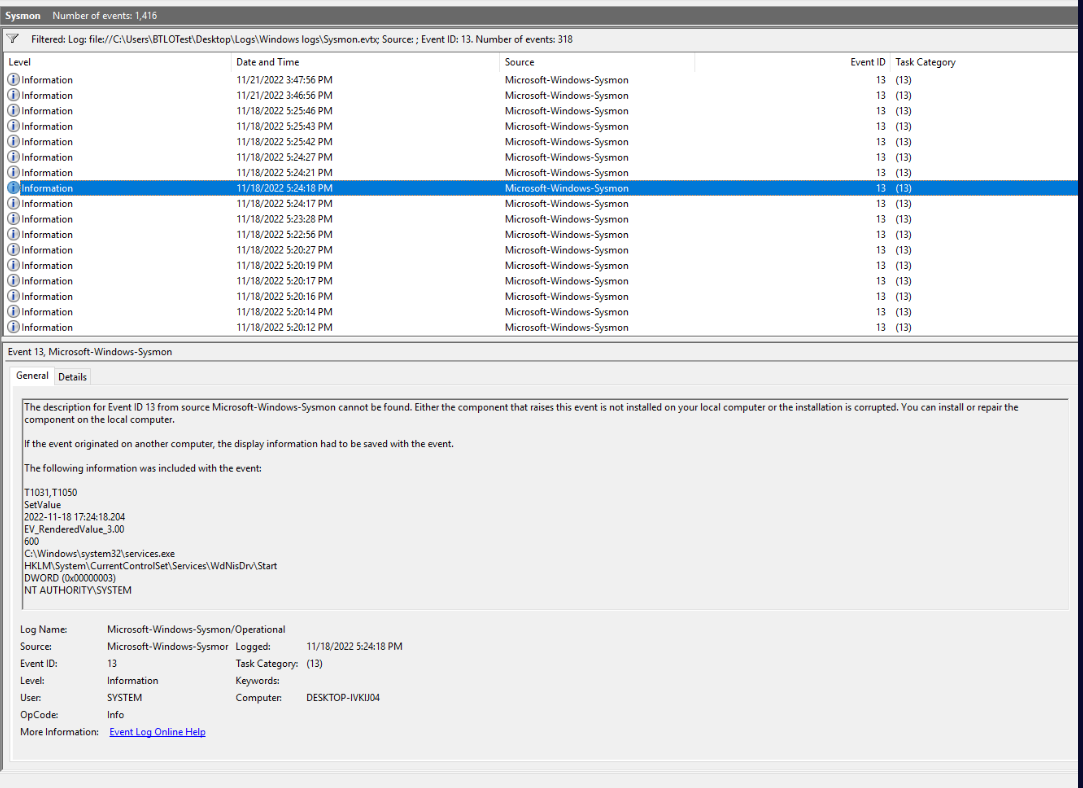
Evidence note. The selected event at 5:24:18 PM shows C:\Windows\system32\services.exe setting HKLM\System\CurrentControlSet\Services\WdNisDrv\Start to DWORD (0x00000003). That is not a direct registry write by either suspicious executable. The other retained screenshot shows a later Run-key write by the suspicious svchost.exe.
The earliest directly attributable malware Run-value set shown in the following question is at 5:24:21 PM. I have kept my original 5:24:18 PM answer visible, but the supplied screenshot does not establish that the malware caused the service-value change. Without the complete event data, I cannot settle the first malware-caused registry write or replace the original answer with a proven earliest timestamp. This is an attribution gap, not a timezone conversion.
Q21. Reading the two Run-value names in order
Question, 1 point. What two registry values has the malware created (in order of creation)? Format: regvalue, regvalue.
Answer: Windows Atapi x86_64 Driver, Windows SCR Manager
The first relevant value used a driver-like name, Windows Atapi x86_64 Driver. I read the value name from the registry target, rather than treating it as the name or verified purpose of the executable.
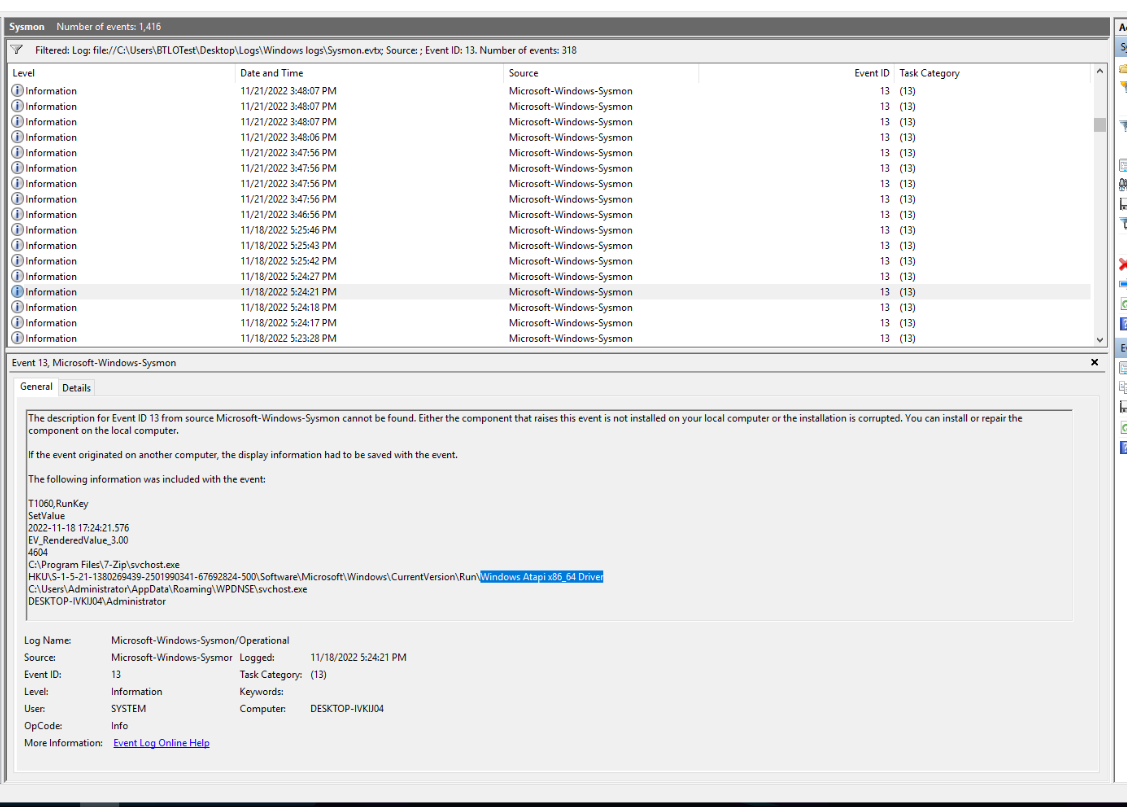
This event was logged at 5:24:21 PM. The creating image was the svchost.exe in the 7-Zip folder, and the value data pointed to C:\Users\Administrator\AppData\Roaming\WPDNSE\svchost.exe.
The second value was Windows SCR Manager.
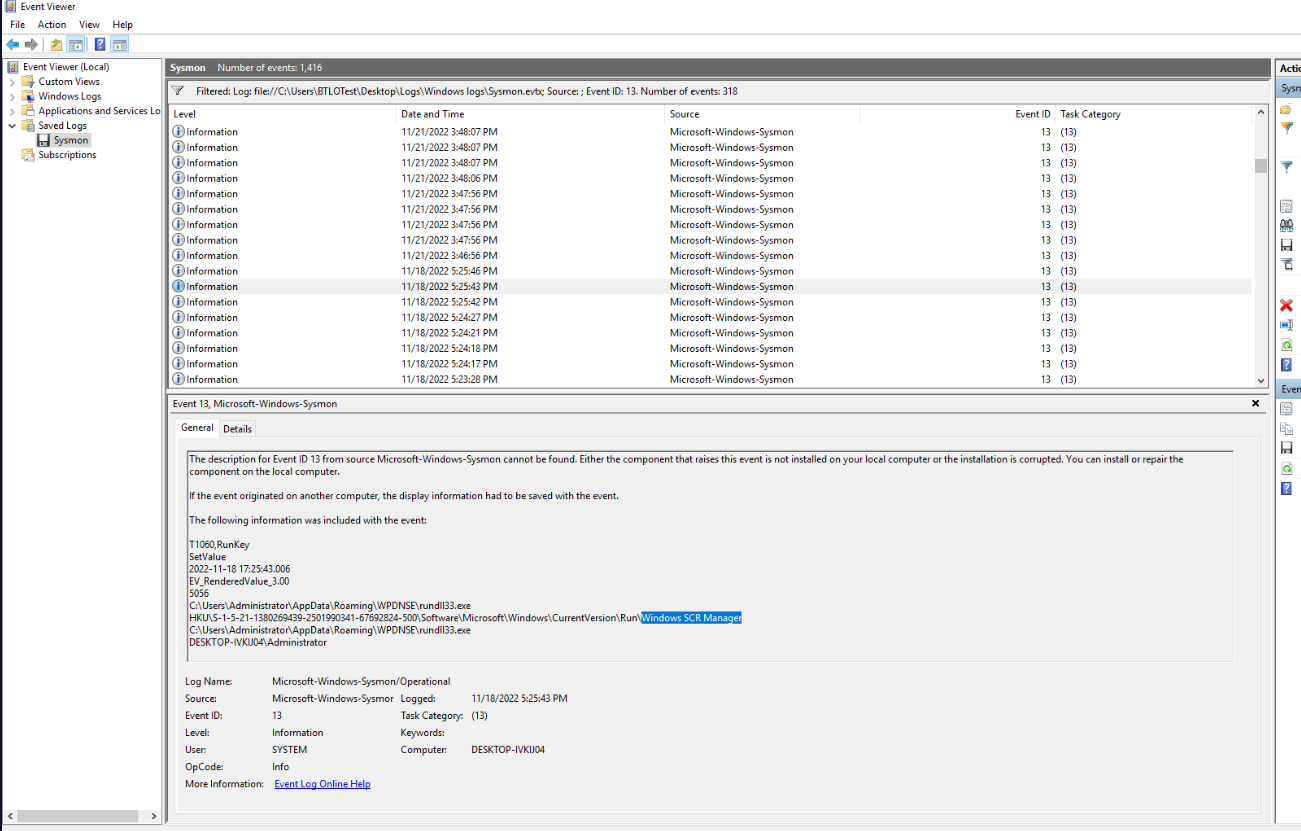
That event was logged at 5:25:43 PM, and its data pointed to C:\Users\Administrator\AppData\Roaming\WPDNSE\rundll33.exe. Both targets were under the same user’s Software\Microsoft\Windows\CurrentVersion\Run key.
The timestamps supplied the order requested by the question. Event ID 13 records setting a value; these screenshots do not independently prove that each value had never existed before, even though the question describes them as created values.
Q22. Mapping the autostart behavior
Question, 1 point. What MITRE ATT&CK persistence technique has the malware used? Format: Technique Name, TXXXX.
Answer: Boot or Logon Autostart Execution, T1547
I used the Run-key writes for the next persistence mapping. The value data pointed to executables in WPDNSE, so the relevant behavior was arranging for those programs to start automatically through a logon-related registry mechanism.
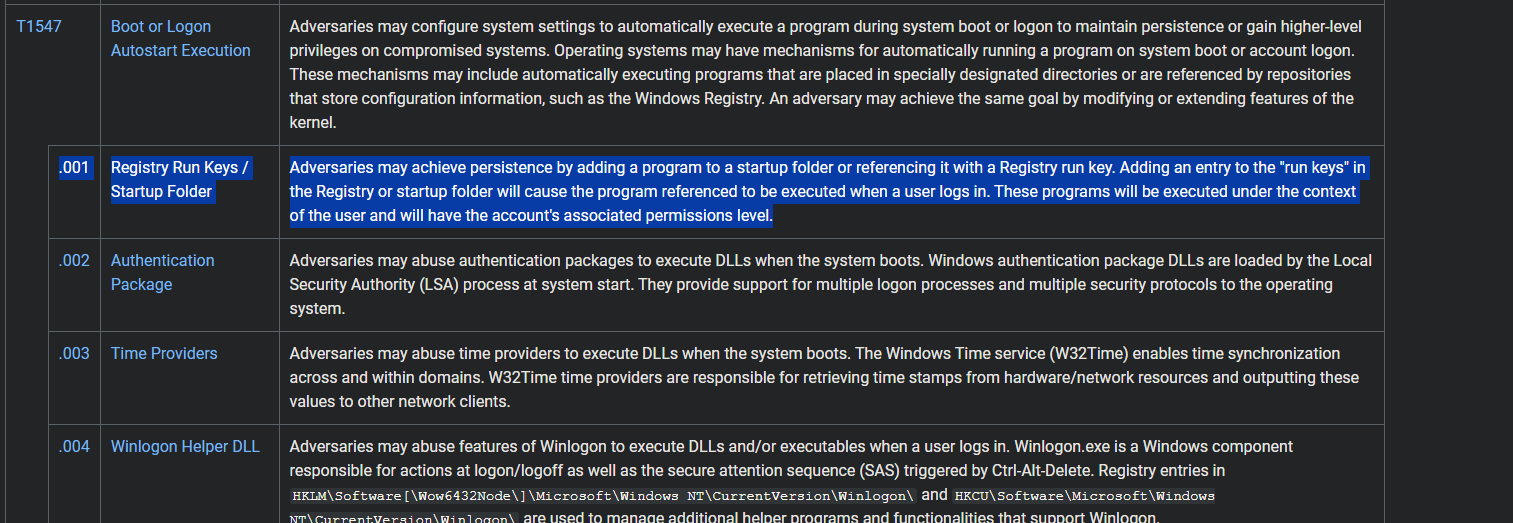
The parent technique was Boot or Logon Autostart Execution, T1547. This answer rested on the registry locations and value data, not on the reassuring words “Windows”, “Driver”, or “Manager” in the value names. It describes the persistence configuration; I did not document a reboot or a later logon proving that it fired.
Q23. Naming the Run-key sub-technique
Question, 1 point. What sub-technique of the previous answer has the malware used? Format: Sub Technique Name, TXXXX.xxx.
Answer: Registry Run Keys / Startup Folder, T1547.001
The more specific mapping was Registry Run Keys / Startup Folder, T1547.001. The screenshots show the Run branch beneath the Administrator account’s registry hive, with values pointing at the WPDNSE executables.
There was no need to infer a Startup-folder artifact just because that wording appears in the sub-technique’s title. The Run-key evidence was sufficient for this part of the mapping.
Q24. Keeping the GitHub lead within its limits
Question, 2 points. What’s the name of the user on GitHub who created this malware? Format: Username.
Answer: ajayrandhawa
The final question took more searching. After working through OSINT results, I narrowed my original search to the ajayrandhawa/Keylogger repository and saved it in my notes. Its owner supplied the username I recorded. The original embedded GitHub reference is preserved here as a normal link. The repository is a lead for the lab’s question, not evidence that its owner conducted the intrusion. The documented work does not include a hash match between the lab executables and that repository, or a source-to-binary comparison.
What I took from the investigation
The account questions became easier once I stopped treating every Security event as a single account name. Account creation has a new account, deletion has a target account, and group membership can expose only a SID for the member. The timestamp and the right field mattered more than finding an event with a familiar ID.
The file questions required the same care with relationships. 7z.exe writing into its own directory was the extraction stage. The extracted executables writing into WPDNSE were later activity. The Run-value data then tied persistence back to that second location. Following those paths kept me from giving the right filename with the wrong explanation.
I also had to be more precise about what an ATT&CK answer means. A technique page can verify a name and ID, but the host evidence has to support the behavior. That distinction is clear in the registry-persistence questions and weaker in the collection questions, where the retained evidence does not show keystrokes being captured. The unresolved registry timestamp is another reminder to attribute the event before assigning it to the attacker.
Skills and techniques
- Reviewing saved OpenSSH, Security, and Sysmon logs in Windows Event Viewer.
- Filtering account-management events and reading subject, target, group, and member fields.
- Building a timeline without confusing newest-first display order with event sequence.
- Following process commands, file writes, and registry-value data across the same intrusion.
- Mapping observed behavior to ATT&CK while distinguishing parent techniques, sub-techniques, and legacy data-source IDs.
- Using a GitHub repository as an OSINT lead without turning repository ownership into attacker attribution.